
Plugin directory / Knowledge / archgraph
archgraph
Verified · install-tested on dsh derekhu0002
What it does
An architecture-graph driven framework for Agentic Engineering.
Works — verified, early-stage project
An architecture-graph driven framework for Agentic Engineering. It installs cleanly and boots without issues in our testing. It's early-stage but functional.
“Verified” means our automated CI actually ran dsh plugin add in a clean profile and it booted — nothing more. Feature descriptions and version compatibility are the author’s claims. This is not a security audit and not an endorsement of third-party code.
README
ArchGraph
An architecture-graph driven framework for Agentic Engineering.
What is this?
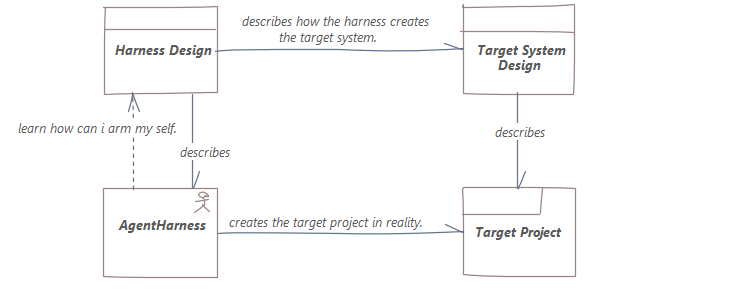
ArchGraph builds a unified language that puts harness design and target product design into
one model — so you get a single view to work and observe, and real control over your agents.
Architecture
The global architecture (Layered Viewpoint) shows how the human, the coding agent, ARGO MCP, the
intent architecture graph, ArchiMate 3.2, and Enterprise Architect relate in graph-driven agentic
engineering:
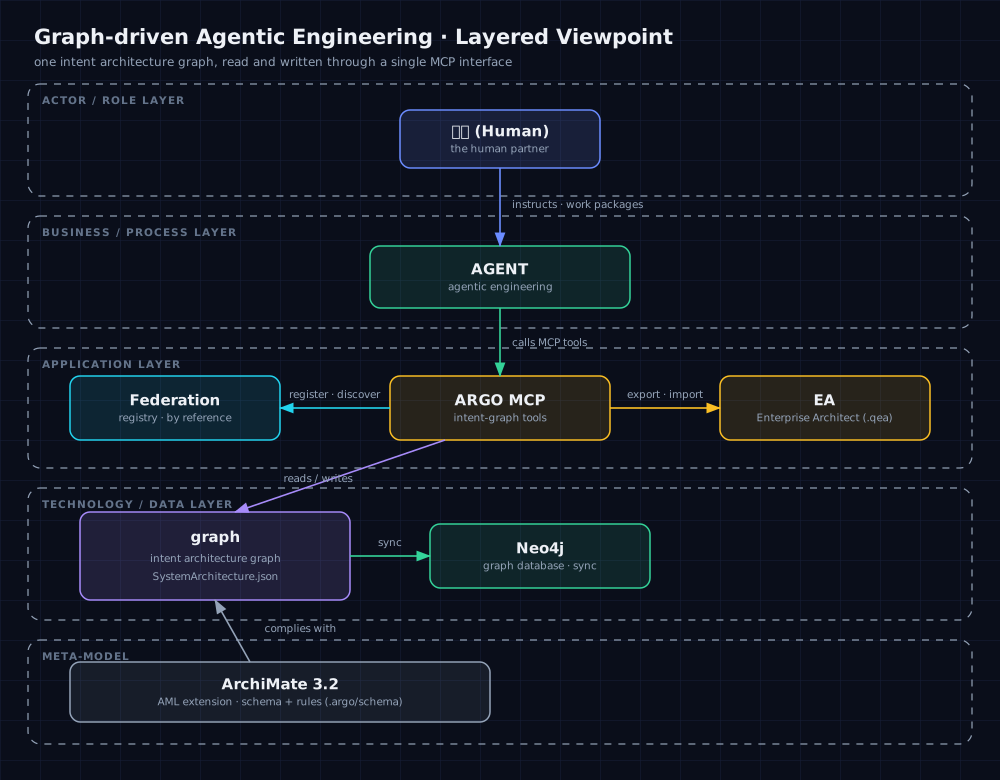
Editable source: docs/diagrams/global-architecture.excalidraw
Supported Harnesses
ArchGraph deploys the ARGO toolchain to all major coding-agent environments:
| Harness | MCP Server | Skills | Rules / Instructions | Agents | Wakeup Gate |
|---|---|---|---|---|---|
| GitHub Copilot | ✓ | ✓ | ✓ | ✓ | — |
| Cursor | ✓ | ✓ | ✓ | ✓ | — |
| OpenCode | ✓ | ✓ | ✓ | ✓ | ✓ |
| DeepSeek Harness | ✓ | ✓ | ✓ | ✓ | ✓ |
| OpenClaw | ✓ | ✓ | ✓ | — | ✓ |
A single argo-deploy registers the argo MCP server and installs all artifacts into each harness
automatically.
Install
npm install -g archgraph-argo
argo-deploy
Done — the ARGO toolchain, skills, and rules are deployed, and the argo MCP server is registered automatically in GitHub Copilot, Cursor, OpenCode, DeepSeek Harness (dsh), and OpenClaw.
Prerequisites and configuration
Everything works out of the box except semantic (Graph RAG) queries, which need:
- Neo4j graph database — stores the structural projection of your architecture graph. During
argo-deployyou configureARGO_NEO4J_DATABASE_URL,ARGO_NEO4J_DATABASE_USERNAME, andARGO_NEO4J_DATABASE_PASSWORDin~/.argo/.env. - Embedding / vector engine — powers semantic Graph RAG retrieval. Configure
ARGO_EMBEDDING_BASE_URL,ARGO_EMBEDDING_MODEL,ARGO_EMBEDDING_PROVIDER,ARGO_EMBEDDING_MODEL_VERSION,ARGO_EMBEDDING_DIMENSIONS, plus the API keyQWEN_KEY.
Where do the values come from? The Neo4j credentials come from the Neo4j instance you own or
provision (URI, username, password). The embedding configuration and QWEN_KEY come from your
embedding provider's dashboard — for example Alibaba DashScope. argo-deploy walks you through the
prompt (existing non-empty values in ~/.argo/.env are kept); you can also edit the file afterwards
and re-run.
How to use
Step 0 — initialize the workspace. In a fresh project, ask your coding agent to run argo init
(the initializeWorkspace MCP call). It creates a starter design/KG/SystemArchitecture.json when
missing, performs the first JSON → Neo4j sync, initializes the semantic (Graph RAG) lifecycle, and
verifies the architecture. From then on, the intent graph is the source of truth for the project.
After installing, open your project and start a coding agent. It will:
- locate the architecture element behind the task before changing anything,
- arm itself with that element's Skills and Rules,
- work test-first (GIVEN-WHEN-THEN), and trace every commit back to the graph.
The intent architecture graph — modelled in ArchiMate 3.2 — is the single source of truth.
Community
ArchGraph runs on open co-building. Join the community hub to share, browse and reuse architecture
subgraphs across projects, and follow the governance & contribution guides:
- Community site — https://argo.derekworkspacev5.com/archgraph/ (subgraph library, docs, blog)
- graph-wiki repository — https://github.com/derekhu0002/graph-wiki (graph-asset home: contribute
a subgraph from your project, or pull one back to reuse)
License
Install
Install the catalog once, then DeepSeek Harness can find and install any plugin from this site automatically:
dsh plugin add dshbase-catalogThen say "install archgraph for me" — your agent finds it in the directory and installs it. Docs: dshbase-catalog · verified packs.
This plugin is GitHub source (not published to npm) — install it straight from the repo:
Web profile:
dsh plugin --profile web add github:derekhu0002/archgraphHeadless (CLI) profile:
dsh plugin --profile headless add github:derekhu0002/archgraphTest report
Verified: L1 install + L2 load + L3 runtime from GitHub source on dsh 0.1.0-rc.6.
Share this badge
Drop this badge into your README — it links back here and updates automatically when our test status changes:

[](https://dshbase.com/plugins/archgraph/)<a href="https://dshbase.com/plugins/archgraph/"><img src="https://dshbase.com/badges/archgraph.svg" alt="dshbase install-tested"></a>