
Plugin directory / Automation / @bigbigtooth/dsh-devops
@bigbigtooth/dsh-devops
Verified · install-tested on dsh bigbigtooth
What it does
DSH 远程运维插件:SSH 服务器管理、硬件/进程/日志监控、只读 AI 巡检、Git 部署闭环。 Remote operations for DeepSeek Harness: SSH server management, monitoring, read-only AI inspection, and a Git deploy loop.
Works — verified, early-stage project
DSH 远程运维插件:SSH 服务器管理、硬件/进程/日志监控、只读 AI 巡检、Git 部署闭环。 Remote operations for DeepSeek Harness: SSH server management, monitoring, read-only AI inspection, and a Git deploy loop. It installs cleanly and boots without issues in our testing. It's early-stage but functional.
“Verified” means our automated CI actually ran dsh plugin add in a clean profile and it booted — nothing more. Feature descriptions and version compatibility are the author’s claims. This is not a security audit and not an endorsement of third-party code.
README
dsh-devops
Server operations inside the DSH Web app: SSH server management · hardware / process / log monitoring · AI inspection · a Git deploy loop





What this is
dsh-devops is a DeepSeek Harness (DSH) Web
plugin. Without leaving the chat view or opening a separate terminal, you open Remote
Operations from the DSH sidebar to add SSH servers, watch hardware and processes, have the AI
inspect logs and process anomalies on a schedule, and deploy a Git repository to a server and
restart its services.
The core of it is a deploy loop:
- First AI deploy — pick a Git repository, a branch and a target server. The AI works over
SSH through environment checks, dependency install, build, service start and health
verification. - Script consolidation — after a successful deploy, the reusable steps are frozen into
versioned.shscripts (candidate → verified → invalidated, hash-pinned against tampering),
so one-off environment work and routine updates are handled separately. - One-click update — later deploys run
git pull --ff-onlyon the server (fast-forward
only, no surprise merges or rebases). Frozen steps run their script, unfrozen steps fall back
to the AI, and a failure is retried after AI-assisted repair (2 rounds by default).
Inspection is always read-only: the AI analyses and recommends, it never repairs or restarts
anything on its own. That boundary is enforced structurally by tool permissions, not by prompt
wording.
Screenshots
| Server overview | Hardware monitoring |
|---|---|
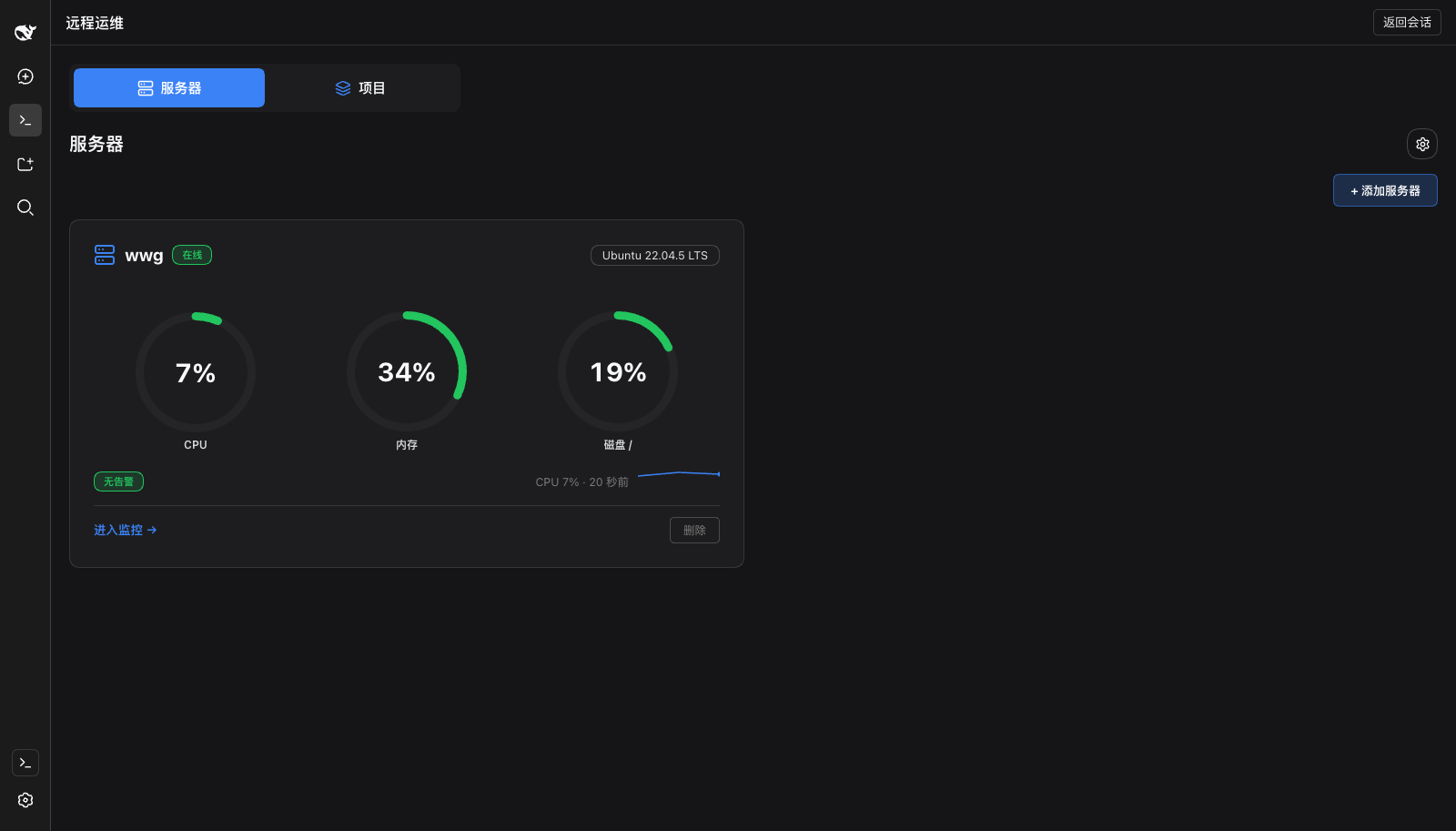 |
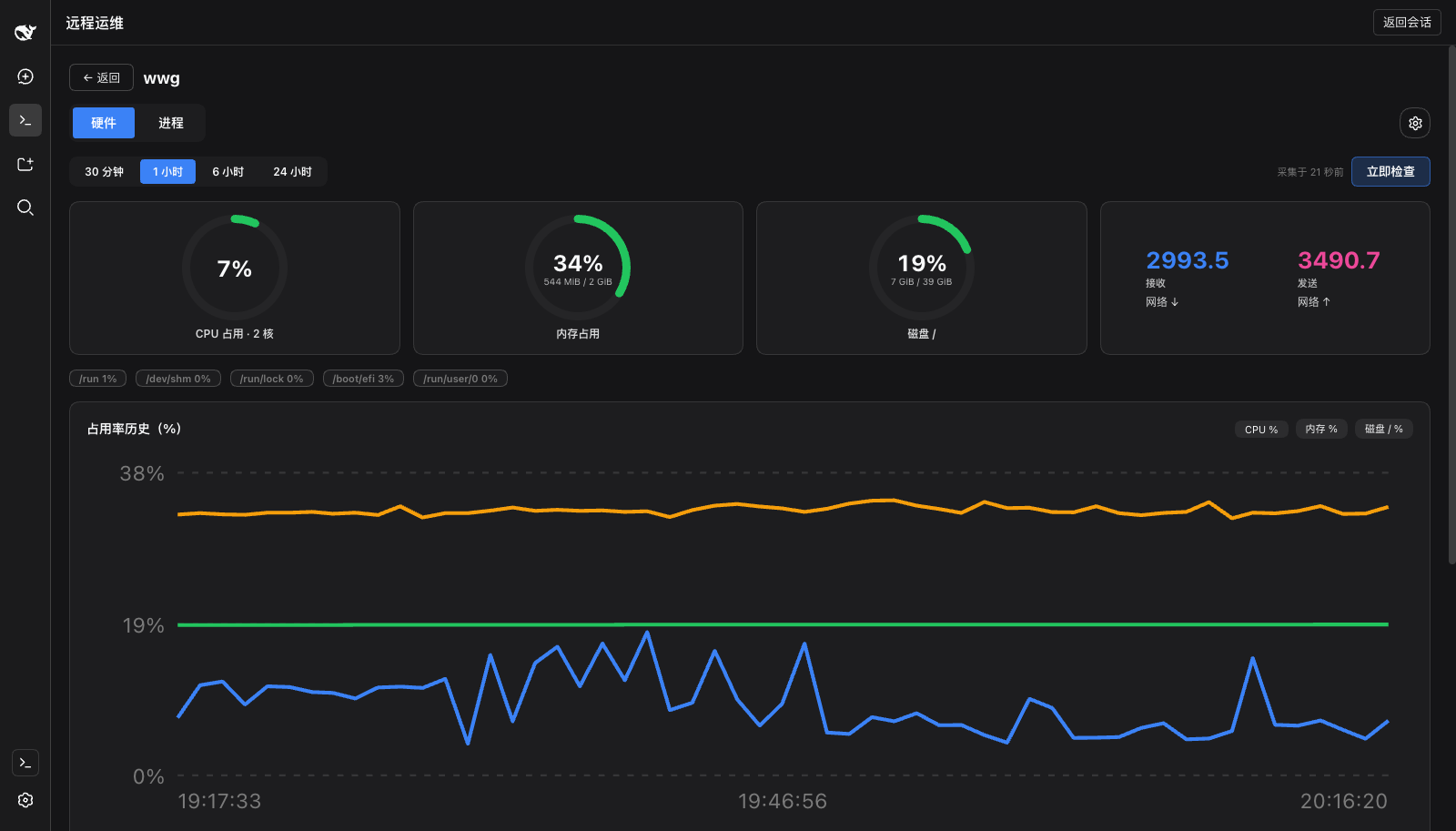 |
| Process groups and AI inspection | Project service detail |
|---|---|
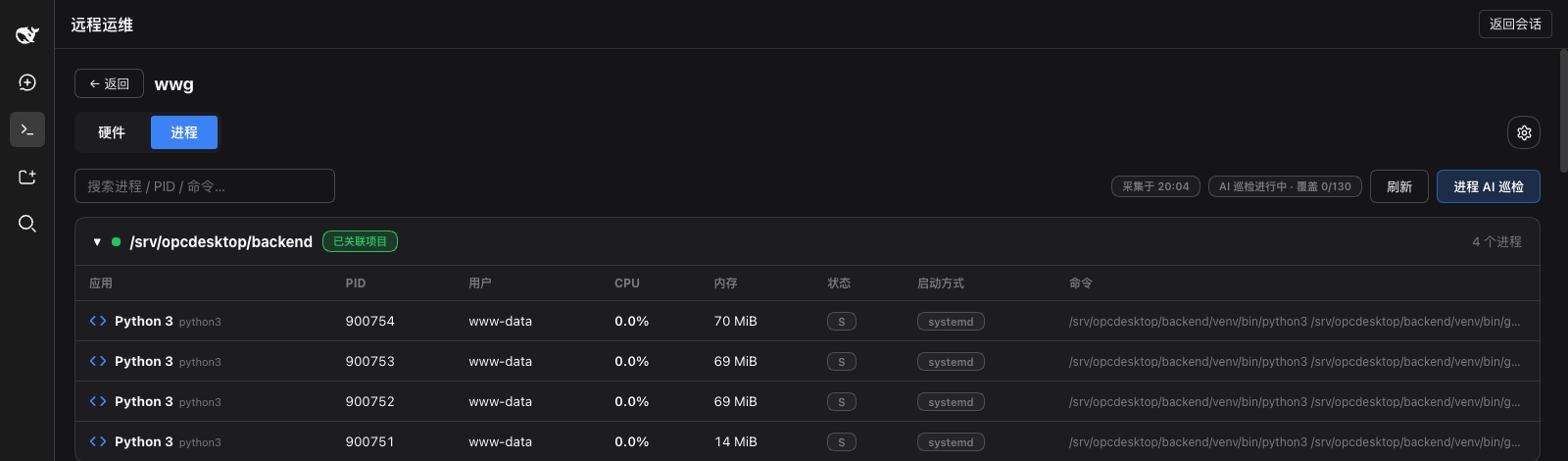 |
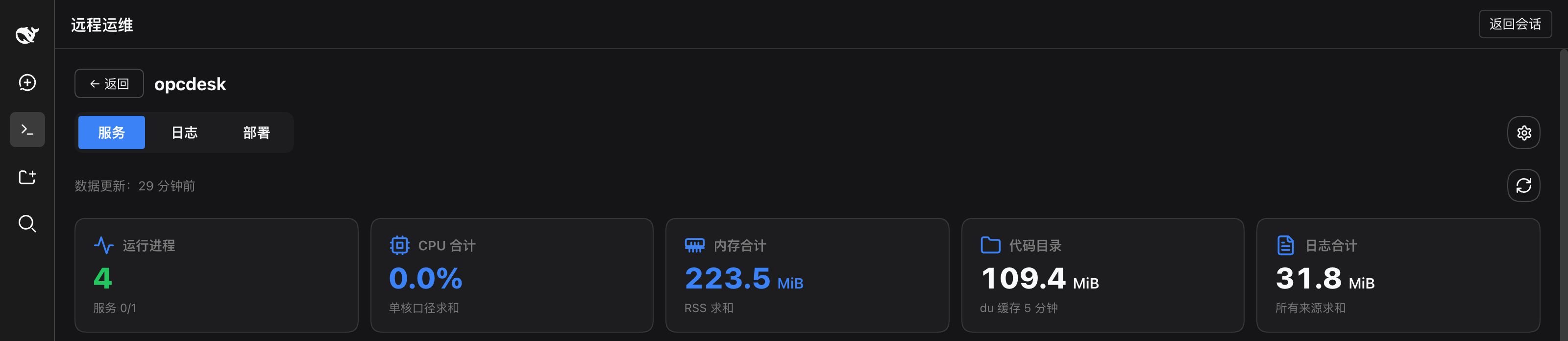 |
Projects: multiple projects, repositories and deploy targets; a first AI deploy and a manual
update are both one click away.
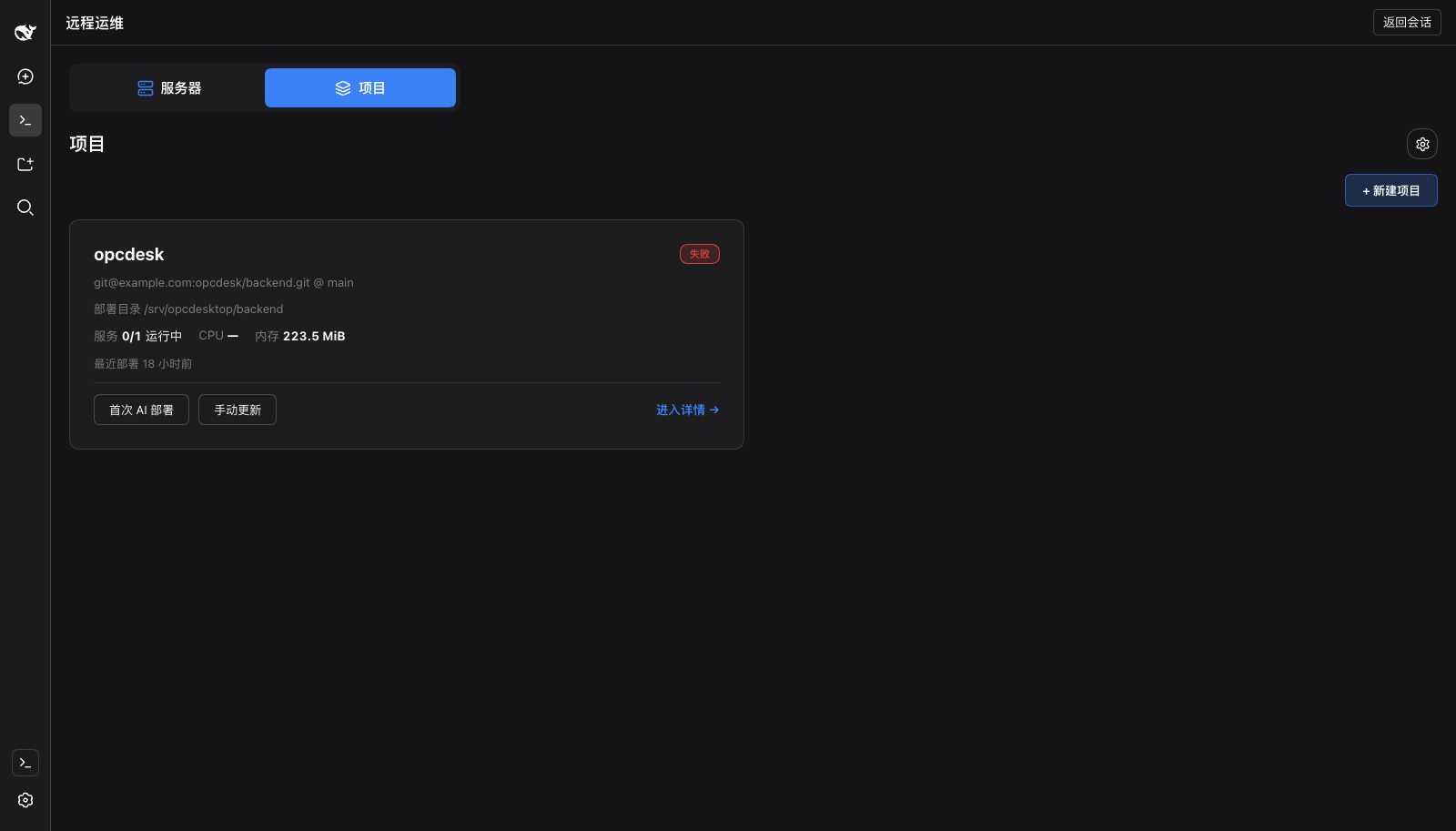
Features
🖥 Server management
- Add, edit and remove any number of SSH servers; a real login test is mandatory before a
server can be saved — it has to execute a remote command unattended - The host fingerprint is verified and stored on first connect; a changed fingerprint pauses the
connection - Plugin-private SSH config, fully isolated from system and user config; supports private keys
and jump hosts - Covers Linux (no distribution whitelist) and macOS, and labels capability as
available / limited / unavailable with the reason when it is not
📊 Monitoring and AI inspection
- Hardware: CPU, memory and disk usage, collected on demand or on a schedule (60s default)
- Processes: no per-process setup — running processes are enumerated in full and grouped by
project and service. The AI analyses resource and state anomalies in batches, names the
specific process and the reason, and shows analysis coverage transparently (a partial analysis
is never presented as normal) - Logs: log sources are discovered dynamically along project → service → log file (for
example by reading Supervisor's actually-effective config), read incrementally, with alert
de-duplication. The AI flags anomalies and alerts with a level, a summary and locatable source
evidence - Server-side execution: closing the browser does not stop inspection; the DSH restart
restores the inspection schedule without piling up catch-up runs
🚀 Project deployment
- Multiple projects, repositories and deploy targets; SSH, Git credentials and privilege
escalation are configured and verified independently - The first deploy is orchestrated by the AI, which fixes the health check up front (expected
process, port, wait deadline) and refreshes log monitoring dynamically - Later deploys: repository / branch reconciliation →
git pull --ff-only→ dependency update /
build → service restart → health verification - A dirty working tree, a branch mismatch or a diverged remote always stops and reports; it never
overwrites automatically, and there is no dangerous bulk rollback - Tasks are persisted end to end; an interrupted task is marked as such and cannot continue until
the actual remote state has been reconciled
🛡 Security design
- Credentials (passwords, private keys, passphrases) are stored with AES-256-GCM encryption,
with key material kept separate from configuration data - Secrets are redacted before they are displayed, persisted, or placed into AI context;
passwords never reach command lines, scripts or logs - Remote commands go through a whitelist parser; inspection is a read-only boundary enforced
by tool permissions rather than prompt wording - RPC runs over the host's authenticated channel; the API layer validates every payload with zod
- No install-time scripts, no telemetry, and the plugin never holds a model API key of its own
Quick start
Requirements
- A DSH Web host that supports the
dsh pluginmechanism — see Compatibility
for the versions this was verified against - An SSH client that can reach your target servers
- ⚠️ Set
DSH_DEVOPS_KEY_FILEbefore you save any credential (see below)
Install
Prebuilt on both paths — you never run a build on your machine:
# from npm (preferred: no build approval needed)
dsh plugin --profile web add @bigbigtooth/dsh-devops

# or from a prebuilt tarball
dsh plugin --profile web add https://github.com/bigbigtooth/DSH-DevOps-Plugin/releases/latest/download/dsh-devops-latest.tgz
You must restart the host afterwards — plugin bundles are loaded at boot, and plugin add
only writes the manifest:
pkill -f '\.bin/dsh --profile web'
sleep 2
nohup ~/.dsh/tooling/node_modules/.bin/dsh --profile web >> /tmp/dsh-web.log 2>&1 &
After installing, a Remote Operations entry appears at the bottom of the DSH sidebar, above
Settings. Click it to open the operations panel, and use "Back to conversation" to return to chat
at any time.
For headless use, swap
--profile webfor--profile headless. The UI half of this plugin
only exists under the web profile; inspection and deployment work in either.
⚠️ Three traps
- Set the key file first. Without
DSH_DEVOPS_KEY_FILEthe plugin uses an in-memory key
that is regenerated on every host start, so stored credentials cannot be decrypted after a
restart:
The key file is written with modeexport DSH_DEVOPS_KEY_FILE="$HOME/.dsh-devops/master.key"0600. There is no recovery path — lose the key file and
the credentials are gone. - Reinstalling the same version is a no-op. pnpm serves the same
file:spec from cache, so
remove before adding:dsh plugin --profile web remove @bigbigtooth/dsh-devops dsh plugin --profile web add @bigbigtooth/dsh-devops - Restart the host. See above.
Permissions and side effects
The full disclosure is in SAFETY.md. Summary:
| Item | Detail |
|---|---|
| Local files read | Only <dataDir> (default ~/.dsh-devops) and the host storage domain dsh_devops. Not ~/.ssh, not shell history |
| Remote files read | Hardware, processes, logs and the git working tree on the servers you add |
| Network egress | ① to your servers (SSH); ② to your configured model (inspection and deploy data). No telemetry, no third-party endpoint |
| API keys | The plugin holds no model API key of its own; it uses the host's LLM service |
| Write behaviour | Inspection is read-only; deployment writes only inside a task you explicitly created (git pull --ff-only, build, restart) |
| Conversation data | Never read and never transmitted. AI context is assembled from inspection and deployment material only |
| Install scripts | No preinstall / install / postinstall |
Compatibility
DSH is entirely on rc and the maintainers state that breaking changes are expected. Align your
versions with this table:
| dsh-devops | DSH (harness) | Status |
|---|---|---|
| 0.5.0 | 0.1.5-rc.2 | ✅ Verified (full test suite plus a real install) |
| 0.4.x | 0.1.5-rc.2 | ✅ Verified |
The package was renamed from
dsh-devopsto@bigbigtooth/dsh-devopsin 0.5.0 because the
unscoped name on npm is reserved by someone else. 0.4.x remains installable from thev0.4.0release assets.
Check the host version with dsh --version. dsh-devops declares a stable range for@deepseek-ai/cordis (^4.0.1; both are optional peers), so there is no prerelease triplet
matching problem. When the host moves to a new minor, upgrade this plugin first.
Verify your install
There is no console exporter during install and ctx.logger only writes to an in-memory buffer,
so neither logs nor exit codes are a verification signal. The only hard evidence is that the
layer loads and that a real route answers:
# 1) Is the config layer present? (you should see a dsh-devops layer)
dsh --profile web --dump-config | grep -A5 'dsh-devops'

# 2) The host log should show no activation gate failure

# 3) Open "Remote Operations" after boot and add a server — the mandatory login test
#    actually executes a remote command, so its success is the real proof
Configuration
The defaults below can be overridden through the cordis patch layer:
| Field | Default | Description |
|---|---|---|
dataDir |
~/.dsh-devops |
Private data directory (SSH config, keys, degraded storage) |
modelRef |
null | Model used for AI inspection and deploy steps; when empty, AI steps honestly report the capability as unavailable |
hardwareIntervalSeconds |
60 | Hardware collection interval |
processIntervalSeconds / logsIntervalSeconds |
300 | Process / log AI inspection interval |
retentionDays |
30 | Retention for ordinary history (config and valid scripts are not pruned) |
batchBudgetTokens |
8000 | Per-batch AI input budget |
The DSH_DEVOPS_KEY_FILE environment variable points at the credential master key file
(see trap 1 above).
Install from source
git clone https://github.com/bigbigtooth/DSH-DevOps-Plugin.git
cd DSH-DevOps-Plugin
pnpm install
pnpm build && pnpm pack --pack-destination dist

dsh plugin --profile web remove @bigbigtooth/dsh-devops   # required before reinstalling the same version
dsh plugin --profile web add ./dist/bigbigtooth-dsh-devops-*.tgz
Installing from Git means you build it yourself — git installs do not run build scripts.
Development and testing
pnpm typecheck            # strict types (host / client / tests)
pnpm test:unit            # contracts / SSH / vault / repository / execution / probes / inspection / logs / scheduler / scripts…
pnpm test:contract:dsh    # real cordis runtime lifecycle + restart persistence
pnpm test:integration:ssh # private config / askpass / fingerprint / execution / stop
pnpm test:integration:ops # real git repository deploy pipeline
pnpm test:e2e:web         # full path + counterexample matrix
pnpm test:acceptance      # executable subset of the product acceptance suite
pnpm test                 # everything
The SSH and deployment integration suites run against an in-process fake, so no real server is
needed. See CONTRIBUTING.md.
Architecture (single Host / Client bundle)
src/contracts/    DTO schemas, error codes, deploy state machine, API contracts (shared by both sides)
src/host/
  adapters/       ports + DSH / file / memory adapters (business logic depends on no SDK)
  repository/     versioned records, migration backups, atomic claim, requestId idempotency
  vault/          AES-256-GCM credential envelope, redaction
  ssh/            command whitelist parser, private config generation, OpenSSH transport (private askpass channel)
  execution/      identified remote execution units (intent first, fact file, stop reconciliation)
  probes/         hardware / process collection (Linux + macOS parsers, missing fields are null, not 0)
  agents/         restricted AI inspection (batched, coverage-tracked, evidence verified server-side)
  logs/           Supervisor discovery, dual cursors, incremental reads, alert de-duplication
  scheduler/      persistent scheduling (single-flight coalescing, no catch-up, jitter, AI concurrency cap)
  deployment/     git precheck, ff-only update, first-deploy orchestration, repair (≤2 rounds), recovery, reconciliation
  scripts/        candidate → verified → invalidated (hash-pinned, applicability fingerprint)
  api/            zod-validated RPC dispatch (/rpc/dsh-devops on the authenticated channel)
src/client/       slots entry + large-card page modules (servers / projects + their detail pages) + charts + state model
Integration notes (for plugin authors building on this)
- When a patch row declares no
config, the plugin receivesundefined(not{}), soConfig
must fall back with.prefault({})or the whole plugin tree fails to boot. - Host service names and storage names have syntactic constraints: services must be read through
ctx.get(name); domain and table names must match^[a-z][a-z0-9_]*$(dsh-devops→dsh_devops,inspectionRuns→inspection_runs), mapped at the adapter boundary. - On unload, multiple async disposers run concurrently (reverse registration order, but with
no serial-completion guarantee). Cleanups with an order dependency must be merged into a single
disposer returned by onectx.effect, awaiting them serially.
Documentation
- Product design (PROD) — product goals, requirements and design defaults
- Implementation plan (PLAN)
- Host integration (INTEGRATION) — integration decisions and design notes
- Acceptance status (ACCEPTANCE) — acceptance results and compatibility matrix
- Safety and disclosure / 安全与行为披露
- Contributing / 贡献指南
License
Install
Install the catalog once, then DeepSeek Harness can find and install any plugin from this site automatically:
dsh plugin add dshbase-catalogThen say "install @bigbigtooth/dsh-devops for me" — your agent finds it in the directory and installs it. Docs: dshbase-catalog · verified packs.
Web profile:
dsh plugin --profile web add @bigbigtooth/dsh-devopsHeadless (CLI) profile:
dsh plugin --profile headless add @bigbigtooth/dsh-devopsPackage
npm: @bigbigtooth/dsh-devops · version — · tested on dsh 0.1.0-rc.6
Test report
Verified end-to-end: L1 install + L2 load + L3 runtime Q&A on dsh 0.1.0-rc.6.
Share this badge
Drop this badge into your README — it links back here and updates automatically when our test status changes:

[](https://dshbase.com/plugins/bigbigtooth-dsh-devops/)<a href="https://dshbase.com/plugins/bigbigtooth-dsh-devops/"><img src="https://dshbase.com/badges/bigbigtooth-dsh-devops.svg" alt="dshbase install-tested"></a>