
Plugin directory / UI & Skins / dsh-arcaea-theme
dsh-arcaea-theme
Verified · install-tested on dsh a1swg1159-pixel
What it does
An original Arcaea-inspired high-key prismatic UI theme plugin for DeepSeek Harness.
Works — verified, early-stage project
An original Arcaea-inspired high-key prismatic UI theme plugin for DeepSeek Harness. It installs cleanly and boots without issues in our testing. It's early-stage but functional.
“Verified” means our automated CI actually ran dsh plugin add in a clean profile and it booted — nothing more. Feature descriptions and version compatibility are the author’s claims. This is not a security audit and not an endorsement of third-party code.
README
dsh-arcaea-theme
English | 简体中文

dsh-arcaea-theme is an original high-key prismatic memory theme for the DeepSeek Harness Web UI. It turns local visual research into a fresh implementation made from CSS and inline SVG; no game image, character, trademark, chart, or other official asset is included.
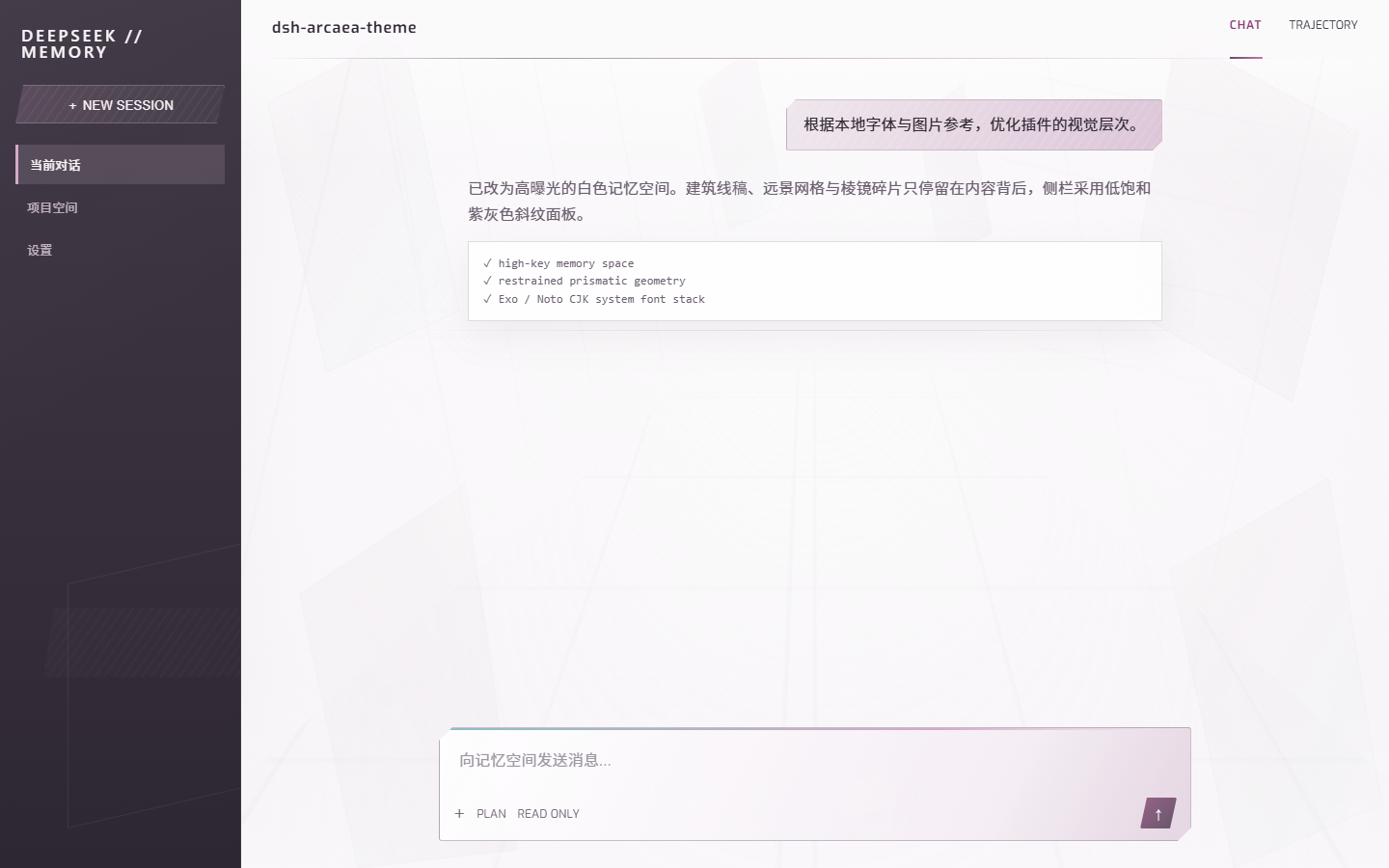
Visual treatment
- A high-exposure ivory workspace with restrained architectural linework, fine texture, and a distant perspective grid.
- A desaturated aubergine sidebar with diagonal halftone texture, clipped shapes, and clearer selection states.
- Subtle blush and pearl-blue prisms that stay behind the conversation instead of crossing the content.
- Sharp clipped corners and quiet shadows for the composer, bubbles, and primary actions.
- A bundled Exo variable display face and bundled Noto Sans CJK SC Light / Regular / Bold body faces, with system fallbacks.
While enabled, the plugin selects its dedicated high-exposure arcaea-light palette. Removing or disabling it restores the previous theme preference. It does not replace chat components, modify session data, or make network requests.
Local reference directories
The original Fonts/ and img/ directories remain local visual research and are not distributed wholesale. Required Exo and Noto Sans CJK SC faces are selected into assets/fonts/ and embedded as data URLs in dist/client.js at build time because DSH's plugin web route serves client.js, not arbitrary package assets. The standalone font files and their SIL Open Font License 1.1 texts remain in the package. Other fonts with unclear provenance and all game images remain excluded. See THIRD_PARTY_NOTICES.md.
Install
Build from the plugin directory:
pnpm run build
Run the DeepSeek Harness script from its repository. Do not use pnpm dsh directly because this project does not expose a dsh executable:
pnpm --dir D:\deepseek-harness run dsh -- plugin --profile web remove dsh-arcaea-theme
pnpm --dir D:\deepseek-harness run dsh -- plugin --profile web add D:\zhuomian\dsh-plugin\dsh-arcaea-theme
pnpm --dir D:\deepseek-harness run dsh -- web
Then hard-refresh the browser with Ctrl+F5.
Verify
pnpm run check
pnpm pack --dry-run
License
Plugin code is MIT licensed. This project is not affiliated with lowiro or Arcaea. Third-party files in the local reference directories are outside this plugin's license and are not packaged.
Install
Install the catalog once, then DeepSeek Harness can find and install any plugin from this site automatically:
dsh plugin add dshbase-catalogThen say "install dsh-arcaea-theme for me" — your agent finds it in the directory and installs it. Docs: dshbase-catalog · verified packs.
This plugin is GitHub source (not published to npm) — install it straight from the repo:
Web profile:
dsh plugin --profile web add github:a1swg1159-pixel/dsh-arcaea-themeHeadless (CLI) profile:
dsh plugin --profile headless add github:a1swg1159-pixel/dsh-arcaea-themeTest report
Verified: L1 install + L2 load + L3 runtime from GitHub source on dsh 0.1.0-rc.6.
Share this badge
Drop this badge into your README — it links back here and updates automatically when our test status changes:

[](https://dshbase.com/plugins/dsh-arcaea-theme/)<a href="https://dshbase.com/plugins/dsh-arcaea-theme/"><img src="https://dshbase.com/badges/dsh-arcaea-theme.svg" alt="dshbase install-tested"></a>