
Plugin directory / Knowledge / dsh-chat-import
dsh-chat-import
Verified · install-tested on dsh Nwflower
What it does
Imports history messages from Claude Code, Codex, Reasonix and other agent tools to continue the conversation in DSH.
Recommended — verified working and popular
Imports history messages from Claude Code, Codex, Reasonix and other agent tools to continue the conversation in DSH. It installs cleanly and boots without issues in our testing. With 217+ stars it's a community-endorsed, low-risk pick.
“Verified” means our automated CI actually ran dsh plugin add in a clean profile and it booted — nothing more. Feature descriptions and version compatibility are the author’s claims. This is not a security audit and not an endorsement of third-party code.
README

DSH Chat Import
A session import plugin built on DeepSeek Harness: import conversation history from external agents with one click and continue chatting in DeepSeek Harness.
All sessions, continued in DSH.








Supported Data Sources


Install
Requires dsh ≥ 0.1.5-rc.1 — verified on the 0.1.x line and on 0.2.0-rc.1 (dsh-tools must satisfy
>=0.1.0-rc.6 <0.3.0)
- Install via terminal
dsh plugin --profile web add dsh-chat-import # npm package
- Install via Plugin Marketplace
Usage
- Import conversations via GUI
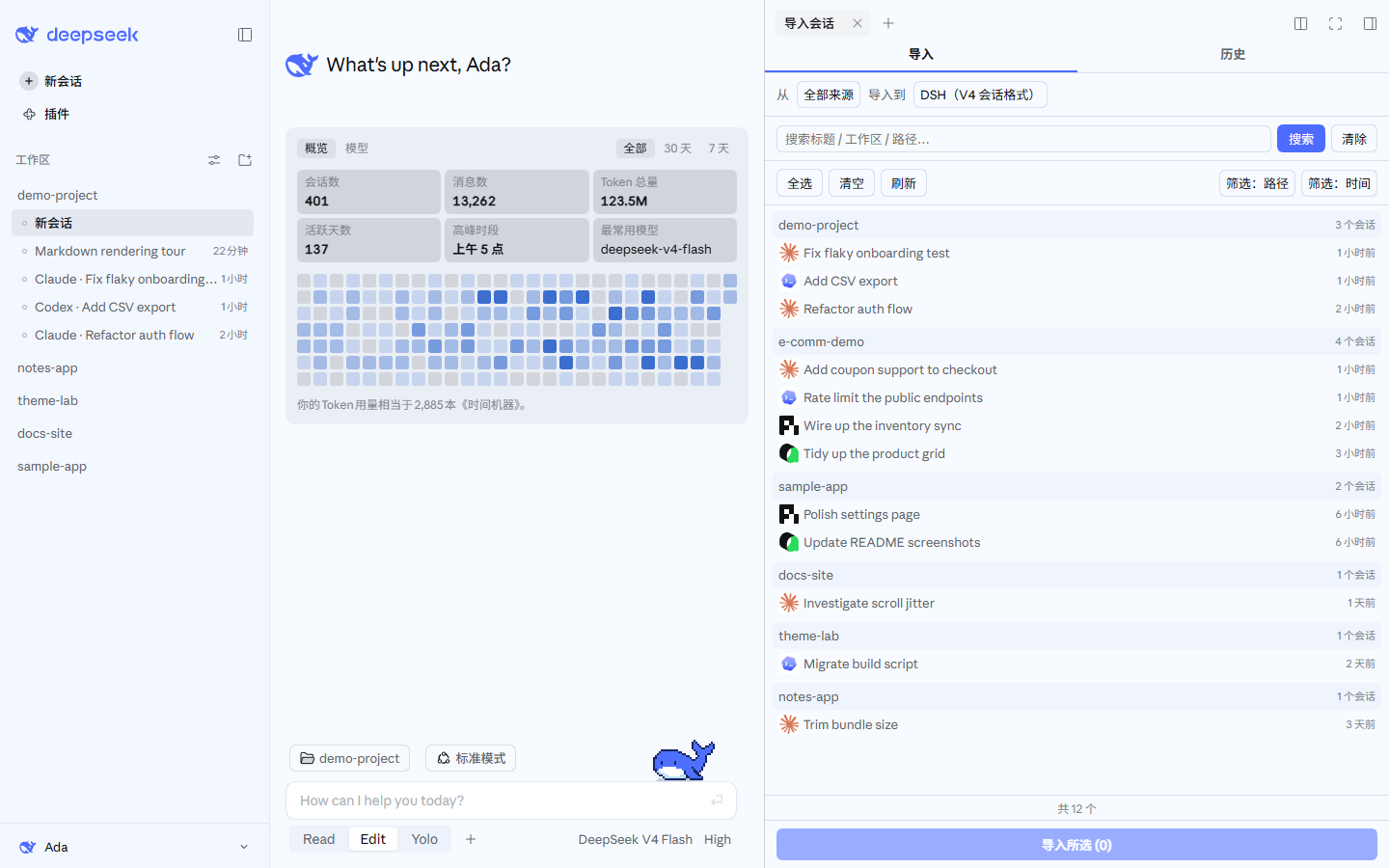
Open the import window from the "Import sessions" button at the bottom of the left sidebar (with the DSH Claude Style theme, that button sits in the account menu at the bottom left), select the conversations you want to import, and import with one click. When the file in hand comes from somewhere else (a web-app export, your own script, a tool this plugin does not list), use Import from file at the top of the same window: type a local path and press Enter, or press Choose… to pick files; when the path is a directory it asks whether to search subfolders. Confirm in the preview, then import (a failed detection lists every candidate parser's reason and points at the skill that converts the format).
 |
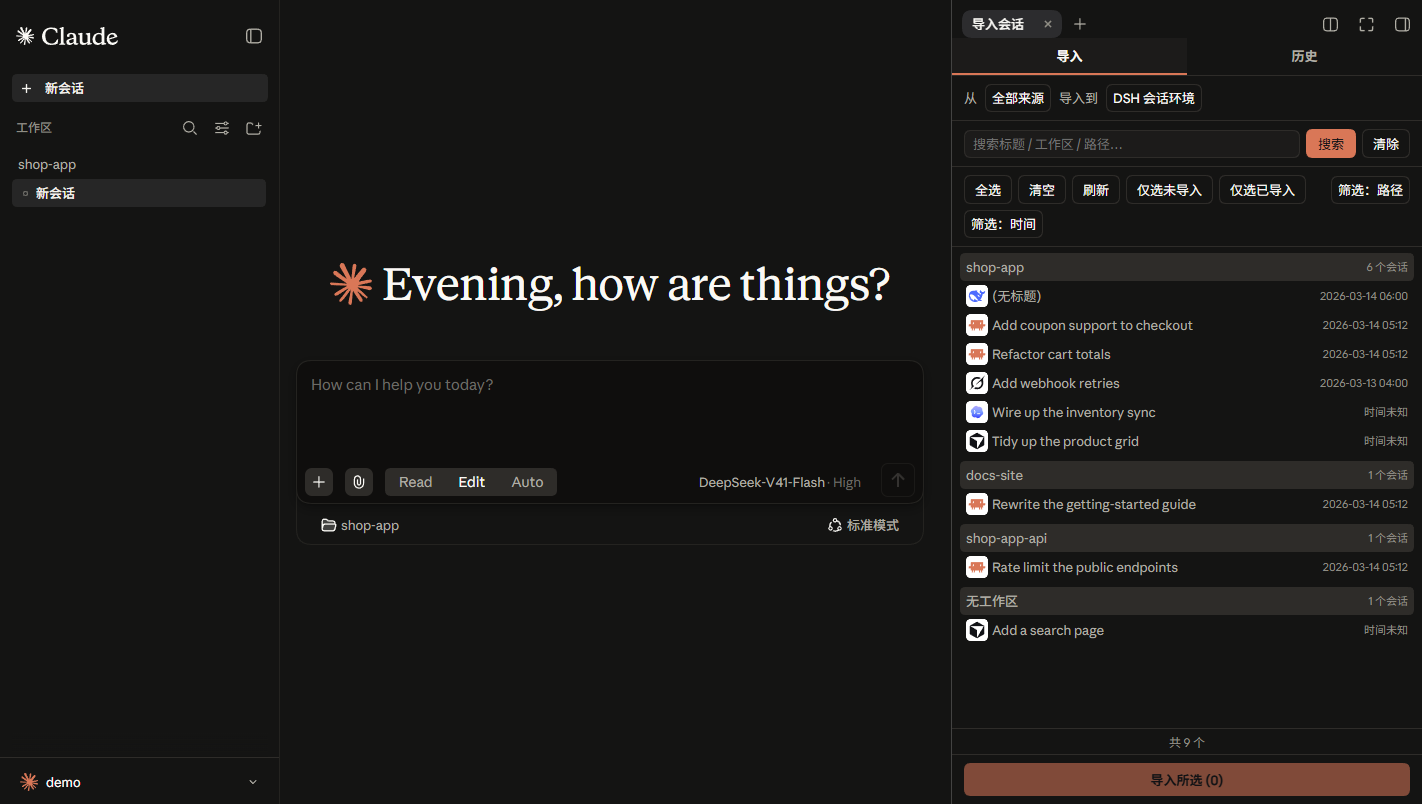 |
These screenshots also use the DeepSeek palette of the author's other theme plugin, DSH Claude Style: it recreates the look and feel of Claude Code Desktop inside DSH, in a Claude palette and a DeepSeek one. If the default theme is not quite your taste, give it a try. The workspaces and sessions in the screenshots are sample data.
- Import via Agent tool calls
# Example call formats
import_chat({ format: "claude", path: "~/.claude/projects" })
import_chat({ format: "chatgpt", path: "~/Downloads/chatgpt-export/conversations.json" })
import_chat({ format: "local-jsonl", path: "D:\downloads\session.jsonl" })
Configuration
For TUI compatibility, plugin-provided tools are injected into context by default. You can configure the import tools in Settings to not inject into context or inject partially, which saves a significant amount of tokens.
For full tool / command usage, see docs/USAGE.md.
Features
| Capability | Entry Point | Description |
|---|---|---|
| Import | Sidebar panel "Import" tab | Import conversations from other agents, preserving reasoning, tool call results, and system prompts (optional) |
| Import from file | Panel "Import from file" / /import auto <path> |
Any local file or directory: three-level detection (explicit format > content marker > parser trial), preview first, an optional "search subfolders?" prompt for directories, and — when every parser fails — a ready-to-send agent task brief plus a registered dsh-chat-import-convert skill |
| Retract Import | Sidebar panel "History" tab | View import history and delete sessions created by this plugin with one click |
| Export | Context tool | Serialize DSH sessions back to external agents |
| Ignore | Automatic + /ignores commands |
Archive / delete / workspace-removal auto-registers the source so rescans skip it; /ignore, /unignore manage the table |
Docs
| Document | Description |
|---|---|
| Usage Reference | Full parameters, examples, and edge cases for every tool / command |
| Interchange Protocol | Interchange v1 protocol and bundle format |
| Conversion Guide | Agent-facing skill instructions: convert any transcript into an importable interchange v1 document |
| Settings Migration | DSH 0.1.5 → 0.1.7 plugin settings-page migration (measured errors, compatibility recipe) |
| Changelog | Version history |
| Roadmap | Shipped / planned |
| Contributing | Development setup, commit rules, security & privacy |
Related Links
Only need to migrate configuration (skills, hooks, global settings, etc.) rather than conversation history? Recommended: dsh-movein
Star History
Install
Install the catalog once, then DeepSeek Harness can find and install any plugin from this site automatically:
dsh plugin add dshbase-catalogThen say "install dsh-chat-import for me" — your agent finds it in the directory and installs it. Docs: dshbase-catalog · verified packs.
Web profile:
dsh plugin --profile web add dsh-chat-importHeadless (CLI) profile:
dsh plugin --profile headless add dsh-chat-importPackage
npm: dsh-chat-import · version 0.2.0 · tested on dsh 0.1.0-rc.6
Test report
Verified end-to-end: L1 install + L2 load + L3 runtime Q&A on dsh 0.1.0-rc.6.
When to use it
Give the agent a memory, a knowledge base, or a retrieval layer so it stops forgetting context between sessions.
Who it's for
Users running long projects who want the agent to remember decisions, docs, and preferences without re-explaining.
For developers — extending it
The memory/retrieval backend is the seam — plug a new store, tune what gets distilled, or add citation and audit trails.
Share this badge
Drop this badge into your README — it links back here and updates automatically when our test status changes:

[](https://dshbase.com/plugins/dsh-chat-import/)<a href="https://dshbase.com/plugins/dsh-chat-import/"><img src="https://dshbase.com/badges/dsh-chat-import.svg" alt="dshbase install-tested"></a>