
Plugin directory / Knowledge / dsh-chat-tune
dsh-chat-tune
Verified · install-tested on dsh xingyingyuzhui
What it does
DeepSeek Harness plugin: tune chat font, width, line height, and paragraph spacing
Works — verified, early-stage project
DeepSeek Harness plugin: tune chat font, width, line height, and paragraph spacing It installs cleanly and boots without issues in our testing. It's early-stage but functional.
“Verified” means our automated CI actually ran dsh plugin add in a clean profile and it booted — nothing more. Feature descriptions and version compatibility are the author’s claims. This is not a security audit and not an endorsement of third-party code.
README
dsh-chat-tune · 对话区界面设置
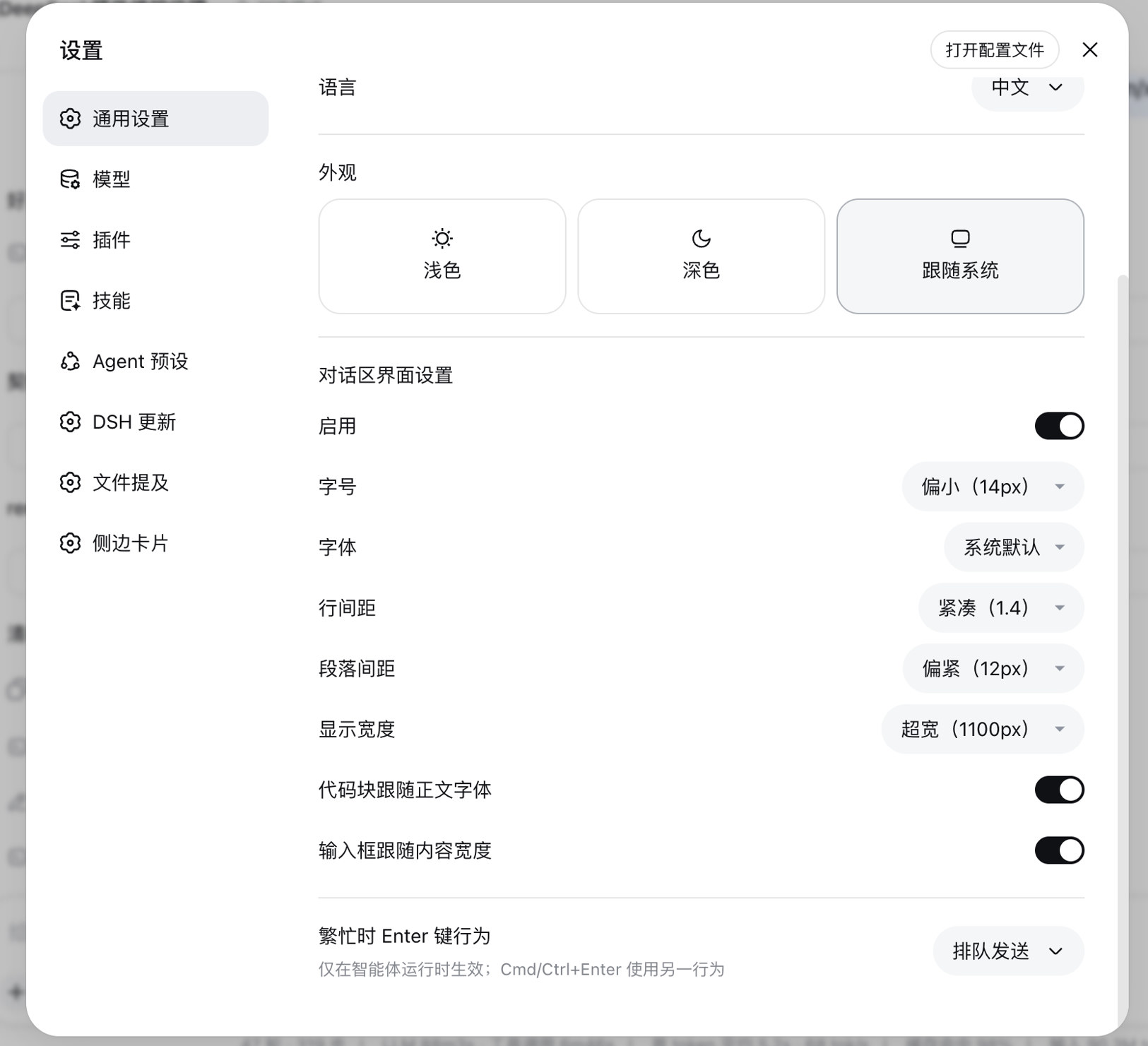
DeepSeek Harness Web 插件:在 设置 → 通用设置 里、「外观」正下方增加「对话区界面设置」,调节会话区的字号 / 字体 / 行距 / 段距 / 显示宽度。不改官方组件——通过覆盖官方 CSS 变量 seam 生效。
安装
前置:本机已能运行 dsh web。
dsh plugin --profile web add github:xingyingyuzhui/dsh-chat-tune
装完重启 dsh web。打开 设置 → 通用设置,在「外观」下面就是本插件的控件。
本地开发:
dsh plugin --profile web add link:/abs/path/to/dsh-chat-tune
能力
| 项 | 说明 |
|---|---|
| 字号 | 小 13 / 偏小 14 / 标准 16 / 大 18 / 特大 20 / 自定义(8–48px) |
| 字体 | 系统默认 / 无衬线 / 衬线 / 等宽 / 苹方 / 思源黑体 |
| 行间距 | 紧凑 1.4 / 适中 1.6 / 标准 1.75 / 宽松 2.0 / 很松 2.4 / 自定义(1.0–3.0) |
| 段落间距 | 紧凑 8 / 偏紧 12 / 标准 16 / 宽松 24 / 很松 32 / 自定义(0–80px) |
| 显示宽度 | 窄 640 / 标准 748 / 宽 900 / 超宽 1100 / 自定义(480–2000px) |
| 代码块跟随 | 打开时代码块改用所选字体(默认保持等宽) |
| 输入框跟随 | 打开时底部输入框宽度同步内容宽度(默认开启) |
| 输入框边缘调宽 | 开启后,宽度拖拽把手仅在底部输入框两侧生效,消息区中部不再误触(默认开启) |
原理
- 正文字号/字族/行距覆盖官方 seam:
--dsw-font-markdown-base/-h1..h4(完整font简写) - 段落间距改消息列里
p/ 列表 / 标题的margin-block - 内容宽度:
composerFollow开启时写在会话根[data-phase]上的--dsh-chat-content-width与--dsh-composer-card-max-width;关闭时只改消息列 - 输入框边缘调宽:
composerWidthOnly开启时裁剪官方[data-width-handle]热区,并用ResizeObserver同步[data-composer-seat]高度到--dsh-chat-tune-handle-height - 代码字体:
--ds-font-family-code - 选择器挂在
body[data-dsh-chat-tune]下 - 偏好存
localStorage(dsh-chat-tune:prefs)
卸载
dsh plugin --profile web remove dsh-chat-tune
开发
npm run build   # 生成 client.js(改 chat-tune-*.mjs 后)
npm test        # build:check + node --test
License
MIT
Install
Install the catalog once, then DeepSeek Harness can find and install any plugin from this site automatically:
dsh plugin add dshbase-catalogThen say "install dsh-chat-tune for me" — your agent finds it in the directory and installs it. Docs: dshbase-catalog · verified packs.
This plugin is GitHub source (not published to npm) — install it straight from the repo:
Web profile:
dsh plugin --profile web add github:xingyingyuzhui/dsh-chat-tuneHeadless (CLI) profile:
dsh plugin --profile headless add github:xingyingyuzhui/dsh-chat-tuneTest report
Verified: L1 install + L2 load + L3 runtime from GitHub source on dsh 0.1.0-rc.6.
Share this badge
Drop this badge into your README — it links back here and updates automatically when our test status changes:

[](https://dshbase.com/plugins/dsh-chat-tune/)<a href="https://dshbase.com/plugins/dsh-chat-tune/"><img src="https://dshbase.com/badges/dsh-chat-tune.svg" alt="dshbase install-tested"></a>