
Plugin directory / UI & Skins / dsh-client-ui-quote
dsh-client-ui-quote
Verified · install-tested on dsh skyhancloud
What it does
A selection-quoting plugin for the DeepSeek Harness web GUI: select text inside an AI reply and attach it to your next message as a quote banner.
Works — verified, early-stage project
A selection-quoting plugin for the DeepSeek Harness web GUI: select text inside an AI reply and attach it to your next message as a quote banner. It installs cleanly and boots without issues in our testing. It's early-stage but functional.
“Verified” means our automated CI actually ran dsh plugin add in a clean profile and it booted — nothing more. Feature descriptions and version compatibility are the author’s claims. This is not a security audit and not an endorsement of third-party code.
README

dsh-client-ui-quote
English | 中文
A selection-quoting plugin for the DeepSeek Harness web GUI: select text inside an AI reply and attach it to your next message as a quote banner.






Table of Contents
Features
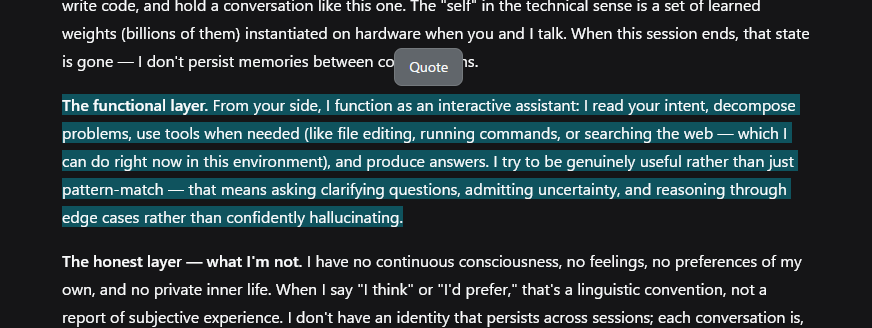
- Selection toolbar — one 引用 (Quote) button appears above the selection after a 50ms debounce, so it never flashes mid-drag. It hides on Escape, scroll-away, or when the selection collapses.
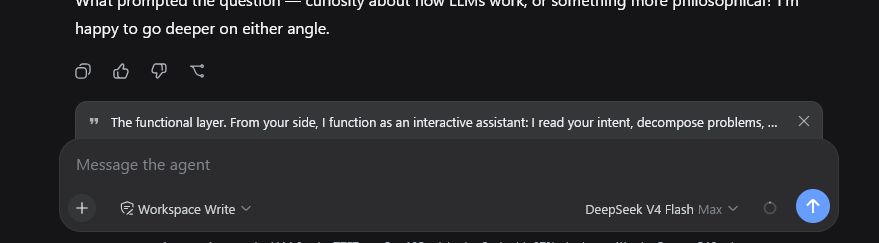
- Quote banner — a removable strip above the composer with a quote glyph, the quoted text, and a × button. The quote is consumed by the next send: the banner clears when the message goes out. Escape while the composer is focused clears it too.
- Clean draft — the quote is a pending-send attachment, not text in your input. Focus returns to the composer so typing follows.
- Localized — toolbar labels and the quote attribution follow the UI language (中文 / English).
- Fallback for older harnesses — on versions without the input-machine quote attachment, the button inserts the quote block at the end of the draft instead.
Preview
Installation
Prerequisites
- DeepSeek Harness with the web GUI (
dsh web) - Full banner behavior needs
@deepseek-ai/dsh-client-ui-conversationwith the input-machine quote attachment (InputActions.setQuote). Older versions fall back to inserting the quote into the draft.
Install
dsh plugin --profile web add https://github.com/skyhancloud/dsh-client-ui-quote
Then restart dsh web and refresh the browser.
Usage
- Select any text inside an AI reply.
- Click 引用 (Quote) above the selection — the quote appears as a banner above the composer.
- Type your message and send — the quote is prepended to the outgoing message:
> 引用 AI 回复:
> <selected lines>

<your message>
- Click × on the banner when you no longer need the quote.
Development
pnpm install
pnpm run bundle   # emits lib/index.js and lib/client.js
Pull requests are welcome.
License
MIT — see LICENSE.
Install
Install the catalog once, then DeepSeek Harness can find and install any plugin from this site automatically:
dsh plugin add dshbase-catalogThen say "install dsh-client-ui-quote for me" — your agent finds it in the directory and installs it. Docs: dshbase-catalog · verified packs.
This plugin is GitHub source (not published to npm) — install it straight from the repo:
Web profile:
dsh plugin --profile web add github:skyhancloud/dsh-client-ui-quoteHeadless (CLI) profile:
dsh plugin --profile headless add github:skyhancloud/dsh-client-ui-quoteTest report
Verified: L1 install + L2 load + L3 runtime from GitHub source on dsh 0.1.0-rc.6.
Share this badge
Drop this badge into your README — it links back here and updates automatically when our test status changes:

[](https://dshbase.com/plugins/dsh-client-ui-quote/)<a href="https://dshbase.com/plugins/dsh-client-ui-quote/"><img src="https://dshbase.com/badges/dsh-client-ui-quote.svg" alt="dshbase install-tested"></a>