
Plugin directory / UI & Skins / dsh-dracula-theme
dsh-dracula-theme
Verified · install-tested on dsh ossFrankFrank
What it does
🧛 Dracula theme for DeepSeek Harness (DSH)
Works — verified, early-stage project
🧛 Dracula theme for DeepSeek Harness (DSH) It installs cleanly and boots without issues in our testing. It's early-stage but functional.
“Verified” means our automated CI actually ran dsh plugin add in a clean profile and it booted — nothing more. Feature descriptions and version compatibility are the author’s claims. This is not a security audit and not an endorsement of third-party code.
README
dsh-dracula-theme
🧛 Dracula theme for DeepSeek Harness (DSH): the classic dark palette — plus the Dracula Soft variant — registered into the built-in theme runtime, with a one-click skin picker in Settings → General.
Features
- Two faithful variants built from the official Dracula palette:
Dracula— the classic#282a36canvasDracula Soft— the gentler#343746background
- Core logic adopted from the official Dracula DeepSeek port (MIT): the canvas/brand
--dsw-static-*overrides and code-highlight palette are taken verbatim and translated into the DSH theme runtime. On top of that, full token coverage: neutral & canvas ramps, brand (purple), blue (cyan), red / green / amber state colors, alias surfaces, component-specific tokens (sidebar, bubbles, composer, menus) and the official Dracula syntax colors for code highlighting (--shiki-*). - One-click switching from Settings → General → Dracula theme, persisted across sessions.
Preview
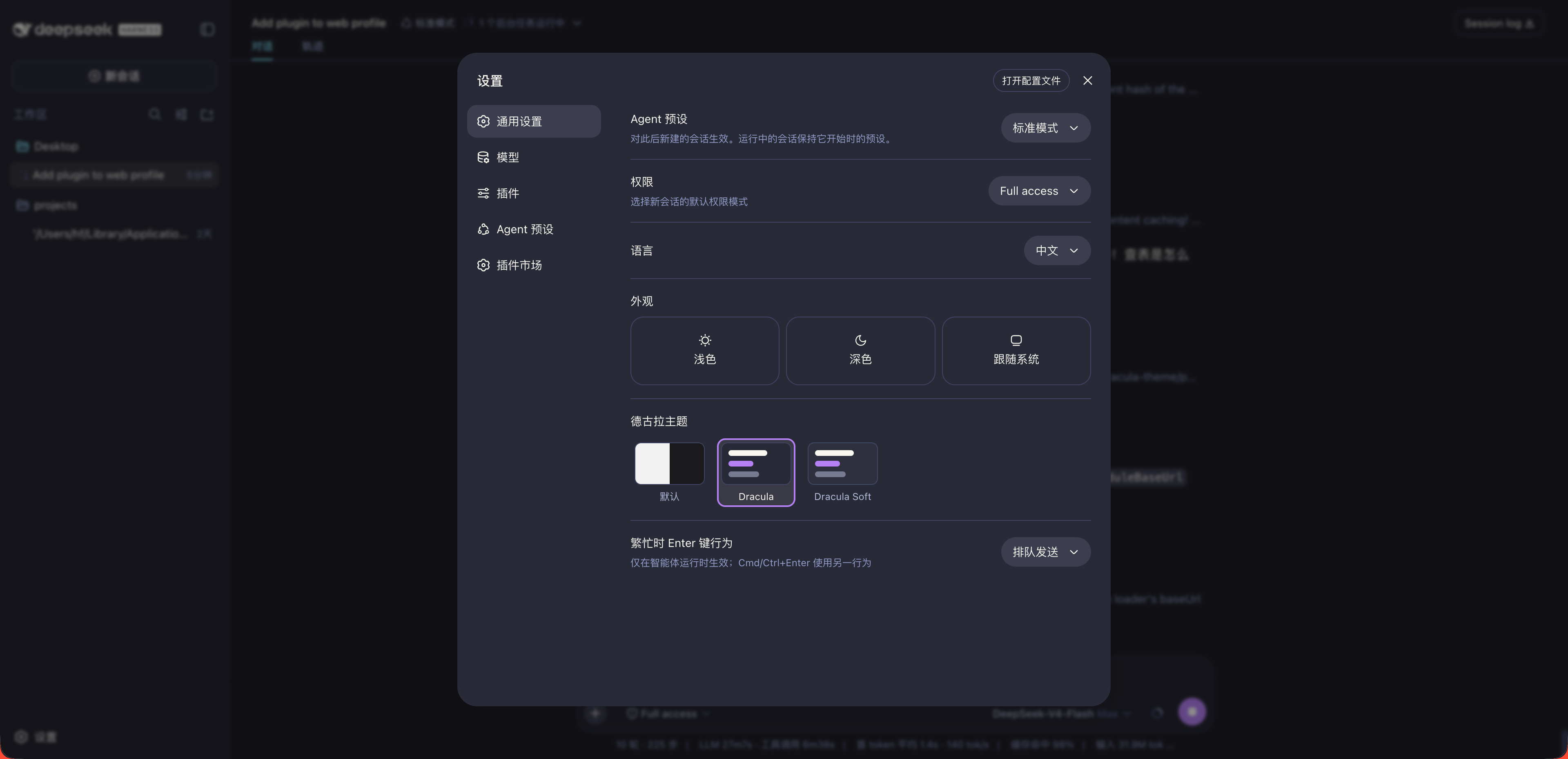
The classic Dracula canvas (#282a36) mapped onto the full DSH surface stack — sidebar, conversations, code blocks — with the purple/cyan brand accents from the official Dracula DeepSeek port.
Palette
| Role | Color |
|---|---|
| Background | #282a36 |
| Dark background (base canvas) | #20212b |
| Current line / selection | #44475a |
| Foreground | #f8f8f2 |
| Comment | #6272a4 |
| Purple (brand) | #bd93f9 |
| Pink (keyword) | #ff79c6 |
| Cyan (link) | #8be9fd |
| Green (success) | #50fa7b |
| Yellow (string) | #f1fa8c |
| Orange (warn) | #ffb86c |
| Red (error) | #ff5555 |
Official spec alignment
The token mappings follow the official Dracula Syntax Highlighting Specification and the classic dracula/sublime convention:
| Role | Color |
|---|---|
| Keywords & storage | Pink #FF79C6 |
| Functions & methods | Green #50FA7B |
| Classes & types | Cyan #8BE9FD |
| Strings & text | Yellow #F1FA8C |
| Numbers & constants | Orange #FFB86C |
| Comments | #6272A4 |
| Variables & parameters | Foreground #F8F8F2 |
| Punctuation | Foreground #F8F8F2 |
| Diff inserted / deleted | Green #50FA7B / Red #FF5555 |
| Links | Cyan #8BE9FD |
UI surfaces follow the spec's current-line / selection distinction: text selection is #44475A (including the ::selection rule), the current-line highlight uses the opaque fallback #353747, and floating interactive elements use #343746 / #424450. Status colors (error/success/warning) deliberately follow the syntax palette like the official Dracula DeepSeek port, keeping the whole UI on one consistent palette.
Installation
# from npm (prebuilt, recommended)
dsh plugin --profile web add dsh-dracula-theme

# or from source
dsh plugin --profile web add https://github.com/ossFrankFrank/dsh-dracula-theme
Restart the profile, then pick the skin in Settings → General → Dracula theme.
DSH Desktop 2.0.4+ — DSH client packages moved to
0.1.2-alpha.1; 1.1.0 is
the first release compatible with that host (see CHANGELOG). On DSH Desktop,
install from the in-app plugin market instead of the CLI--profile webflow
(the desktop app now owns its own profile). Installing 1.0.0 on a 2.0.4 host
makes the app fail to start (plugin client bundle references the removed@deepseek-ai/dsh-client-runtimemodule), so do not install the old version.
Development
npm run generate # rebuild themes/*.json and lib/client.js from palette/dracula.json
The token tables are generated: edit the anchors in palette/dracula.json (colors, the official canvasRamp/brandRamp/codeTokens mappings, grayRamp, soft.background) and regenerate. lib/client.js is the browser bundle consumed by the DSH client runtime; lib/index.js is a no-op host entry.
License
MIT — see LICENSE. Structure modeled on dsh-catppuccin (MIT); token mapping adopted from the official Dracula DeepSeek port (MIT).
Development workflow
- Edit the anchors in
palette/dracula.json— colors, the official canvas/brand/code mappings,grayRamp,soft.background. npm run generate— rebuildsthemes/*.jsonandlib/client.js(the browser bundle).- Validate:
node scripts/check-themes.mjs(structural token check) — CI runs the same check plus a generated-artifacts diff. - Test in a live profile:
dsh plugin --profile web add /path/to/this/repo(local link), restart the profile, pick a skin in Settings → General → Dracula theme. - Release: bump
versioninpackage.json, commit, push,pnpm publish, then update the profile to the published version (dsh plugin --profile web add dsh-dracula-theme) and restart the app. The profile installs from npm, not from the working tree — local edits only take effect after publishing or via a local link.
Install
Install the catalog once, then DeepSeek Harness can find and install any plugin from this site automatically:
dsh plugin add dshbase-catalogThen say "install dsh-dracula-theme for me" — your agent finds it in the directory and installs it. Docs: dshbase-catalog · verified packs.
This plugin is GitHub source (not published to npm) — install it straight from the repo:
Web profile:
dsh plugin --profile web add github:ossFrankFrank/dsh-dracula-themeHeadless (CLI) profile:
dsh plugin --profile headless add github:ossFrankFrank/dsh-dracula-themeTest report
Verified: L1 install + L2 load + L3 runtime from GitHub source on dsh 0.1.0-rc.6.
Share this badge
Drop this badge into your README — it links back here and updates automatically when our test status changes:

[](https://dshbase.com/plugins/dsh-dracula-theme/)<a href="https://dshbase.com/plugins/dsh-dracula-theme/"><img src="https://dshbase.com/badges/dsh-dracula-theme.svg" alt="dshbase install-tested"></a>