
Plugin directory / UI & Skins / dsh-git-panel
dsh-git-panel
Verified · install-tested on dsh a792883583
What it does
DSH web GUI git panel: branch management + GitLens-style commit graph
Works — verified, early-stage project
DSH web GUI git panel: branch management + GitLens-style commit graph It installs cleanly and boots without issues in our testing. It's early-stage but functional.
“Verified” means our automated CI actually ran dsh plugin add in a clean profile and it booted — nothing more. Feature descriptions and version compatibility are the author’s claims. This is not a security audit and not an endorsement of third-party code.
README
dsh-git-panel
DSH Web GUI 的 Git 面板插件:分支管理(切换 / 拉取 / 抓取 / 重命名 / 删除 / 合并)+ GitLens 风格的提交图谱。
功能
- 分支面板(聊天区右侧):
- 双行卡片式布局:分支名占据完整上行空间(超长分支名不再被挤压截断),提交时间与 Commit 信息位于独立下半行
- 搜索与快速过滤:分支列表顶部配备实时搜索框,支持按分支名或提交信息快速过滤
- 本地分支:当前分支高亮,显示相对上游的
↑ahead / ↓behind,双击切换分支(当前分支双击为拉取) - 远程分支:双击检出(自动创建本地跟踪分支)
- 右键菜单:复制分支名 / 重命名 / 删除 / 合并至当前分支(远程分支为删除远程分支)
- 一键拉取当前分支、全部抓取(
git fetch --all --prune)
- 分支胶囊(输入框上方):显示当前分支,点击展开本地分支列表快速切换
- Git 图谱:提交 DAG 泳道图(lane 算法),三栏标题(线图 / 提交 / 分支),提交列左右两侧可拖拽调宽(宽度持久化),点击节点查看提交详情;虚拟化渲染——只绘制可视区域,大仓库滚动流畅
- 写操作条(面板顶部,位于标签页下方):
- 提交:输入提交信息回车即
git add -A && git commit -m - 推送:一键
git push当前分支 - 暂存 / 恢复暂存:
git stash push(可带说明)/git stash pop - 状态:显示当前工作区变更文件数(
git status --porcelain)
- 提交:输入提交信息回车即
- 变更文件 + 行内着色 Diff:写操作条下方列出未提交的变更文件(状态码 + 路径),点击任意文件查看与 HEAD 的完整 diff,新增行(绿色 +)、删除行(红色 -)与块头(蓝色 @@)带精细高亮——提交前清晰审核改动
- 会话上下文一键注入:
- 改动列表一键带入:变更文件栏提供「💬 将改动带入对话输入框」,一键将当前所有修改文件及代码生成格式化 Prompt,方便让 Agent 自动 Review 或生成规范 Commit Message
- 文件 Diff 一键带入:Diff 头部提供「💬 将 Diff 带入对话输入框」,直接把该文件的完整差异送入会话让 Agent 深度分析
- 图谱提交操作:点击图谱中的提交节点,可一键 cherry-pick 到当前分支 或 撤销该提交(
git revert --no-edit) - 多语言:自动跟随 DSH Web 界面语言(中文 / 英文),西班牙语浏览器自动切换西班牙语,默认简体中文
- 跟随当前会话工作目录:切换项目会话自动重新绑定
- 明暗主题跟随 DSH Web GUI
界面预览
分支面板(本地/远程分支、ahead/behind、双击切换、右键菜单):
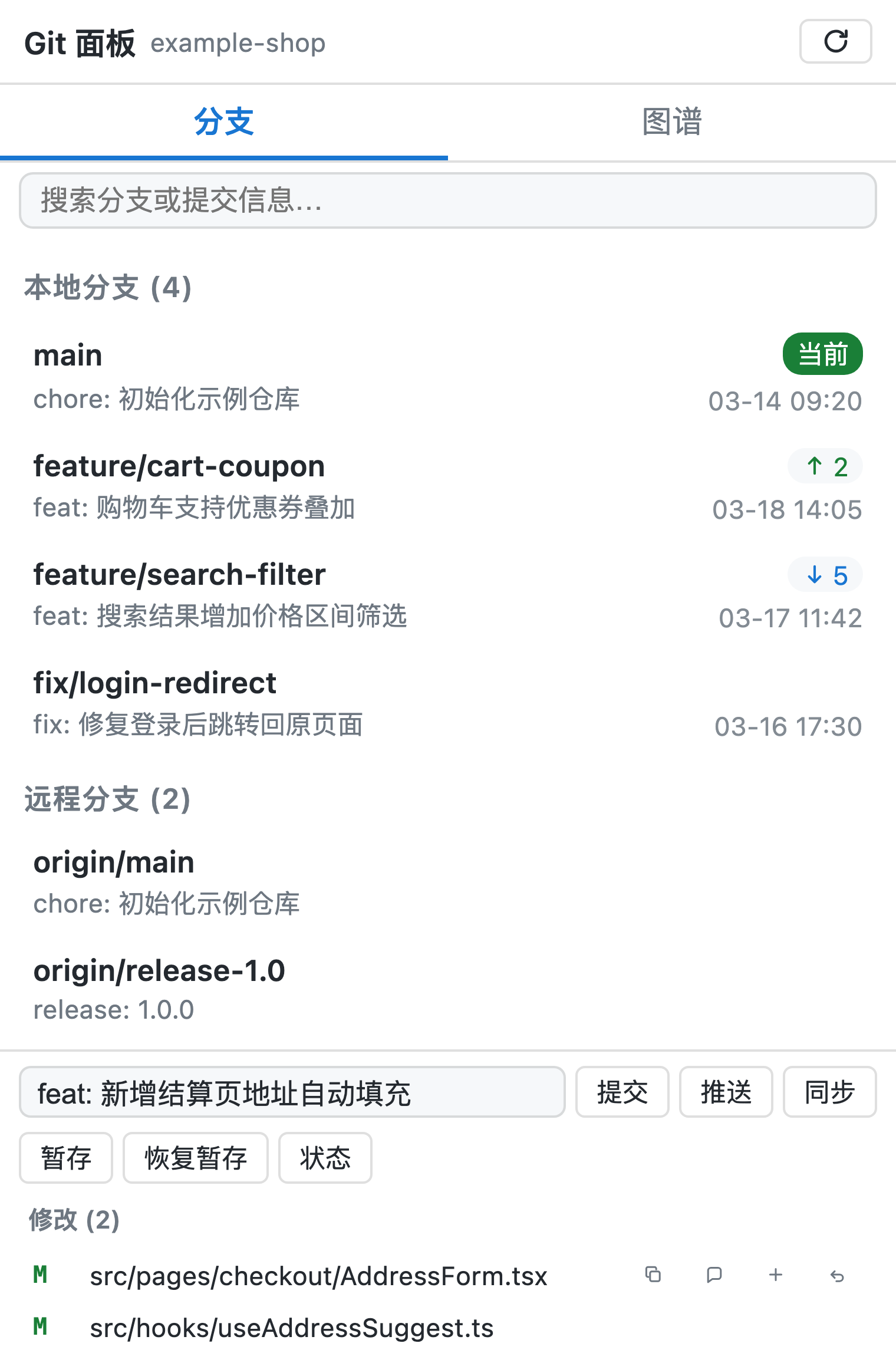
分支胶囊(输入框上方快速切换分支):

提交图谱(三栏可拖拽列宽、虚拟化滚动):
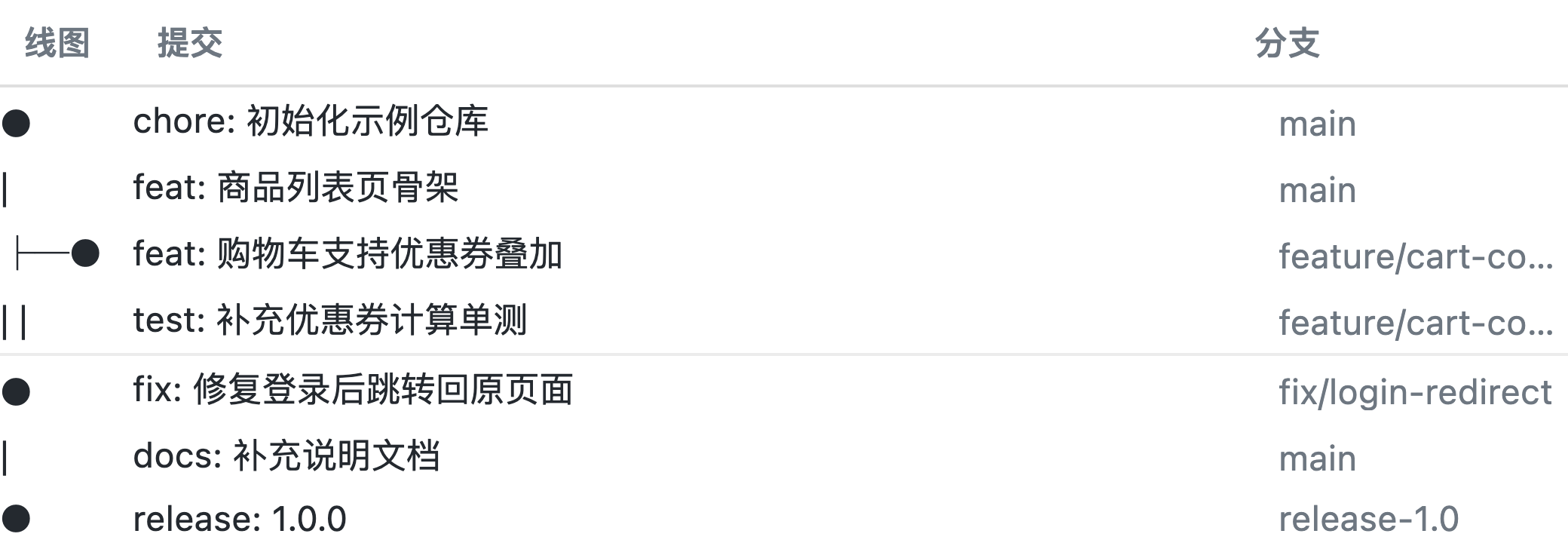
安装
dsh plugin --profile web add dsh-git-panel
重启 dsh web,打开绑定 git 仓库的项目会话,聊天区右侧出现「Git 面板」。
本地开发时可用
dsh plugin --profile web add link:/path/to/dsh-git-panel以链接方式安装,修改源码后npm run build并刷新页面即可生效。
反馈
使用中遇到问题或有功能建议?欢迎到 GitHub Issues 反馈,帮助我们把插件做得更好。
License
MIT
Install
Install the catalog once, then DeepSeek Harness can find and install any plugin from this site automatically:
dsh plugin add dshbase-catalogThen say "install dsh-git-panel for me" — your agent finds it in the directory and installs it. Docs: dshbase-catalog · verified packs.
This plugin is GitHub source (not published to npm) — install it straight from the repo:
Web profile:
dsh plugin --profile web add github:a792883583/dsh-git-panelHeadless (CLI) profile:
dsh plugin --profile headless add github:a792883583/dsh-git-panelTest report
Verified: L1 install + L2 load + L3 runtime from GitHub source on dsh 0.1.0-rc.6.
Share this badge
Drop this badge into your README — it links back here and updates automatically when our test status changes:

[](https://dshbase.com/plugins/dsh-git-panel/)<a href="https://dshbase.com/plugins/dsh-git-panel/"><img src="https://dshbase.com/badges/dsh-git-panel.svg" alt="dshbase install-tested"></a>