
Plugin directory / UI & Skins / dsh-git-sidebar
dsh-git-sidebar
Verified · install-tested on dsh H2O-MERO
What it does
嵌入式 Git 可视化工作台(代码 Diff / 未提交改动面板 / 对话页侧边改动模块)A Git visualization workbench embedded in the DeepSeek Harness Web GUI
Works — verified, early-stage project
嵌入式 Git 可视化工作台(代码 Diff / 未提交改动面板 / 对话页侧边改动模块)A Git visualization workbench embedded in the DeepSeek Harness Web GUI It installs cleanly and boots without issues in our testing. It's early-stage but functional.
“Verified” means our automated CI actually ran dsh plugin add in a clean profile and it booted — nothing more. Feature descriptions and version compatibility are the author’s claims. This is not a security audit and not an endorsement of third-party code.
README
dsh-git-sidebar
🌐 English | 简体中文
🧭 DSH 对话页右侧的「未提交改动」侧边栏:从
dsh-git-studio中提取,只保留对话侧边栏部分,已删去 Git 图谱(提交历史图、分支过滤、提交详情等)相关代码。
DeepSeek Harness(DSH)Web GUI 的嵌入式 Git 工作区改动侧边栏插件。
在对话界面右侧停靠 VSCode 风格的未提交改动面板:已暂存 / 更改 / 未跟踪三组文件列表、状态徽标、每文件 +/− 行数、点击展开单文件 diff、重命名 旧 → 新、未跟踪文件直接显示内容,并可调用系统默认应用打开文件。
📸 界面截图
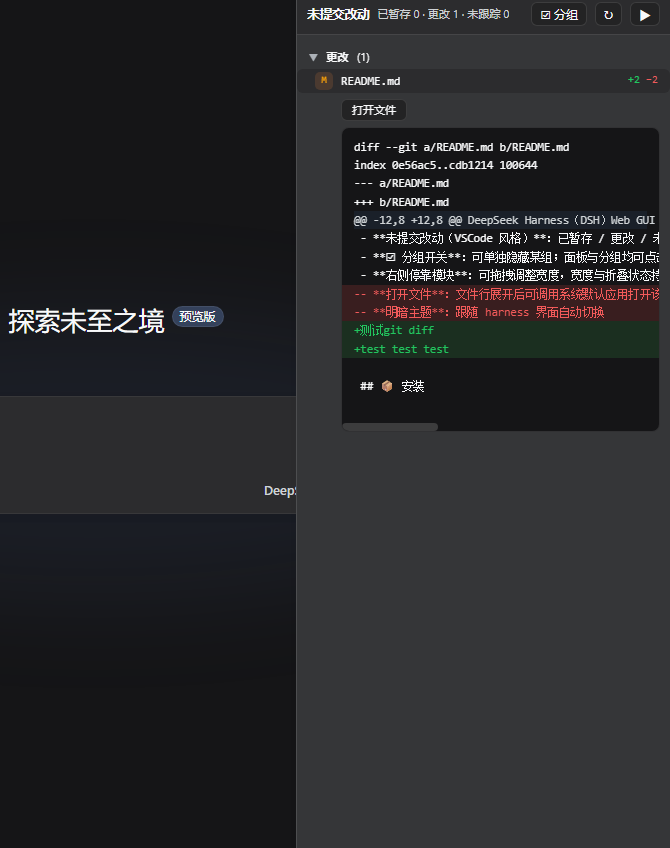
✨ 功能
- 跟随当前对话:打开哪个对话就显示哪个对话工作区的 git 仓库,切换对话自动跟随;非 git 仓库的对话显示空态提示
- 未提交改动(VSCode 风格):已暂存 / 更改 / 未跟踪三组文件列表、状态徽标(A/M/D/R/U/?)、每文件 +/− 行数、点击行展开单文件 diff、重命名
旧 → 新、未跟踪文件直接显示内容 - ☑ 分组开关:可单独隐藏某组;面板与分组均可点击折叠
- 右侧停靠模块:可拖拽调整宽度,宽度与折叠状态持久化;折叠时只显示窄把手,不渲染内容、不发起请求;宿主工具详情面板打开时自动让位
- 打开文件:文件行展开后可调用系统默认应用打开该文件
- 明暗主题:跟随 harness 界面自动切换
📦 安装
1. 把插件加入 profile
编辑你的 DSH web profile 的 package.json,添加依赖:
{
  "dependencies": {
    "dsh-git-sidebar": "file:./plugins/git-sidebar"
  }
}
(plugins/git-sidebar 为本插件源码所在目录,按实际路径调整。)
2. 挂载 bundle
在 profile 的 cordis.patch.yml 中加入:
- insert:
    - id: git-sidebar
      name: dsh-git-sidebar
      config:
        repo: "C:/path/to/your/repo"
config.repo/config.repos是初始可访问仓库白名单;运行中被会话工作区发现的仓库也会自动加入可访问集合。
3. 安装并重启
pnpm install
# 然后重启 dsh web
打开 http://127.0.0.1:3080 ,在任意会话页右侧即可看到「未提交改动」侧边栏。
🛠️ 开发
git-sidebar/
├── index.js          # 服务端:git API(repos/workstatus/workfile/openfile)
├── client.js         # 客户端插件:对话页右侧「未提交改动」侧边栏
├── package.json      # 插件清单(dsh.client.inject + bundle patch)
├── dsh.plugin.json   # 官方 DSH 插件清单
└── cordis.patch.yml  # profile 挂载点
服务端(index.js)和客户端(client.js)改动后需重启 dsh web。
📄 开源协议
Install
Install the catalog once, then DeepSeek Harness can find and install any plugin from this site automatically:
dsh plugin add dshbase-catalogThen say "install dsh-git-sidebar for me" — your agent finds it in the directory and installs it. Docs: dshbase-catalog · verified packs.
This plugin is GitHub source (not published to npm) — install it straight from the repo:
Web profile:
dsh plugin --profile web add github:H2O-MERO/dsh-git-sidebarHeadless (CLI) profile:
dsh plugin --profile headless add github:H2O-MERO/dsh-git-sidebarTest report
Verified: L1 install + L2 load + L3 runtime from GitHub source on dsh 0.1.0-rc.6.
Share this badge
Drop this badge into your README — it links back here and updates automatically when our test status changes:

[](https://dshbase.com/plugins/dsh-git-sidebar/)<a href="https://dshbase.com/plugins/dsh-git-sidebar/"><img src="https://dshbase.com/badges/dsh-git-sidebar.svg" alt="dshbase install-tested"></a>