
Plugin directory / Terminal / dsh-gitbash-preset
dsh-gitbash-preset
Verified · install-tested on dsh liceses
What it does
DeepSeek Harness plugin: one-click install 'Minimal Mode (Git Bash)' agent preset — maps bash calls in DSH's built-in minimal mode to Git for Windows' bash (MSYS), making minimal mode truly usable on Windows.
Recommended — verified working and popular
DeepSeek Harness plugin: one-click install 'Minimal Mode (Git Bash)' agent preset — maps bash calls in DSH's built-in minimal mode to Git for Windows' bash (MSYS), making minimal mode truly usable on Windows. It installs cleanly and boots without issues in our testing. With 134+ stars it's a community-endorsed, low-risk pick.
“Verified” means our automated CI actually ran dsh plugin add in a clean profile and it booted — nothing more. Feature descriptions and version compatibility are the author’s claims. This is not a security audit and not an endorsement of third-party code.
README
dsh-gitbash-preset · 让 Windows 上的极简模式用上 Git Bash
English: A DeepSeek Harness plugin that installs a "minimal (Git Bash)" agent preset, so on Windows the minimal mode's command tool runs Git for Windows bash instead of PowerShell.




DSH 的极简模式在 Windows 上不会给你 bash —— 官方按平台分叉,win32 那一支挂的是持久 PowerShell。
这个插件交付一个预设变体「极简模式 (Git Bash)」:persona 与 str_replace_editor 跟官方极简模式逐字一致,
只把命令工具换成 bash,每次调用真正跑在 Git for Windows 的 bash(MSYS) 上。
一句话:Windows 上想要一个写 bash 的极简模式,装它。
[!IMPORTANT]
先看版本边界再动手。 本插件用的是 DSH 早期的「用户预设目录」机制;在本次勘察所用的
DSH0.1.7-rc.2上,官方已把预设换成 bundle 声明行,那个目录已不再被读取。
详情与出处见 已知限制 → DSH 版本边界。旧版本上是否可用,未在本机验证。
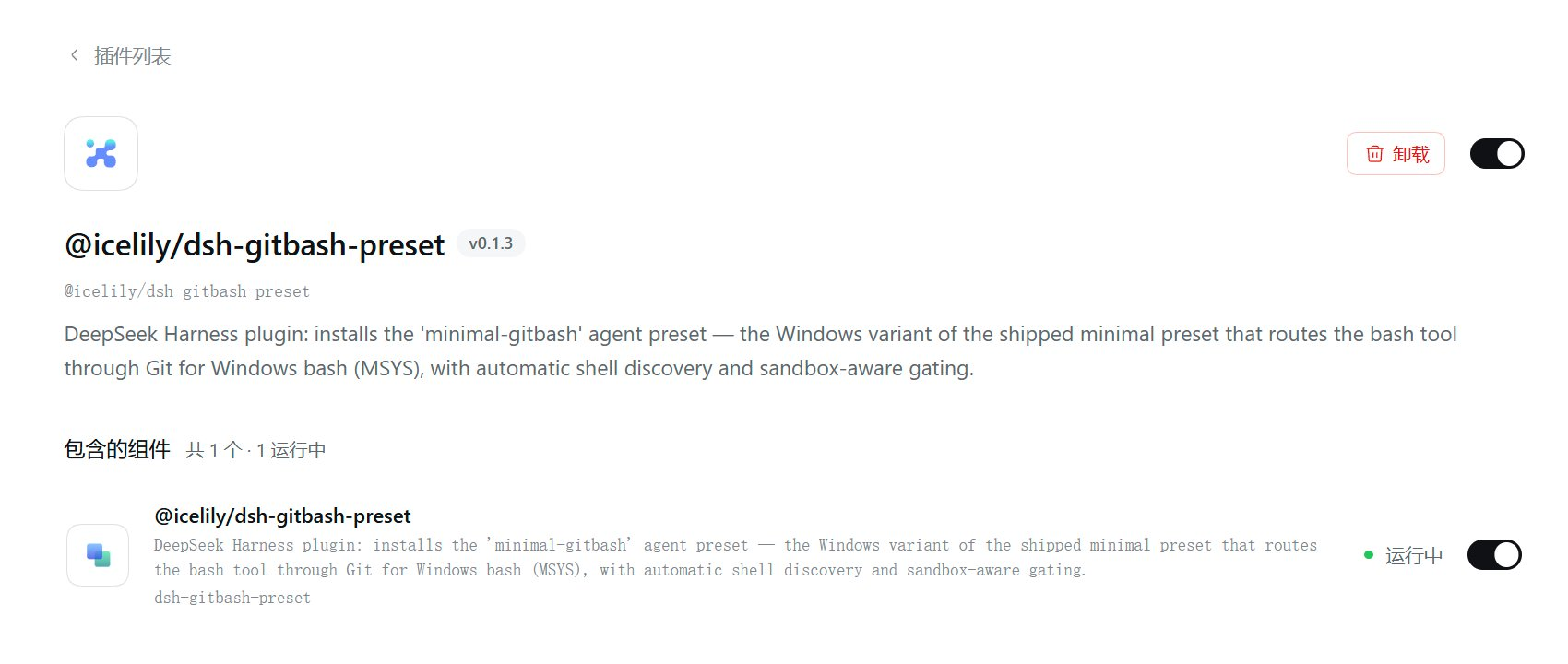
本机实拍:插件装上了、组件「运行中」,但这一页上*没有出现可选的预设卡片 —— 这正是上面那条版本边界的现场表现。*
目录
| 想了解 | 看这里 |
|---|---|
| 装前 / 装后到底差在哪 | 它改变了什么 |
| 三分钟装起来 | 快速开始 |
| 装完之后你得到什么 | 装完之后你得到什么 |
| 它和姊妹插件 dsh-all-gitbash 的区别 | 与 dsh-all-gitbash 的关系 |
| 命令到底怎么跑起来的 | 工作原理 |
| 有哪些可配的字段 | 配置 |
| 出问题 / 不适用 | 已知限制 |
| 想改代码 | 开发 |
它改变了什么
DSH 自带的极简模式是按平台分叉的(源码出处:@deepseek-ai/dsh-web-app 的presets/minimal.patch.yml,同一套分叉也在 dsh-sdk-minimal/cordis.patch.yml 里):
# 官方 minimal 预设的 persistent-shell 组(节选,逐字来自包内文件)
- id: terminal-bash      # 持久 bash
  name: '@deepseek-ai/dsh-terminal-bash'
  disabled: !!js process.platform === 'win32'      # ← Windows 上关掉
- id: persistent-bash
  name: '@deepseek-ai/dsh-tool-bash-persistent'
  disabled: !!js process.platform === 'win32'      # ← Windows 上关掉
- id: terminal-pwsh      # 于是 Windows 拿到的是持久 PowerShell
  name: '@deepseek-ai/dsh-terminal-bash'
  disabled: !!js process.platform !== 'win32'
  config: { shellDialect: pwsh }
- id: persistent-pwsh
  name: '@deepseek-ai/dsh-tool-pwsh-persistent'
  disabled: !!js process.platform !== 'win32'
也就是说:Windows 上的极简模式没坏,只是命令工具是 PowerShell。 本插件给的就是另一种选法。
| 官方极简模式(POSIX) | 官方极简模式(Windows) | 本预设(Windows) | |
|---|---|---|---|
| 命令工具名 | bash |
pwsh |
bash |
| 命令落点 | bash -c |
PowerShell | <git bash> -c(MSYS) |
| 会话状态 | 持久(cd / export 保留) |
持久($env: 保留) |
每次调用新 shell(不保留) |
| 路径写法 | /home/... |
C:\...、$env:NAME |
/d/...、$NAME |
| 文件工具 | str_replace_editor |
str_replace_editor |
str_replace_editor(同) |
| persona | 固定一句,complete: true |
同 | 逐字相同 |
| 后台命令 | 有 | 有 | 未启用(enableRunInBackground: false) |
「每次调用新 shell」不是偷懒:Windows 上官方把持久 bash 整条支路关掉了(上面那两行 disabled),
而本插件的执行器是直接 spawn 一个 bash -c(见 工作原理)—— 这是替代设计,不是等价实现。
快速开始
前置条件:Windows;装了 Git for Windows;DSH 的 Node ≥ 20。
dsh plugin --profile web add @icelily/dsh-gitbash-preset
装完 重启 DSH(插件行在启动时装配,重启时才会把预设文件写进用户预设根)。
注意包名:安装命令必须用包名
@icelily/dsh-gitbash-preset,
不能写仓库名dsh-gitbash-preset—— 后者在 npm 上不是这个包,会装失败。
然后:新建会话 → 选「极简模式 (Git Bash)」→ 把会话沙箱切到「完全访问」,
之后所有 bash 调用直接走 Git Bash。想留在 workspace-write 也可以,让模型在第一次调用失败后
按提示用 sandbox_permissions: "danger-full-access" + justification 单次升级(走正常审批流程)。
⚠️ 先读 已知限制。 本插件依赖的用户预设目录在当前 DSH 上已不再被读取,
装完可能选不到这个预设(出处与核对方式)。
装完之后你得到什么
预设文件被复制到 ${DSH_HOME:-~/.dsh}/.agent-presets/minimal-gitbash/(lib/index.js:32-37),
一共三个文件加一份测试。下面是仓库里真实的内容(不是示意)。
agent-presets/minimal-gitbash/preset.yml —— 预设的显示信息:
name: 极简模式 (Git Bash)
description: 极简模式的 Windows 变体:bash 调用映射到 Git for Windows 的 bash(MSYS),需在"完全访问"沙箱模式或经 sandbox_permissions 单次升级后使用。
order: 6
order: 6排在官方四个预设之后(standard标准模式=1 /ptcPTC 模式=2 /minimal极简模式=3 /cordis创造模式=4;顺序取自@deepseek-ai/dsh-web-app的presets/*.patch.yml)。
agent-presets/minimal-gitbash/agent.cordis.yml —— 预设挂的三个组:
- id: persona                       # ① 与官方 minimal 逐字相同的一句话 persona
  name: '@deepseek-ai/dsh-persona'
  config:
    prefix: You are a helpful software engineer assistant.
    complete: true                  # 这段话就是完整系统提示,后面的装配监听器加不进字
    includeRuntimeContext: false    # 也不注入运行时上下文快照

- id: gitbash-shell                 # ② 会话内的 shell 服务 + bash 工具
  name: cordis:group
  group: true
  disabled: !!js process.platform !== 'win32'   # ← 非 Windows 直接禁用
  isolate: { shell: true }          # entry-local realm:只在本预设内顶替 shell 服务
  config:
    - id: gitbash-executor
      name: ./gitbash-executor.mjs  # 相对名:从预设目录加载(见「已知限制」)
      config: { timeoutMs: 120000, maxTimeoutMs: 600000, maxOutputBytes: 64000, maxSpillBytes: 67108864, graceMs: 3000 }
    - id: tool-bash
      name: '@deepseek-ai/dsh-tool-bash'
      config: { enableRunInBackground: false }

- id: filesystem                    # ③ 文件工具(与官方极简模式一致)
  name: cordis:group
  group: true
  isolate: { fs: true }
  config:
    - id: fs-local
      name: '@deepseek-ai/dsh-fs-local'
      config: { cwd: !!js process.env.DSH_CWD ?? process.cwd() }
    - id: str-replace-editor
      name: '@deepseek-ai/dsh-tool-str-replace-editor'
      config: { maxOutputChars: 16000 }
模型看到的能力面因此只有两个工具:bash 与 str_replace_editor;没有 pwsh 工具,
没有上下文压缩(跟官方极简模式的取舍一致)。
与 dsh-all-gitbash 的关系
同一个作者的姊妹插件 dsh-all-gitbash
也把 Windows 上的命令引到 Git Bash,但改的是完全不同的东西:
| dsh-gitbash-preset(本仓库) | dsh-all-gitbash | |
|---|---|---|
| 一句话 | 给极简模式一个 bash 版预设 | 把完整模式(web)的 pwsh 执行器整个改道 bash |
| 作用对象 | minimal 预设里的命令工具 |
宿主已挂载的 ctx.shell(dsh-pwsh-sandbox 实例) |
| 生效范围 | 只影响选了本预设的会话 | 所有会话(宿主全局) |
| 实现手段 | 交付一份 agent preset,isolate: {shell:true} 在会话 realm 内自供 shell |
运行时把执行器实例的 argv() 换成 [<git bash>, '-c', 命令](原型方法遮蔽),并注册 bash 工具、移除 pwsh 工具、注入 PATH 垫片 |
| 工具面 | bash + str_replace_editor |
保留完整模式的全部工具,只是 pwsh 换成 bash |
| 开关 | 无(预设常驻,切换预设即切换) | 有:设置面板滑块 / settings.yaml 的 enabled,往返无损 |
| 安装 | dsh plugin --profile web add @icelily/dsh-gitbash-preset |
dsh plugin --profile web add @icelily/dsh-all-gitbash |
| 包名 | @icelily/dsh-gitbash-preset |
@icelily/dsh-all-gitbash |
怎么选:
- 只想在极简模式里写 bash、其他会话不动 → 装本插件;
- 想在完整模式下也全程 bash、还要一键开关 → 装 dsh-all-gitbash;
- 两个都装也可以:极简会话走本预设的 bash,其他会话走姊妹插件的 bash。
两边都是 Git Bash,命令落点一致。
两者共用同一条沙箱边界:MSYS 在 Windows 受限令牌沙箱里起不来(无法创建 signal pipe),
所以两边都门控到 danger-full-access 并给升级指引 —— 都不绕过沙箱。
工作原理
一句话:用一个会话内的 shell 服务顶替官方执行器,把每条命令变成 "<git bash>" -c <命令>。
模型 ──bash 工具──► ctx.shell(本预设提供的 gitbash-executor)
                          │
                          ├─ 沙箱门控:mode !== 'danger-full-access' → 抛错 + 升级指引
                          │
                          └─ subprocess.spawn([ <git bash>, '-c', <命令> ])  ──► Git Bash (MSYS)
四个环节:
| 环节 | 说明 | 出处 |
|---|---|---|
| 装配点 | cordis.patch.yml 往 web profile 的插件名单里 insert 一行 dsh-gitbash-preset;启动时它只做一件事:把包内预设复制到用户预设根 |
cordis.patch.yml:11-13、lib/index.js:49-73 |
| 幂等安装 | 三个文件都在且没配 force → 只打一行日志返回;还会逐字节比对包内与已装文件,不一致时提示 set force: true |
lib/index.js:52-63 |
| 服务顶替 | 预设的 gitbash-shell 组 isolate: { shell: true },在 entry-local realm 内 ctx.provide('shell', executor) —— 只在本预设内生效,不碰宿主的执行器 |
agent.cordis.yml:31-47、gitbash-executor.mjs:346 |
| 命令执行 | 每次调用 subprocess.spawn([shellPath, '-c', command]);固定注入 NO_COLOR=1 / TERM=dumb / PAGER=cat / GIT_PAGER=cat,避免交互式分页器把输出卡住 |
gitbash-executor.mjs:38-43、:213-224 |
Git Bash 怎么找到的
detectShellPath() 按顺序取第一个存在的候选(gitbash-executor.mjs:83-117):
- 配置里的
shellPath(显式指定,优先级最高); - 环境变量
GIT_BASH; %ProgramFiles%\Git\bin\bash.exe;%ProgramFiles(x86)%\Git\bin\bash.exe;%LOCALAPPDATA%\Programs\Git\bin\bash.exe;- 一个写死的兜底路径
D:\applications\Git\bin\bash.exe(作者本机遗留,对别人通常是无效候选,无害); - PATH 逐目录找
bash.exe,跳过System32/Sysnative/SysWOW64—— 那里是 Microsoft 的 WSL 启动器存根,
用它当 shell 会在没装发行版时报「没有已安装的分发版」。这是 issue #1 的修复; - 都不存在 → 返回裸名
bash,让 spawn 自己报出解析错误。
路径翻译的边界
toWindowsPath() 只做一件事:把 MSYS 的单字母盘符路径转成 Windows 路径(gitbash-executor.mjs:54-64)。
边界由单元测试逐条钉住(test/gitbash-executor.test.mjs:23-45):
| 输入 | 输出 | 为什么 |
|---|---|---|
/d/foo、/d/foo/bar.txt |
D:\foo、D:\foo\bar.txt |
盘符形,转 |
/d、/d/ |
D:\ |
同上 |
/usr/bin、/tmp/x |
原样不动 | 只认「单字母 + / 或结尾」,否则 /usr/bin 会被拧成 U:\sr\bin |
D:\foo、D:/foo、\\server\share\x |
原样通过 | 已经是 Windows / UNC 形态 |
foo/bar、''、undefined |
原样通过 | 相对路径与空值不动 |
非 Windows 平台这个函数直接返回原值(gitbash-executor.mjs:55),整个 gitbash-shell 组也被process.platform !== 'win32' 禁用 —— 所以这是一个 Windows 专用插件,不要指望它在 macOS / Linux 上做任何事。
配置
预设配置(agent-presets/minimal-gitbash/agent.cordis.yml 的 gitbash-executor):
| 字段 | 默认 | 说明 |
|---|---|---|
shellPath |
自动探测 | 显式指定 Git Bash 路径时优先,可写 Windows 或 MSYS 形(如 'C:\\Program Files\\Git\\bin\\bash.exe') |
cwd |
不设 | 显式工作目录;不设时用请求的 workdir,再退回 process.cwd() |
timeoutMs |
120000 |
单次命令默认超时 |
maxTimeoutMs |
600000 |
单次请求超时的上限(resolve 里 Math.min 钳位) |
maxOutputBytes |
64000 |
单流保留字节数,溢出写入 spill 文件 |
maxSpillBytes |
67108864(64 MB) |
spill 文件上限 |
graceMs |
3000 |
终止进程的 SIGTERM→SIGKILL 宽限 |
数值字段必须是正的有限数,且三个时间字段不得大于 Node 的定时器上限 2147483647;
违反会在装配时抛 TypeError(gitbash-executor.mjs:119-134,测试 :128-137)。
插件配置(cordis.patch.yml 插入的那一行):
| 字段 | 默认 | 说明 |
|---|---|---|
force |
false |
预设已存在时,是否用包内文件覆盖(用户额外放进去的文件会保留) |
force: true 的典型用途见 已知限制 → 升级路径。
目录结构
dsh-gitbash-preset/
├── package.json                                    # 无任何依赖;dsh.bundle.patch 指向 cordis.patch.yml
├── cordis.patch.yml                                # 装配点:insert 一行 dsh-gitbash-preset
├── LICENSE                                         # MIT
├── lib/
│   └── index.js                                    # 宿主半边(74 行):启动时把预设复制进用户预设根
└── agent-presets/minimal-gitbash/                  # 会被整体复制到用户预设根
    ├── preset.yml                                  # 显示名 / 描述 / order
    ├── agent.cordis.yml                            # 预设的插件清单(persona + gitbash-shell + filesystem)
    ├── gitbash-executor.mjs                        # 会话内 shell 服务提供者(347 行)
    └── test/gitbash-executor.test.mjs              # 10 个用例(纯函数)
已知限制
DSH 版本边界(最重要的一条)
本插件的安装机制是「把预设文件写进 ${DSH_HOME:-~/.dsh}/.agent-presets/<id>/」。
这个目录在较新的 DSH 上已经没人读了 —— 官方把用户预设换成了 bundle 声明行。原文出处
(本机安装的 @deepseek-ai/dsh-agent-preset@0.1.7-rc.2):
skills/editing-cordis-compositions/SKILL.md:Before declaration rows, a user preset was a directory
$DSH_HOME/.agent-presets/<id>/holdingpreset.yml… andagent.cordis.yml… Nothing reads that directory any more.- 同包
README.md:Declarations provide no directory, file-copy or file-delete operations.
- 同技能还有一条对本地相对插件名不利的要求:
Resolve assets from installed packages rather than a preset directory.
可以自己核对的旁证:在本机 …\@deepseek-ai\dsh\node_modules\@deepseek-ai 目录下搜.agent-presets、agent.cordis.yml、preset.yml,命中的只有上面这段技能文本,
没有任何 loader 代码读它;现在的预设是 dsh-web-app/presets/<id>.patch.yml 里的声明行(roster 行 id preset-<id>)。
结论:在 DSH 0.1.7-rc.2 上,安装器会正常执行(文件确实写到位了),
但不会出现可选的预设卡片。旧版本上是否可用,本机未验证。
如果你正是遇到「装完在设置里找不到极简模式 (Git Bash)」,原因就在这里。
迁移方向(尚未实施):把预设改写成 bundle 声明行,并让 gitbash-executor.mjs 从已安装的包里解析,
而不是当预设目录里的相对文件。这件事需要动源码,本次只改 README,未处理。
升级路径(对能用的版本)
安装器对已存在的预设默认 no-op。0.1.3 之前的版本装出的预设是坏的(用了 dsh-persona 旧的text 字段,装配会报 $.prefix missing required value)。升级插件后要显式让它覆盖:
- 在插件行配置
force: true,或 - 删掉
~/.dsh/.agent-presets/minimal-gitbash/再重启。
(0.1.3 起改用 prefix;本机核对 @deepseek-ai/dsh-persona@0.1.7-rc.2 的 schema 确实是prefix 必填、complete 默认 false、includeRuntimeContext 默认 true,与预设写法一致。)
其它
- 只对极简模式生效。它交付的是一个 agent preset,只有选了「极简模式 (Git Bash)」的会话受影响。
完整模式(web)下的 pwsh 工具、其他预设的命令工具,一律不动 —— 那正是
dsh-all-gitbash 要解决的事。 - 需要 Git for Windows。没装的话探测链全部落空,最终返回裸名
bash,每条命令都会 spawn 失败。
装了但不在标准目录时,用GIT_BASH环境变量或shellPath配置指路。 - 受限沙箱下用不了。MSYS 运行时无法在 Windows 受限令牌沙箱内初始化(创建不了 signal pipe),
所以执行器只在danger-full-access(或部署本身没有沙箱策略)下放行,其余情况抛错并给升级指引。
这是沙箱边界,插件不绕过。 - bash 不保持状态。每次调用都是新 shell,
cd/export不会留到下一次;后台命令也没启用
(enableRunInBackground: false)。这是「Windows 上官方持久 bash 支路被关掉」的替代设计,不是等价实现。 - 路径有两个域。文件工具走 Node(Windows 路径
D:\...),bash 走 MSYS(POSIX 路径/d/...)。
两者都能接受D:/...这种正斜杠形式 —— 拿不准时用这个写法。toWindowsPath只转单字母盘符形,/usr/bin这类 MSYS 根路径不会被误转。 - 探测链里有一条作者本机遗留的写死路径
D:\applications\Git\bin\bash.exe
(gitbash-executor.mjs:89)。对别的机器通常只是无效候选,无害;但它是本机痕迹,未擅自改动源码。 - 无卸载命令记录。仓库里只有安装命令,没有对应的移除命令,所以这里也不写。
开发
零依赖、零构建:lib/index.js 与 agent-presets/ 都是入库的手写文件,改完直接跑。
npm run check   # 三个文件的语法检查(插件 / 执行器 / 测试)
npm run test    # 单元测试:10 个用例(路径转换 / 探测优先级 / WSL 启动器防御 / 配置校验)
测试只覆盖纯函数(toWindowsPath / detectShellPath / isWslBashDirectory / resolveConfig),
不碰 ctx、不真的 spawn —— 真实的 spawn 路径要在活的 DSH 会话里验证(测试文件头注释原话)。
改预设要注意:预设是「复制到用户预设根」的一次性动作,改了包内文件后,已经装过的机器
不会自动更新(默认 no-op)。本地迭代要么配 force: true,要么先删掉已装目录。
想在本地边改边试,也可以不装插件,直接把
agent-presets/minimal-gitbash/复制到~/.dsh/.agent-presets/—— 但这条捷径同样受 DSH 版本边界 影响。
许可
MIT —— 见仓库根目录的 LICENSE(Copyright (c) 2025 icelily),
与 package.json 的 license 字段一致。
相关
- dsh-all-gitbash —— 姊妹插件:把完整模式下所有 pwsh 命令改道 Git Bash(带一键开关)。
- awesome-dsh-plugin —— DSH 插件精选列表。
Install
Install the catalog once, then DeepSeek Harness can find and install any plugin from this site automatically:
dsh plugin add dshbase-catalogThen say "install dsh-gitbash-preset for me" — your agent finds it in the directory and installs it. Docs: dshbase-catalog · verified packs.
This plugin is GitHub source (not published to npm) — install it straight from the repo:
Web profile:
dsh plugin --profile web add github:liceses/dsh-gitbash-presetHeadless (CLI) profile:
dsh plugin --profile headless add github:liceses/dsh-gitbash-presetTest report
Verified: L1 install + L2 load + L3 runtime from GitHub source on dsh 0.1.0-rc.6.
When to use it
Improve the terminal experience — a TUI, command palette, or shell integration — so dsh feels native in a terminal.
Who it's for
Terminal-first developers who drive dsh from the command line and want it to behave like the CLI agents they know.
For developers — extending it
The TUI layout and shell integration are the seams — add panels, keybindings, or new shell hooks.
- Suspicious permission (medium)
- Dangerous command (high)
Share this badge
Drop this badge into your README — it links back here and updates automatically when our test status changes:

[](https://dshbase.com/plugins/dsh-gitbash-preset/)<a href="https://dshbase.com/plugins/dsh-gitbash-preset/"><img src="https://dshbase.com/badges/dsh-gitbash-preset.svg" alt="dshbase install-tested"></a>