
Plugin directory / UI & Skins / dsh-hacker-terminal-theme
dsh-hacker-terminal-theme
Verified · install-tested on dsh chengwill45-bot
What it does
Standalone hacker-terminal theme plugin for the DeepSeek Harness Web UI
Works — verified, early-stage project
Standalone hacker-terminal theme plugin for the DeepSeek Harness Web UI It installs cleanly and boots without issues in our testing. It's early-stage but functional.
“Verified” means our automated CI actually ran dsh plugin add in a clean profile and it booted — nothing more. Feature descriptions and version compatibility are the author’s claims. This is not a security audit and not an endorsement of third-party code.
README
DSH Hacker Terminal Theme
A standalone hacker-terminal theme plugin for the DeepSeek Harness Web UI.
It turns DSH into a green-on-black secure terminal with a Latin letter and number matrix rain, glass composer, HUD bars, scan effects, local monospace fonts, and fully reversible cleanup.
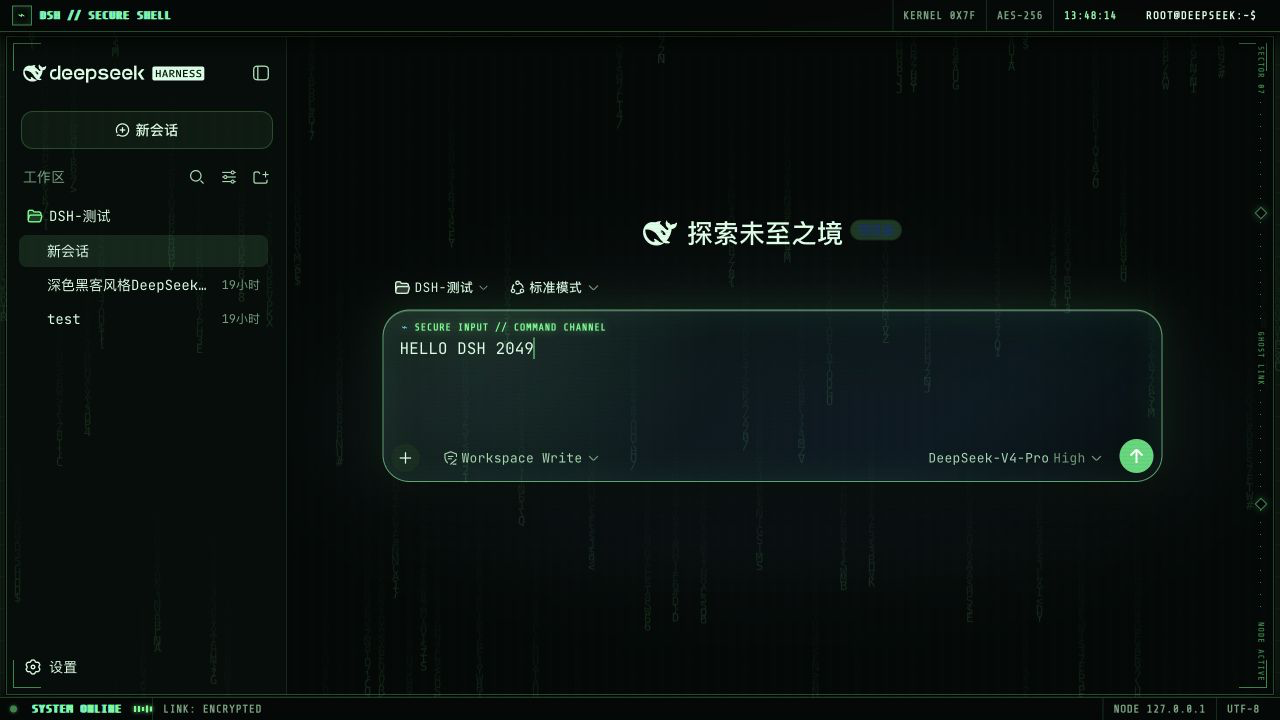
Highlights
- Installs as a normal DSH bundle and activates automatically.
- Uses only
A-Z,0-9, and terminal symbols in the matrix rain. - Embeds Share Tech Mono for HUD labels and JetBrains Mono for content.
- Falls back to PingFang SC for Chinese text.
- Supports
prefers-reduced-motion. - Removes every injected style, element, listener, observer, and timer when unloaded.
- Does not send analytics or make network requests.
Install from GitHub
dsh plugin --profile web add github:chengwill45-bot/dsh-hacker-terminal-theme
Restart the current dsh web process and refresh the page.
Because the compiled lib/ files are committed, installation from GitHub does not need a prepare script or pnpm build authorization.
Install from a local checkout
git clone https://github.com/chengwill45-bot/dsh-hacker-terminal-theme.git
cd dsh-hacker-terminal-theme
npm test
dsh plugin --profile web add "link:$PWD"
Restart DSH and refresh the Web UI.
Remove
dsh plugin --profile web remove dsh-client-ui-skin-hacker-terminal
Restart DSH and refresh the page. The plugin cleanup is reversible and does not modify conversation data or DSH configuration outside the profile dependency entry.
Development
npm run build
npm test
npm run check
The project intentionally has no runtime npm dependencies.
Compatibility
DeepSeek Harness is currently a developer preview and may introduce breaking UI changes. This plugin targets the current DSH Web UI composer and layout structure.
License
Plugin code is released under the MIT License. Bundled Share Tech Mono and JetBrains Mono font files are distributed under the SIL Open Font License 1.1. See THIRD_PARTY_NOTICES.md and the license files under fonts/.
Install
Install the catalog once, then DeepSeek Harness can find and install any plugin from this site automatically:
dsh plugin add dshbase-catalogThen say "install dsh-hacker-terminal-theme for me" — your agent finds it in the directory and installs it. Docs: dshbase-catalog · verified packs.
This plugin is GitHub source (not published to npm) — install it straight from the repo:
Web profile:
dsh plugin --profile web add github:chengwill45-bot/dsh-hacker-terminal-themeHeadless (CLI) profile:
dsh plugin --profile headless add github:chengwill45-bot/dsh-hacker-terminal-themeTest report
Verified: L1 install + L2 load + L3 runtime from GitHub source on dsh 0.1.0-rc.6.
Share this badge
Drop this badge into your README — it links back here and updates automatically when our test status changes:

[](https://dshbase.com/plugins/dsh-hacker-terminal-theme/)<a href="https://dshbase.com/plugins/dsh-hacker-terminal-theme/"><img src="https://dshbase.com/badges/dsh-hacker-terminal-theme.svg" alt="dshbase install-tested"></a>