
Plugin directory / Developer / dsh-plugin-knowledge-base
dsh-plugin-knowledge-base
Verified · install-tested on dsh ds-customize
What it does
你的私人资料库,只存在你自己的电脑上。 选中本地文件或文件夹,DSH 会同步一份妥善保管;之后每次提问,它只在这份副本里搜答案,并告诉你答案出自哪个文件第几行。全程不上传、不联网,数据始终在你手里。
Works — verified, early-stage project
你的私人资料库,只存在你自己的电脑上。 选中本地文件或文件夹,DSH 会同步一份妥善保管;之后每次提问,它只在这份副本里搜答案,并告诉你答案出自哪个文件第几行。全程不上传、不联网,数据始终在你手里。 It installs cleanly and boots without issues in our testing. It's early-stage but functional.
“Verified” means our automated CI actually ran dsh plugin add in a clean profile and it booted — nothing more. Feature descriptions and version compatibility are the author’s claims. This is not a security audit and not an endorsement of third-party code.
README
dsh-plugin-knowledge-base
你的私人资料库,只存在你自己的电脑上。
选中本地文件或文件夹,DSH 会复制一份妥善保管;之后每次提问,它只在这份副本里搜答案,并告诉你答案出自哪个文件第几行。全程不上传、不联网,数据始终在你手里。
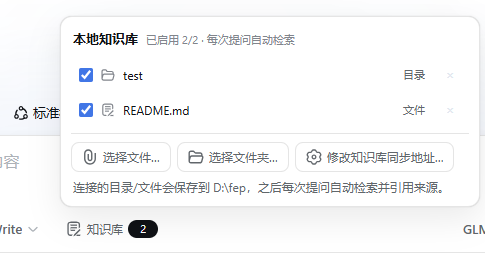
它是怎么工作的
- 连接——在输入框左侧点「知识库」面板,选择文件或文件夹。插件会把内容复制到本机的同步目录(默认
~/dsh-kb-data,Windows 为C:\Users\<你>\dsh-kb-data),原件后续移动、改名、删除都不影响检索。 - 检索——只要面板里有启用中的连接,每次提问模型都会自动调用
knowledge_base工具,在副本里做带中文分词的全文检索。 - 引用——回答中来自知识库的内容会标注「副本路径 + 行号」,可自行打开文件核对。
🔒 隐私边界:拷贝、索引、检索全部发生在本机 DSH 进程内,没有任何网络上传行为;断开连接即删除副本。
安装
# 从本地 tarball 安装到指定 profile
dsh plugin --profile <profile名> add dsh-plugin-knowledge-base-0.1.0.tgz

# 或发布到 npm 后按包名安装
dsh plugin --profile <profile名> add dsh-plugin-knowledge-base
安装后 cordis.patch.yml 会自动把插件挂载进 profile,无需改任何配置。
打包
npm pack # 产出 dsh-plugin-knowledge-base-0.1.0.tgz
Install
Install the catalog once, then DeepSeek Harness can find and install any plugin from this site automatically:
dsh plugin add dshbase-catalogThen say "install dsh-plugin-knowledge-base for me" — your agent finds it in the directory and installs it. Docs: dshbase-catalog · verified packs.
This plugin is GitHub source (not published to npm) — install it straight from the repo:
Web profile:
dsh plugin --profile web add github:ds-customize/dsh-plugin-knowledge-baseHeadless (CLI) profile:
dsh plugin --profile headless add github:ds-customize/dsh-plugin-knowledge-baseTest report
Verified: L1 install + L2 load + L3 runtime from GitHub source on dsh 0.1.0-rc.6.
Share this badge
Drop this badge into your README — it links back here and updates automatically when our test status changes:

[](https://dshbase.com/plugins/dsh-plugin-knowledge-base/)<a href="https://dshbase.com/plugins/dsh-plugin-knowledge-base/"><img src="https://dshbase.com/badges/dsh-plugin-knowledge-base.svg" alt="dshbase install-tested"></a>