
Plugin directory / UI & Skins / dsh-plugin-opencode-usage
dsh-plugin-opencode-usage
Verified · install-tested on dsh jiekesu967
What it does
OpenCode Go 订阅用量悬浮面板:DeepSeek Harness Web 侧边栏显示滚动/每周/每月额度、已用与剩余额度。
Works — verified, early-stage project
OpenCode Go 订阅用量悬浮面板:DeepSeek Harness Web 侧边栏显示滚动/每周/每月额度、已用与剩余额度。 It installs cleanly and boots without issues in our testing. It's early-stage but functional.
“Verified” means our automated CI actually ran dsh plugin add in a clean profile and it booted — nothing more. Feature descriptions and version compatibility are the author’s claims. This is not a security audit and not an endorsement of third-party code.
README
dsh-plugin-opencode-usage
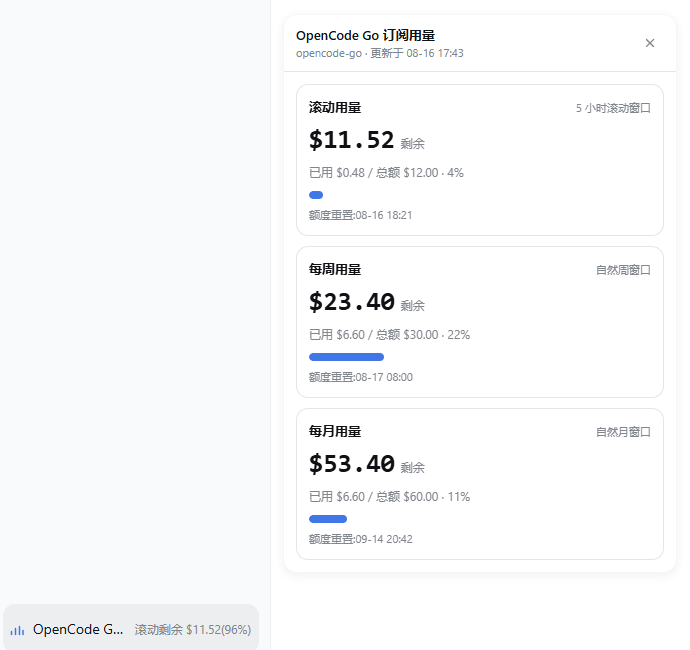
OpenCode Go 订阅用量悬浮面板:在 DeepSeek Harness Web GUI 会话窗口左下角显示订阅额度使用情况。


功能
- 在会话窗口左下角注册独立悬浮入口,不占用侧边栏入口,也不放入输入框,避免与其他插件冲突
- 点击弹出悬浮面板,展示 OpenCode Go 订阅的三个窗口:滚动用量、每周用量、每月用量
- 每张卡片显示:已用百分比 / 剩余百分比 / 重置时间
- 不展示具体美元金额,避免不同模型额度金额不同造成误导
- 面板以入口按钮为锚点:左边缘对齐按钮,底部在按钮上方 12px,随会话窗口/侧边栏变化自动调整
- 打开期间每 60s 自动刷新;支持
Esc与点击面板外部关闭 - API key 只在 Harness host 进程内解析,不会下发浏览器
截图
工作原理
DSH Web 浏览器
   │  1. 点击会话窗口左下角按钮
   ▼
GET /plugins/opencode-usage/stats
   │
   ▼
DSH Host 插件
   │  2. ctx.credentials.resolve("OPENCODE_GO_API_KEY")
   │  3. GET https://opencode.ai/zen/go/v1/usage
   │     Authorization: Bearer <api-key>
   │  4. 透出 percent / remainingPercent / resetsAt
   ▼
返回 JSON,由 React 面板渲染
官方接口只返回 percent 与 resetsAt:
{
  "usage": {
    "rolling": { "status": "ok", "percent": 30, "resetsAt": "..." },
    "weekly":  { "status": "ok", "percent": 19, "resetsAt": "..." },
    "monthly": { "status": "ok", "percent": 9,  "resetsAt": "..." }
  }
}
插件直接展示官方 API 返回的百分比,不做金额换算。
目录结构
dsh-plugin-opencode-usage/
├── cordis.patch.yml   # bundle patch: 把插件插入 profile host 组合
├── lib/
│   ├── index.js       # Host 半: 订阅额度 API 查询 + HTTP 路由
│   └── client.js      # Client 半: 会话窗口左下角悬浮按钮 + 面板
├── LICENSE
├── package.json       # dsh.bundle / dsh.client 元数据
└── README.md
额度口径(背景说明,不用于显示)
不同模型的额度金额不同(例如 V4 Pro 月度 $15、V4 Flash 月度 $30,
整体月上限 $60),因此插件只展示官方 API 返回的百分比,不做金额换算。
| 窗口 | 官方接口字段 | 说明 |
|---|---|---|
| 滚动用量 | usage.rolling |
5 小时滚动窗口百分比 |
| 每周用量 | usage.weekly |
每周窗口百分比 |
| 每月用量 | usage.monthly |
月度窗口百分比 |
官方 API 只返回 percent 与 resetsAt;插件同时给出 remainingPercent = 100 - percent。
安装
cd /path/to/your/workspace
dsh plugin --profile web add ./dsh-plugin-opencode-usage
也可以安装已发布的 GitHub 仓库(prepare 无构建步骤,可直接引用):
dsh plugin --profile web add github:jiekesu967/dsh-plugin-opencode-usage
安装后 dsh plugin 会自动写入 web profile 的 dependencies,并把dsh-plugin-opencode-usage 追加到 dsh.profile.bundles。重启 dsh web
并刷新页面后,会话窗口左下角会出现独立的 “OpenCode Go 用量” 悬浮入口。
配置
在 profile 的 cordis.patch.yml 覆盖 opencode-usage 条目:
- id: opencode-usage
  config:
    # Harness credentials 文件中保存 API key 的变量名
    credentialRef: OPENCODE_GO_API_KEY

    # OpenCode Go 订阅接口
    apiBaseUrl: https://opencode.ai/zen/go/v1

    # host 成功结果缓存时间
    cacheMs: 30000
凭据
在 ~/.dsh/.credentials.yaml 中确认存在:
OPENCODE_GO_API_KEY: sk-...
也可以通过 DSH Web 的 Models / Credentials 设置页写入。
入口与面板定位规则
入口注册在 shell.overlay,绝对定位于 AppFrame 的会话中心列左下角:
- 按钮:会话中心列左侧内边距
12px、底部16px - 面板:左边缘与按钮对齐,底部位于按钮上方
12px - 面板宽度最大
392px,右侧/顶部超出视口时自动回退 ResizeObserver监听会话中心列,侧边栏展开/收起、详情面板开关、窗口缩放时实时跟随
已知限制
- 官方 usage 接口只返回百分比,不返回绝对金额;插件也只展示百分比
- 不同模型额度金额不同,因此不提供金额换算,避免误导
- 仅适用于
webprofile;headless下不注册路由
致谢 / Credits
- DeepSeek Harness — 本插件运行所基于的 Harness 框架
- jiekesu967 — 插件开发者
License
MIT
Install
Install the catalog once, then DeepSeek Harness can find and install any plugin from this site automatically:
dsh plugin add dshbase-catalogThen say "install dsh-plugin-opencode-usage for me" — your agent finds it in the directory and installs it. Docs: dshbase-catalog · verified packs.
This plugin is GitHub source (not published to npm) — install it straight from the repo:
Web profile:
dsh plugin --profile web add github:jiekesu967/dsh-plugin-opencode-usageHeadless (CLI) profile:
dsh plugin --profile headless add github:jiekesu967/dsh-plugin-opencode-usageTest report
Verified: L1 install + L2 load + L3 runtime from GitHub source on dsh 0.1.0-rc.6.
Share this badge
Drop this badge into your README — it links back here and updates automatically when our test status changes:

[](https://dshbase.com/plugins/dsh-plugin-opencode-usage/)<a href="https://dshbase.com/plugins/dsh-plugin-opencode-usage/"><img src="https://dshbase.com/badges/dsh-plugin-opencode-usage.svg" alt="dshbase install-tested"></a>