
Plugin directory / UI & Skins / dsh-power
dsh-power
Verified · install-tested on dsh jcfung1122
What it does
给 DeepSeek Harness Web 界面加一个电源按钮:一键关闭 DSH 或重启 Web UI。Power controls for the DeepSeek Harness Web GUI: shut down or restart DSH from the sidebar.
Works — verified, early-stage project
给 DeepSeek Harness Web 界面加一个电源按钮:一键关闭 DSH 或重启 Web UI。Power controls for the DeepSeek Harness Web GUI: shut down or restart DSH from the sidebar. It installs cleanly and boots without issues in our testing. It's early-stage but functional.
“Verified” means our automated CI actually ran dsh plugin add in a clean profile and it booted — nothing more. Feature descriptions and version compatibility are the author’s claims. This is not a security audit and not an endorsement of third-party code.
README
dsh-power


English | 中文
给 DeepSeek Harness Web 界面加一个电源按钮:在侧边栏「设置」上方悬停,即可关闭 DSH 或重启 Web UI。
特性
- 🚫 绝不误关其他浏览器窗口 —— 页面通过
window.close()自行关闭,宿主进程从不杀 Chrome。 - 🧭 环境自适应 —— 无硬编码路径或端口。重启命令由当前进程重建,重开地址跟随实际监听端口。
- 🌍 跨平台 —— Windows(无窗口
wscript辅助进程)、macOS(open)、Linux(xdg-open)。 - ⚡ 零配置 —— 装完即可用。
快速安装
需要 DeepSeek Harness web profile(@deepseek-ai/dsh >= 0.1.0-rc.6)。
dsh plugin --profile web add "github:jcfung1122/dsh-power"
重启已经在跑的 dsh web,浏览器硬刷新,侧边栏「设置」上方就会出现电源图标。
卸载:
dsh plugin --profile web remove dsh-power
用法
悬停电源图标,选择:
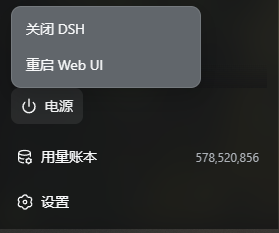
- 关闭 DSH —— 只关闭本页面并优雅停止服务,其他浏览器窗口不受影响。
- 重启 Web UI —— 重新拉起服务并自动重新打开页面。
每一项都先弹确认,确认后才执行。
配置
通常不需要任何配置。需要覆盖时写进 cordis.patch.yml:
- id: power
  config:
    restartWaitMs: 7000     # 重新拉起前等待旧进程释放端口的时长(毫秒)
    restartCommand: ""      # supervisor 管理的部署可填完整重启命令
    reopenUrl: ""           # 覆盖自动推导的重开地址
| 键 | 默认值 | 说明 |
|---|---|---|
restartWaitMs |
7000 |
等待旧进程释放端口后再拉起。 |
restartCommand |
(自动) | 完整重启命令;默认从当前进程重建。 |
reopenUrl |
(自动) | 重开地址;默认 http://127.0.0.1:<端口>。 |
工作原理
宿主半边注册两个仅限回环的 POST 接口:/api/power/shutdown 与/api/power/restart。shutdown 请求启动器提供的 appExit 优雅退出;restart
先从 process.argv 重建启动命令、读 webServer.port 得到重开地址,再 detach 一个
跨平台辅助进程(Windows 用无窗口 VBS 脱离父进程 job,macOS/Linux 用 sh +open/xdg-open)后退出。浏览器收到确认后 window.close() 关闭本页。
隐私与安全
- 两个接口都是 exact 路由,位于 RPC 信任边界之外,处理器自己设防:仅 POST、仅回环 peer 地址。
- 不读取任何会话、提示词或模型数据。
开发
npm test           # 纯 JS,无构建步骤;浏览器半边也能在 Node 里物化和测试
npm pack --dry-run
浏览器半边没有构建步骤:它是一个手写的 __ModuleLoader__ bundle,React 由宿主作为
peer 提供。
License
Install
Install the catalog once, then DeepSeek Harness can find and install any plugin from this site automatically:
dsh plugin add dshbase-catalogThen say "install dsh-power for me" — your agent finds it in the directory and installs it. Docs: dshbase-catalog · verified packs.
This plugin is GitHub source (not published to npm) — install it straight from the repo:
Web profile:
dsh plugin --profile web add github:jcfung1122/dsh-powerHeadless (CLI) profile:
dsh plugin --profile headless add github:jcfung1122/dsh-powerTest report
Verified: L1 install + L2 load + L3 runtime from GitHub source on dsh 0.1.0-rc.6.
Share this badge
Drop this badge into your README — it links back here and updates automatically when our test status changes:

[](https://dshbase.com/plugins/dsh-power/)<a href="https://dshbase.com/plugins/dsh-power/"><img src="https://dshbase.com/badges/dsh-power.svg" alt="dshbase install-tested"></a>