
Plugin directory / Knowledge / dsh-sonar
dsh-sonar
Verified · install-tested on dsh Howe829
What it does
Draggable deep-sea token and context dashboard for DeepSeek Harness
Works — verified, early-stage project
Draggable deep-sea token and context dashboard for DeepSeek Harness It installs cleanly and boots without issues in our testing. It's early-stage but functional.
“Verified” means our automated CI actually ran dsh plugin add in a clean profile and it booted — nothing more. Feature descriptions and version compatibility are the author’s claims. This is not a security audit and not an endorsement of third-party code.
README
dsh-sonar
English | 中文
A compact, draggable deep-sea usage dashboard for the DeepSeek Harness Web UI.
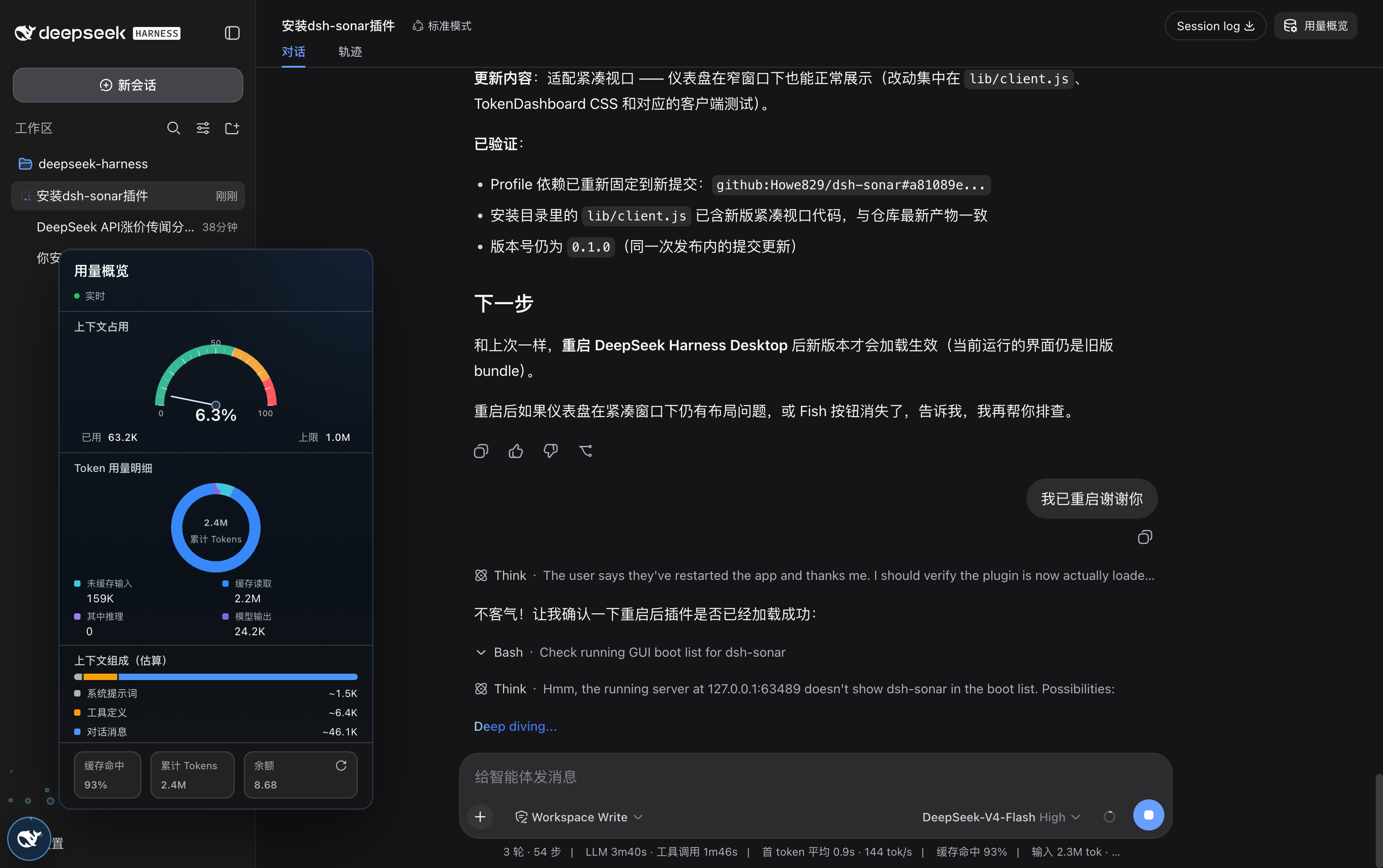
dsh-sonar adds a Fish-logo floating launcher without narrowing the conversation. Click the Fish to open a complete session dashboard; drag it anywhere in the viewport. The panel automatically chooses a direction where it fits, and Escape or another Fish click collapses it. While the model is answering, lightweight bubbles rise around the launcher.
The dashboard includes:
- a green / amber / red context-window gauge;
- an accounted-token donut for uncached input, cache read/write, output, and reasoning when the installed Harness exposes it;
- heuristic system prompt, tool schema, and conversation composition;
- turn, step, model time, tool time, cache hit rate, and cumulative tokens;
- exact DeepSeek
total_balance, refreshed after each completed turn or manually.
The API key stays on the Host. The browser calls a same-origin dsh-sonar route that returns only { totalBalance }; cross-site and non-IP/localhost Host requests are rejected, and responses are never cached.
Install from GitHub
The repository commits its built lib/ artifacts, so a Git install does not need to execute a build script:
dsh plugin --profile web add github:Howe829/dsh-sonar#v0.1.0
dsh --profile web
Pin a release tag for repeatable installations. Remove it with:
dsh plugin --profile web remove dsh-sonar
Configuration
The bundle inserts one dsh-sonar row. Defaults use the managed DEEPSEEK_API_KEY credential and the public DeepSeek API:
- id: dsh-sonar
  name: dsh-sonar
  config:
    apiKeyEnv: DEEPSEEK_API_KEY
    baseURL: https://api.deepseek.com
A later profile or home patch can replace this row. Harness patch configuration is row-replacing, so restate every field you want to keep.
Development
pnpm install
pnpm run verify
pnpm pack --pack-destination .artifacts
The current stable dsh-sonar release is v0.1.0. It is tested against the public DeepSeek Harness 0.1.0-rc.6 package family. DeepSeek Harness itself remains a developer preview, so future Harness releases may require compatibility updates.
Privacy and model impact
This is a read-only UI plugin. It adds no tools, prompts, commands, durable session events, or model-visible context. It does not alter the request envelope or KV cache behavior.
License
MIT
Install
Install the catalog once, then DeepSeek Harness can find and install any plugin from this site automatically:
dsh plugin add dshbase-catalogThen say "install dsh-sonar for me" — your agent finds it in the directory and installs it. Docs: dshbase-catalog · verified packs.
This plugin is GitHub source (not published to npm) — install it straight from the repo:
Web profile:
dsh plugin --profile web add github:Howe829/dsh-sonarHeadless (CLI) profile:
dsh plugin --profile headless add github:Howe829/dsh-sonarTest report
Verified: L1 install + L2 load + L3 runtime from GitHub source on dsh 0.1.0-rc.6.
Share this badge
Drop this badge into your README — it links back here and updates automatically when our test status changes:

[](https://dshbase.com/plugins/dsh-sonar/)<a href="https://dshbase.com/plugins/dsh-sonar/"><img src="https://dshbase.com/badges/dsh-sonar.svg" alt="dshbase install-tested"></a>