
Plugin directory / Developer / dsh-token-plan-monitor
dsh-token-plan-monitor
Verified · install-tested on dsh YOYOYOAKE
What it does
A plugin in the Developer category for DeepSeek Harness.
Works — verified, early-stage project
A plugin in the Developer category for DeepSeek Harness. It installs cleanly and boots without issues in our testing. It's early-stage but functional.
“Verified” means our automated CI actually ran dsh plugin add in a clean profile and it booted — nothing more. Feature descriptions and version compatibility are the author’s claims. This is not a security audit and not an endorsement of third-party code.
README
dsh-token-plan-monitor
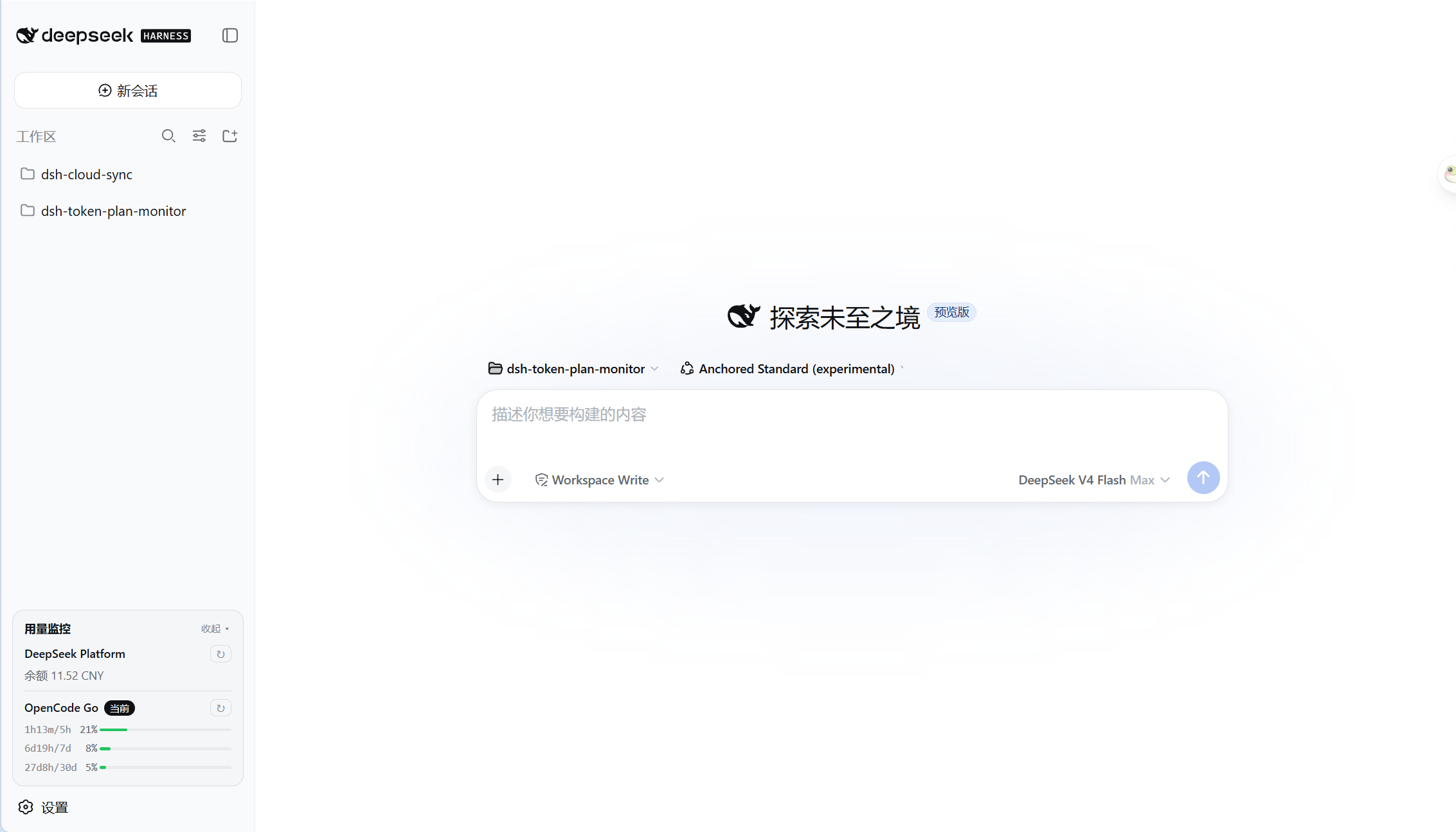
DeepSeek Harness 插件,用于在侧边栏底部 API 余额或 Token Plan 用量。
目前支持:
- DeepSeek Platform 余额
- OpenCode Go
安装
dsh plugin --profile web add @yoyoyoake/dsh-token-plan-monitor
使用
DeepSeek Platform
自动读取 DeepSeek API Key 查询余额。
OpenCode Go
需要在 DeepSeek Harness 设置中额外配置用量查询参数:
WorkSpace ID:从 URL 中复制;Cookie:从 DevTools 中获取。
开发
项目结构
├── package.json            # 插件 manifest:dsh.bundle / dsh.client;prepare 会自动构建 lib/
├── cordis.patch.yml        # 组合补丁层,声明插件行
├── tsconfig.host.json      # 宿主端 ESM 构建配置
├── tsconfig.client.json    # 客户端 CommonJS 构建配置
├── build.mjs               # 将编译后的客户端包装成浏览器 module-loader bundle
├── lib/                    # 构建产物,由 prepare 自动生成
├── docs/                   # 文档
└── src/
    ├── index.ts            # 宿主端:settings 持久化、自动检测、缓存、HTTP 端点
    ├── client.ts           # 客户端:侧边栏用量卡片 + 设置页
    ├── types.ts            # UsageProvider 契约与 wire 类型
    ├── shims.d.ts          # @deepseek-ai/dsh-settings 环境类型
    └── providers/          # 每个供应商一个文件
        ├── deepseek.ts     # DeepSeek Platform 余额查询
        └── opencode.ts     # OpenCode Go Token Plan 用量查询
添加新的提供商
- 新建
src/providers/my-vendor.ts - 实现
UsageProvider<T>:id/name/descriptionconfigFields:设置页需要填写的特殊参数credentialRefs:候选凭据名usageConfigFields:哪些参数填好后才能发起查询matchesModel():判断是否对应 DSH 中的某个 providerfetchUsage():调用供应商 APIrenderLines():把结果渲染成卡片行
- 在
src/index.ts的PROVIDERS数组中追加一行 - 重新构建并安装:
npm run build
dsh plugin --profile web add .
常用开发命令
npm install          # 安装编译期依赖,并触发 prepare 构建 lib/
npm run typecheck    # 类型检查
npm run build        # 构建宿主端 + 客户端 bundle
开发时修改源码后重新执行 npm run build,刷新浏览器即可看到效果;cordis.patch.yml 会被 profile 的补丁监视器热重载。
License
MIT.
Install
Install the catalog once, then DeepSeek Harness can find and install any plugin from this site automatically:
dsh plugin add dshbase-catalogThen say "install dsh-token-plan-monitor for me" — your agent finds it in the directory and installs it. Docs: dshbase-catalog · verified packs.
This plugin is GitHub source (not published to npm) — install it straight from the repo:
Web profile:
dsh plugin --profile web add github:YOYOYOAKE/dsh-token-plan-monitorHeadless (CLI) profile:
dsh plugin --profile headless add github:YOYOYOAKE/dsh-token-plan-monitorTest report
Verified: L1 install + L2 load + L3 runtime from GitHub source on dsh 0.1.0-rc.6.
Share this badge
Drop this badge into your README — it links back here and updates automatically when our test status changes:

[](https://dshbase.com/plugins/dsh-token-plan-monitor/)<a href="https://dshbase.com/plugins/dsh-token-plan-monitor/"><img src="https://dshbase.com/badges/dsh-token-plan-monitor.svg" alt="dshbase install-tested"></a>