
Plugin directory / UI & Skins / dsh-token-tracker
dsh-token-tracker
Verified · install-tested on dsh XiaHouSheng
What it does
A DeepSeek-Harness web plugin that tracks provider token usage, prices it with a peak/off-peak table, and shows the totals in the dsh GUI — plus a standalone overview page and JSON API.
Works — verified, early-stage project
A DeepSeek-Harness web plugin that tracks provider token usage, prices it with a peak/off-peak table, and shows the totals in the dsh GUI — plus a standalone overview page and JSON API. It installs cleanly and boots without issues in our testing. It's early-stage but functional.
“Verified” means our automated CI actually ran dsh plugin add in a clean profile and it booted — nothing more. Feature descriptions and version compatibility are the author’s claims. This is not a security audit and not an endorsement of third-party code.
README
dsh-token-tracker
简体中文 · Read this page in English
A dsh (DeepSeek-Harness) web plugin that folds provider token usage from the
durable session log, prices it with a peak/off-peak table, and surfaces totals in
the dsh web GUI — a header badge + period tag, a Tracker button, a composer dock
line, a closed-turn tail, an injected conversation.view Token tab — plus a
standalone overview page and a JSON API.
This repository is itself a directly installable dsh plugin package: lib/
is prebuilt and committed, and the repo root ships the dsh.bundle +dsh.client manifests together with cordis.patch.yml. You can install it viadsh plugin add <git-url>, dsh plugin add <local-path>, or (as a fallback)dsh plugin add ./dsh-token-tracker-<version>.tgz. No manual pack step or
separate tarball download required.
This is not the in-repo
@deepseek-ai/dsh-token-trackerpackage (which lives
inside the harness monorepo and is built by the workspace). It is the samesrc/, wrapped for independent distribution.
Screenshots
| Token badge & period tag in the GUI header | Conversation Token tab / dock line | Standalone overview page |
|---|---|---|
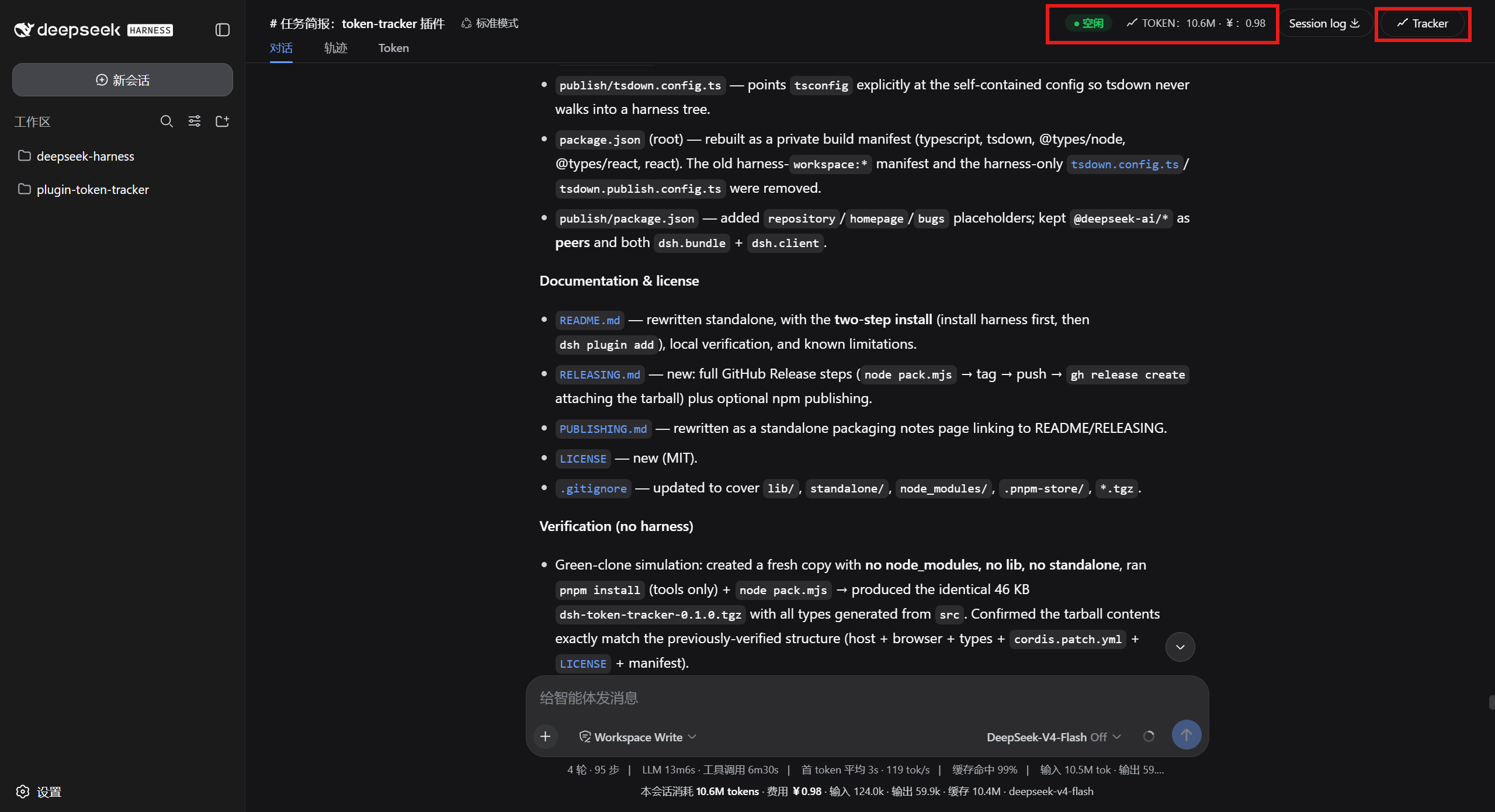 |
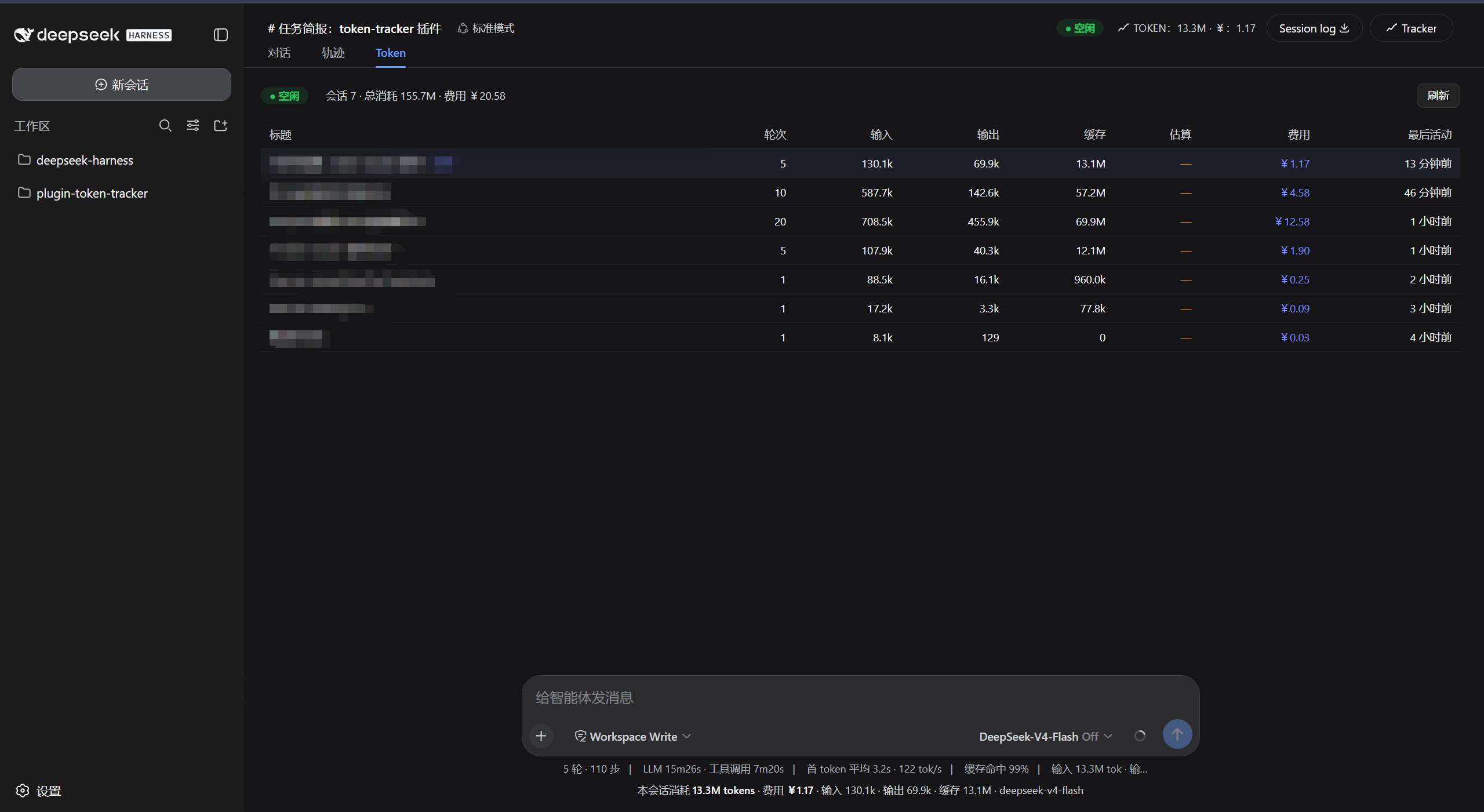 |
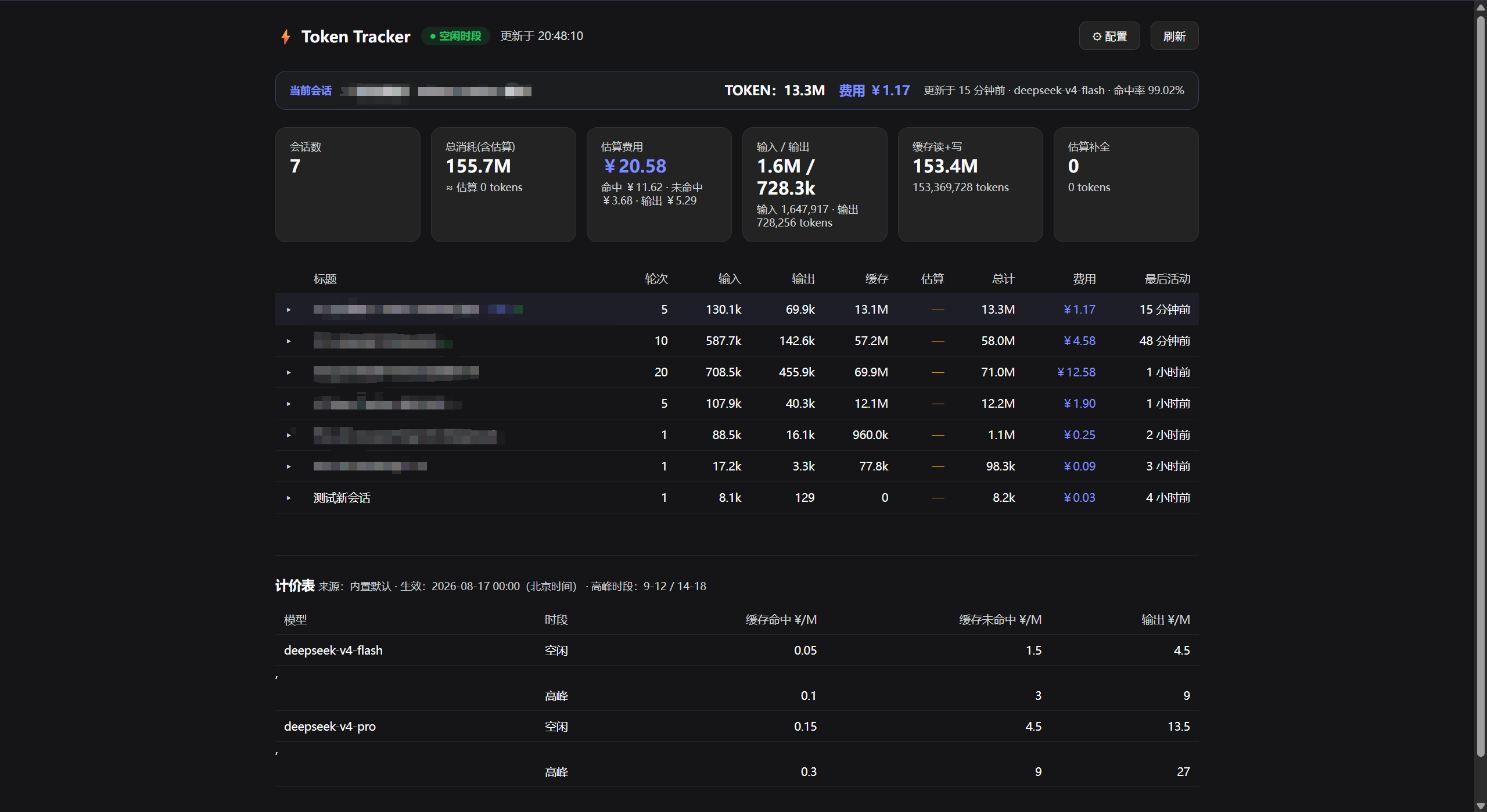 |
What it does
The package has a Host half and a Browser half.
Host half (TokenTrackerService, mounted as a webServer service consumer):
- Listens to
session/eventand foldsassistant/messageproviderusageinto
per-session/per-turn token buckets, attributing each message to the model named
by the latestrequest/headerand to the Beijing hour of its event time. - Serves the standalone overview page at
GET /dsh-token-trackerand the JSON
API atGET /dsh-token-tracker/api(?session=<id>returns one session's
totals plus a per-turn breakdown). - Prices usage with a peak/off-peak cost table (CNY per 1M tokens). The table
resolves, in order: a browser localStorage override, atoken-pricing.json
file in the workspace root or a session cwd, then the built-in default (seesrc/pricing.ts). Overrides are picked up on a short cache.
Browser half (src/client/): registers the header token badge + period tag,
the Tracker button, the composer dock line, the closed-turn tail, and theconversation.view "Token" tab. All data is fetched from the Host JSON API, so
no typert Remote surface has to ride the browser assembly bus.
Requirements
- Node.js >= 20 and pnpm (only needed when you want to rebuild from
source; installing the plugin does not require them). The plugin itself runs
inside a harnessdshhost. - The dsh harness (DeepSeek-Harness) at the version that matches this
package's peer dependencies. This plugin is a peer of the@deepseek-ai/dsh-*runtime packages and does not bring them itself.
Installing the plugin (two-step)
Important. This plugin declares the
@deepseek-ai/dsh-*harness packages
as peer dependencies, notdependencies. It deliberately does not pull
them from the npm registry. This makes the install order matter: harness
first, then the plugin.
Step 1 — install the harness first
dsh needs a harness installation to satisfy the peers. Clone and install DeepSeek-Harness first:
git clone --depth 1 https://github.com/deepseek-ai/deepseek-harness.git
cd deepseek-harness
pnpm install          # installs the full @deepseek-ai/dsh-* tree locally
Step 2 — install the plugin (choose one of three)
This repository exposes three equivalent install paths. Use whichever fits your environment.
Option A · Direct from a GitHub repo URL (recommended)
On any machine that already has the harness installed:
dsh plugin --profile web add https://github.com/XiaHouSheng/dsh-token-tracker.git
How it works: after pnpm clones the repo it automatically runs the repo'sprepack hook, which injects the exact @deepseek-ai/* peer version ranges
into the packed manifest, then packs the already-built lib/ +cordis.patch.yml into a tarball and installs it. No build step required on
your side.
Option B · From a local directory (plugin dev / on-machine verification)
Run pnpm run build in this repo once first (see Development & build flow
below), then:
dsh plugin --profile web add /path/to/dsh-token-tracker
pnpm run build drops a complete lib/, the cordis.patch.yml layer patch,
and a publish-shaped package.json with the exact harness peer ranges straight
into the repo root. The directory is then a self-contained installable dsh
plugin package.
Option C · GitHub Release tarball (offline / legacy)
Download dsh-token-tracker-<version>.tgz from the Releases page,
then add it to a dsh profile:
dsh plugin --profile web add ./dsh-token-tracker-<version>.tgz
All three options produce the same result: a bundle layer is activated
(dsh.bundle → cordis.patch.yml) so the token-tracker row is inserted, and
the browser half is auto-discovered via the same package's dsh.client
manifest and served from the web app.
Verify the layer then boot
dsh --profile web --dump-config     # should list the token-tracker layer
dsh --profile web                   # boot the GUI + web server
Then open:
http://127.0.0.1:<port>/dsh-token-tracker— overview pagehttp://127.0.0.1:<port>/dsh-token-tracker/api— JSON- the web GUI header badge / Token tab
If
dshis not on yourPATH, use the harness-local binary:./node_modules/.bin/dsh ...from the harness checkout.
Installing from npm (optional, later)
If/when this package is published to npm under a personal scope, the same
peer-rule applies. Point dsh plugin add at the package instead of a tarball:
# scope-rename the package first (see RELEASING.md), then:
dsh plugin --profile web add @your-scope/dsh-token-tracker
Pricing override
Drop a token-pricing.json in the workspace root or a session cwd. It is
picked up on a short cache:
{
  "timezone": "Asia/Shanghai (UTC+8)",
  "peakHours": [{ "start": 9, "end": 12 }, { "start": 14, "end": 18 }],
  "models": {
    "my-model": [{
      "effectiveFrom": "2026-01-01T00:00:00+08:00",
      "prices": {
        "inputCached": { "offpeak": 0.05, "peak": 0.1 },
        "inputUncached": { "offpeak": 1.5, "peak": 3.0 },
        "output": { "offpeak": 4.5, "peak": 9.0 }
      }
    }]
  }
}
The built-in default prices 09–12 and 14–18 Beijing hours as peak (2×
off-peak) for deepseek-v4-flash and deepseek-v4-pro.
Development & build flow
This section is for plugin authors / maintainers. If you only install and
use the plugin, you can skip it.
Dev manifest vs. Publish manifest
The root package.json intentionally toggles between two shapes:
| Form | Active when | @deepseek-ai/* in peerDependencies |
Purpose |
|---|---|---|---|
| Dev | Fresh git clone / after restore-dev |
only react |
Lets pnpm install succeed at the plugin dev repo: the harness ^0.1.0-rc.5 versions are not on the public npm registry, so they must be omitted from the dev-time lockfile. |
| Publish | After build / pack, or during the prepack hook |
all 10 harness packages with exact ranges | Required for a git push or a local install: dsh's pnpm layout needs them declared as explicit peers so the plugin sandbox can require('@deepseek-ai/cordis') etc. at runtime. |
Two helper scripts manage the swap:
pnpm run build        # build lib/, switch root manifest to Publish shape (commit / local-dir install)
pnpm run restore-dev  # revert to Dev shape (use before pnpm install / version bumps / adding devDeps)
Plain git checkout -- package.json does the same thing if you prefer.
Everyday build loop
# Only needed if package.json is currently in Publish form:
pnpm run restore-dev

pnpm install            # only build tooling (tsc, tsdown, react types, node types)
# …edit files under src/…

pnpm run build          # -> lib/ populated, cordis.patch.yml copied to root, manifest becomes Publish
# Then you can:
dsh plugin --profile web add /path/to/dsh-token-tracker      # local install for verification
# And/or commit & push:
git add lib cordis.patch.yml package.json src scripts pack.mjs
git commit -m "feat: …"
git push origin main    # After this push, anyone else can run:
                        #   dsh plugin --profile web add https://github.com/XiaHouSheng/dsh-token-tracker.git
Packing a tarball (GitHub Release / offline distribution)
pnpm run pack          # = node pack.mjs: same as build, plus `pnpm pack` inside the stage
# -> dsh-token-tracker-0.1.0.tgz appears at the repo root
pack.mjs is fully self-contained:
- It stages
standalone/fromsrc/+publish/. - Type declarations are generated straight from
src/bytscwith the
repo-localtsconfig.json(self-contained;@deepseek-ai/*resolves to the
ambient stubs undertypes.stub/, so no peer package is pulled at build
time). - Host + browser bundles are produced by
tsdownfrom the self-containedpublish/tsdown.config.ts(which includes TypeScript decorator lowering so
the@Remotemarkers run). - Build artifacts are synced back to the root
lib/for "direct install"
usage; the stage is also packed withpnpm packto produce the.tgz.
No harness checkout or in-repo lib/ is required or read.
Local verification after a build
Inside a fresh harness checkout (with Step 1 pnpm install already done):
# Direct local directory:
dsh plugin --profile web add /path/to/dsh-token-tracker
# Or the tarball:
dsh plugin --profile web add ./dsh-token-tracker-0.1.0.tgz

dsh --profile web --dump-config      # token-tracker layer present
dsh --profile web                     # boot; then check:
#   /dsh-token-tracker               (overview page)
#   /dsh-token-tracker/api           (JSON)
Known Limitations and Deferred Work
- Token accounting depends on the provider reporting
usageonassistant/messageevents; without it the plugin falls back to a
character-count estimate (marked≈), which is not a billing-grade count. - Peak/off-peak pricing is timezone-anchored to Beijing time and the pricing
cache has a short TTL, so a pricing-file edit takes a few seconds to appear. - Peer versions in the Publish form are bracketed ranges (
^0.1.0-rc.5). They
are satisfied by a matching harness install; keep them in step with the
deployed harness edition, ordsh plugin addwill warn about unsatisfied
peers. - The overview page auto-refreshes on a slow 10-minute interval (and pauses
while the tab is hidden); very large session logs are capped at the first 300
sessions in the table.
License
Install
Install the catalog once, then DeepSeek Harness can find and install any plugin from this site automatically:
dsh plugin add dshbase-catalogThen say "install dsh-token-tracker for me" — your agent finds it in the directory and installs it. Docs: dshbase-catalog · verified packs.
This plugin is GitHub source (not published to npm) — install it straight from the repo:
Web profile:
dsh plugin --profile web add github:XiaHouSheng/dsh-token-trackerHeadless (CLI) profile:
dsh plugin --profile headless add github:XiaHouSheng/dsh-token-trackerTest report
Verified: L1 install + L2 load + L3 runtime from GitHub source on dsh 0.1.0-rc.6.
Share this badge
Drop this badge into your README — it links back here and updates automatically when our test status changes:

[](https://dshbase.com/plugins/dsh-token-tracker/)<a href="https://dshbase.com/plugins/dsh-token-tracker/"><img src="https://dshbase.com/badges/dsh-token-tracker.svg" alt="dshbase install-tested"></a>