
Plugin directory / Developer / dsh-voice-input-space
dsh-voice-input-space
Verified · install-tested on dsh XSakura666
What it does
Voice input for DeepSeek Harness: hold Space to speak, release to insert. Zero dependencies, Web Speech API. / 语音输入:长按空格说话,松开上屏,零依赖。
Works — verified, early-stage project
Voice input for DeepSeek Harness: hold Space to speak, release to insert. Zero dependencies, Web Speech API. / 语音输入:长按空格说话,松开上屏,零依赖。 It installs cleanly and boots without issues in our testing. It's early-stage but functional.
“Verified” means our automated CI actually ran dsh plugin add in a clean profile and it booted — nothing more. Feature descriptions and version compatibility are the author’s claims. This is not a security audit and not an endorsement of third-party code.
README
dsh-voice-input-space
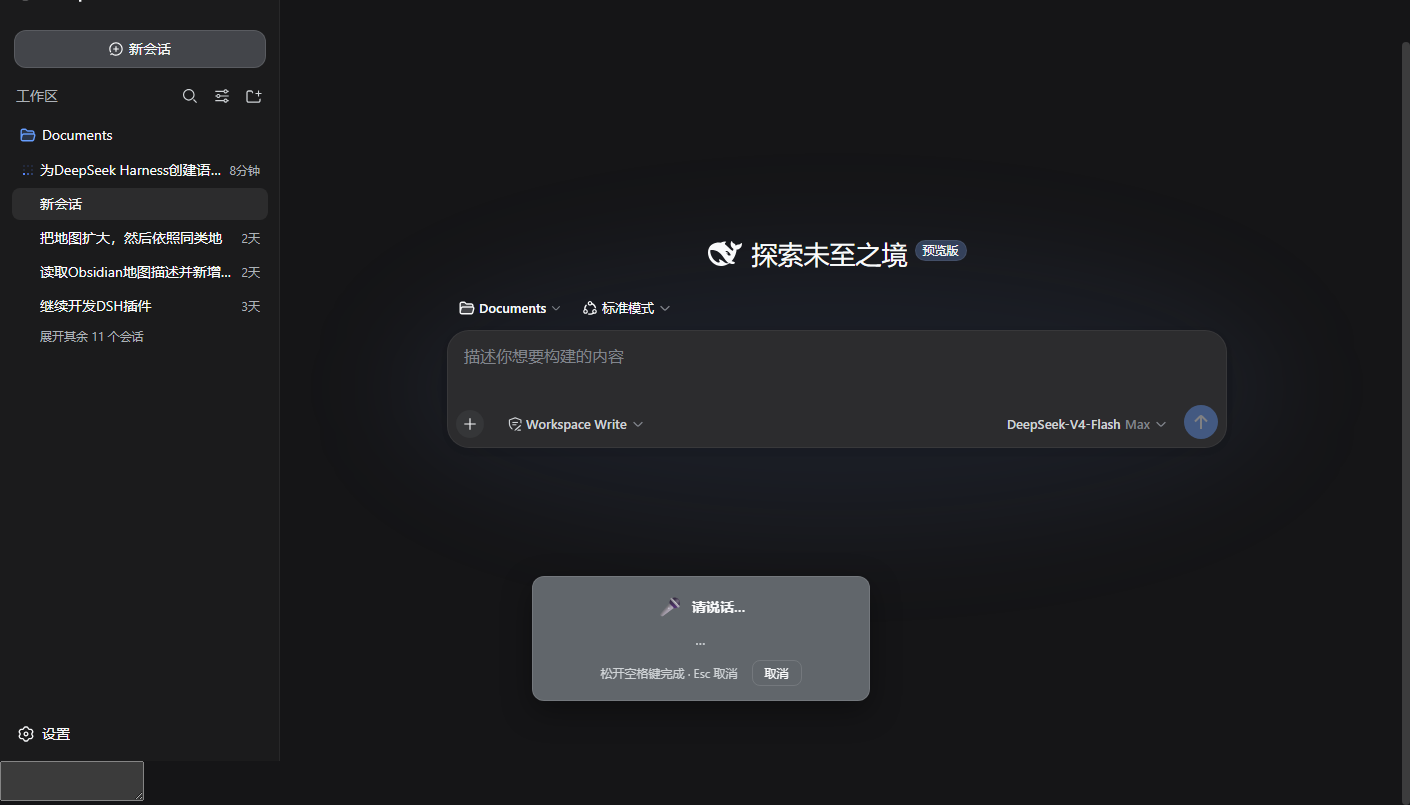
Voice input for DeepSeek Harness — hold Space in any editable field to speak, release to insert the transcript at the caret. Zero dependencies, powered by the browser's Web Speech API (Chrome / Edge).
语音输入插件:在输入框长按空格键说话,松开自动上屏。零依赖,基于浏览器 Web Speech API(Chrome / Edge)。
Features / 功能
- Hold-to-talk: long-press Space (≥ 450 ms) in the composer (or any text field) starts listening; a floating panel shows the live transcript; release inserts the final text at the caret. / 按住说话:在输入框(或任意文本框)长按空格键(≥450ms)开始聆听,悬浮面板实时显示转写,松开后文字插入光标处。
- Esc / Cancel button abandons the session without inserting. / Esc 或「取消」按钮放弃本次输入。
- IME-safe: space used to confirm Chinese IME candidates is never intercepted (
isComposingguard); a quick tap still types a normal space. / 中文输入法安全:选词用的空格不会被拦截;轻点空格仍是普通空格。 - Languages: 普通话 / 繁體中文 / 粤语 / English / 日本語 / 한국어, switchable in Settings → General. / 支持六种语言,可在 设置 → 通用 切换。
- Toggle: enable/disable the hotkey from Settings → General. / 可在设置中一键停用。
- Status chip under the composer shows the current language and listening state. / 输入框下方状态条显示当前语言与聆听状态。
Why this plugin / 为什么选它
Voice-input plugins already exist in the DSH ecosystem (e.g. SenseVoice-based offline transcription with a mic-button flow). This plugin targets a different trade-off — zero setup and hands-on-keyboard dictation:
语音输入插件社区里已有别的方案(如 SenseVoice 离线转写 + 麦克风按钮流程)。本插件选择了不同的取舍——零配置、手不离键盘:
| dsh-voice-input-space(本插件) | SenseVoice-style plugins | |
|---|---|---|
| Setup / 安装 | install + refresh — no model, no build / 即装即用,无模型无构建 | needs model download & transcription chain / 需下载模型与转写链路 |
| Interaction / 交互 | hold Space in the editor, release to insert / 长按空格,松开上屏 | click mic button → record → refill / 点按钮 → 录音 → 回填 |
| IME / 中文输入法 | never intercepts composition Space / 选词空格永不拦截 | — |
| Privacy / 隐私 | audio via browser speech service, not stored / 音频走浏览器语音服务,不落盘 | fully offline, audio never leaves the machine / 全离线,音频不出本机 |
| Dependencies / 依赖 | zero / 零依赖 | sherpa-onnx 等 |
Both approaches are valid: theirs for offline privacy, this one for instant use. 两种方案各有取舍:对方适合离线隐私场景,本插件适合即装即用。
Install / 安装
dsh plugin --profile web add dsh-voice-input-space
Or from the plugin market (Settings → Plugins → Plugin Market) after the entry is listed. Then refresh the page.
或者等插件进入社区目录后,在 设置 → 插件 → 插件市场 中一键安装,然后刷新页面。
First use: the browser asks for microphone permission — click Allow in the address bar (127.0.0.1 is a secure context). / 首次使用浏览器会请求麦克风权限,在地址栏点击允许即可。
Usage / 用法
- Click into the input box. / 点击输入框。
- Hold Space for about half a second. / 长按空格键约 0.5 秒。
- Speak — the transcript appears live in the floating panel. / 说话,面板实时转写。
- Release Space — the text lands at the cursor. / 松开空格,文字上屏。
Uninstall / 卸载
dsh plugin --profile web remove dsh-voice-input-space
Notes / 说明
- Speech recognition runs in the browser via the Web Speech API; on Chrome/Edge it uses the platform speech service (network access required). Audio is not stored. / 语音识别由浏览器 Web Speech API 完成,音频不会被保存。
- Without microphone permission the panel shows a persistent error until you release the key. / 未授权麦克风时,面板会持续显示错误提示直至松开按键。
- Dev aid:
window.__dshVoiceInputexposes the plugin's state and counters for debugging. / 调试钩子:window.__dshVoiceInput暴露状态与计数器。
Development / 开发
# headless verification against a running dsh web (needs Edge):
node tools/verify-headless.cjs
License
MIT
Install
Install the catalog once, then DeepSeek Harness can find and install any plugin from this site automatically:
dsh plugin add dshbase-catalogThen say "install dsh-voice-input-space for me" — your agent finds it in the directory and installs it. Docs: dshbase-catalog · verified packs.
This plugin is GitHub source (not published to npm) — install it straight from the repo:
Web profile:
dsh plugin --profile web add github:XSakura666/dsh-voice-input-spaceHeadless (CLI) profile:
dsh plugin --profile headless add github:XSakura666/dsh-voice-input-spaceTest report
Verified: L1 install + L2 load + L3 runtime from GitHub source on dsh 0.1.0-rc.6.
Share this badge
Drop this badge into your README — it links back here and updates automatically when our test status changes:

[](https://dshbase.com/plugins/dsh-voice-input-space/)<a href="https://dshbase.com/plugins/dsh-voice-input-space/"><img src="https://dshbase.com/badges/dsh-voice-input-space.svg" alt="dshbase install-tested"></a>