
Plugin directory / UI & Skins / PianpianUI
PianpianUI
Verified · install-tested on dsh tdyangbo
What it does
用于DeepSeek Harness的林翩翩主题UI插件。使用《哀鸿:城破十日记》的角色林翩翩作为页面半透明背景,并支持透明度和深度调节。
Works — verified, early-stage project
用于DeepSeek Harness的林翩翩主题UI插件。使用《哀鸿:城破十日记》的角色林翩翩作为页面半透明背景,并支持透明度和深度调节。 It installs cleanly and boots without issues in our testing. It's early-stage but functional.
“Verified” means our automated CI actually ran dsh plugin add in a clean profile and it booted — nothing more. Feature descriptions and version compatibility are the author’s claims. This is not a security audit and not an endorsement of third-party code.
README
PianpianUI
PianpianUI 是一个 DeepSeek Harness Web UI 插件。安装后,它会改变聊天主页面样式,使用《哀鸿:城破十日记》中的角色林翩翩作为半透明背景,并保留正常聊天界面的可读性。
安装
使用 DSH 命令安装:
dsh plugin --profile web add git+https://github.com/tdyangbo/PianpianUI.git
或下载压缩包到本地并解压(例如,解压到E:\software\PianpianUI-main),从本地文件安装:
dsh plugin --profile web add file:E:\software\PianpianUI-main
启动 DSH Web UI:
dsh web
如果页面仍显示旧效果,请在浏览器中按 Ctrl + F5 强制刷新。
效果预览
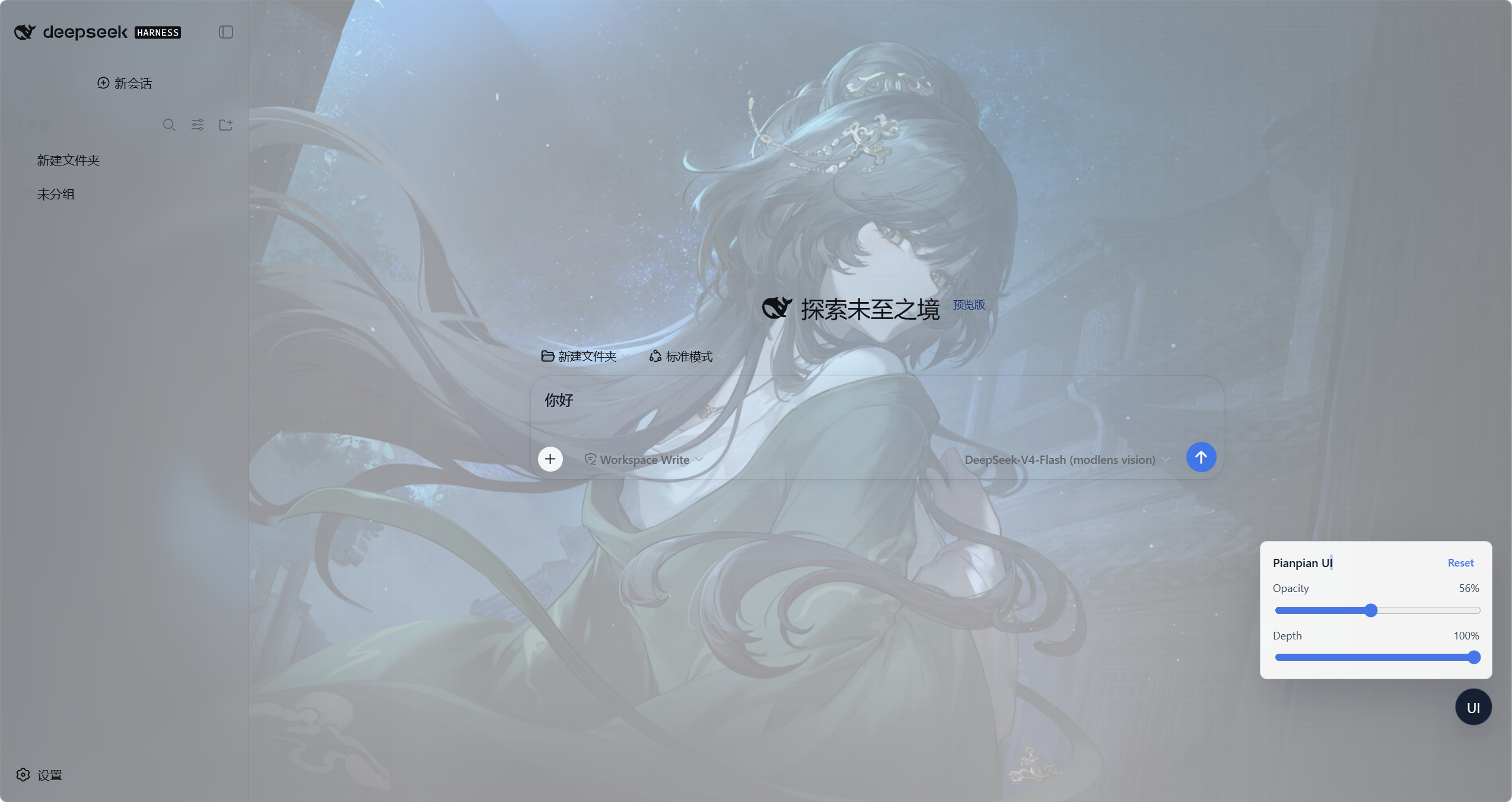
安装后的效果
- 聊天主页面会显示林翩翩半透明背景。
- 侧边栏、输入框、按钮和聊天内容仍保持清晰可读。
- 页面右下角会出现一个
UI调节按钮。 - 打开设置弹窗等非聊天页面时,调节按钮会自动隐藏。
调节背景效果
在聊天页面点击右下角 UI 按钮,可以打开调节面板。
Opacity:调节图片透明度。向右拖动,图片更明显;向左拖动,图片更淡。Depth:调节背景深度。向右拖动,背景更深、更有层次;向左拖动,界面更亮、更柔和。Reset:恢复默认显示效果。
调节结果会保存在当前浏览器中,刷新页面后仍会保留。
更新插件
如果插件已有新版本,先移除旧版本,再重新安装:
dsh plugin --profile web remove dsh-pianpian-ui
dsh plugin --profile web add git+https://github.com/tdyangbo/PianpianUI.git
dsh web
然后在浏览器中按 Ctrl + F5。
停用插件
如果不想继续使用该 UI 插件,执行:
dsh plugin --profile web remove dsh-pianpian-ui
dsh web
如果页面仍有缓存效果,请按 Ctrl + F5 或重新打开浏览器页面。
Install
Install the catalog once, then DeepSeek Harness can find and install any plugin from this site automatically:
dsh plugin add dshbase-catalogThen say "install PianpianUI for me" — your agent finds it in the directory and installs it. Docs: dshbase-catalog · verified packs.
This plugin is GitHub source (not published to npm) — install it straight from the repo:
Web profile:
dsh plugin --profile web add github:tdyangbo/PianpianUIHeadless (CLI) profile:
dsh plugin --profile headless add github:tdyangbo/PianpianUITest report
Verified: L1 install + L2 load + L3 runtime from GitHub source on dsh 0.1.0-rc.6.
Share this badge
Drop this badge into your README — it links back here and updates automatically when our test status changes:

[](https://dshbase.com/plugins/pianpianui/)<a href="https://dshbase.com/plugins/pianpianui/"><img src="https://dshbase.com/badges/pianpianui.svg" alt="dshbase install-tested"></a>