
插件目录 / Developer / codex-dsh-bridge
codex-dsh-bridge
已验证 · 实测可装 knottttt
功能简介
Codex bridge for dispatching tasks to DeepSeek Harness sessions, with Harness settings integration.
可用 — 实测通过,早期项目
Codex bridge for dispatching tasks to DeepSeek Harness sessions, with Harness settings integration. 实测能干净安装、正常启动。早期项目,但功能可用。
「已验证」表示我们的自动化 CI 在干净 profile 里实际执行了 dsh plugin add 并启动成功——仅此而已。功能描述与版本兼容性均为作者声明。这不是安全审计,也不代表对第三方代码的背书。
README
Codex DeepSeekHarness Bridge
Let Codex dispatch local project tasks to DeepSeek Harness sessions. All code in this repository was generated by Codex.
ENGLISH | 简体中文
Overview
codex-dsh-bridge connects Codex to a locally running DeepSeek Harness WebUI through its HTTP RPC API.
The repository contains both sides of the integration:
- a Codex plugin with MCP tools and a collaboration skill;
- a DeepSeek Harness companion that adds bridge controls to Harness settings.
Beginner one-click install
Requirements:
- Windows PowerShell 5.1 or PowerShell 7;
- Node.js 18 or newer;
- Codex CLI with plugin support;
- DeepSeek Harness with the
dshcommand available.
Download and run the installer:
$installer = Join-Path $env:TEMP "codex-dsh-bridge-install.ps1"
Invoke-WebRequest "https://raw.githubusercontent.com/knottttt/codex-dsh-bridge/main/install.ps1" -OutFile $installer
powershell -ExecutionPolicy Bypass -File $installer
The installer:
- adds or refreshes the Codex marketplace;
- installs the Codex plugin;
- installs the Harness companion into the
webprofile; - prints the required restart steps.
After installation:
- restart the DeepSeek Harness WebUI;
- start a new Codex task;
- open
Settings → Plugins → Plugin configurationin Harness; - confirm that Codex DSH Bridge is enabled.
Manual installation
Run these commands if you prefer to review each action:
codex plugin marketplace add knottttt/codex-dsh-bridge --ref main
codex plugin add codex-dsh-bridge@codex-dsh-bridge
dsh plugin --profile web add github:knottttt/codex-dsh-bridge#main
Restart Harness and start a new Codex task after the commands finish.
Updating
Run the installer again. It refreshes the marketplace, reinstalls the Codex plugin, and updates the Harness package:
powershell -ExecutionPolicy Bypass -File $installer
Uninstalling
Download and run the uninstaller:
$uninstaller = Join-Path $env:TEMP "codex-dsh-bridge-uninstall.ps1"
Invoke-WebRequest "https://raw.githubusercontent.com/knottttt/codex-dsh-bridge/main/uninstall.ps1" -OutFile $uninstaller
powershell -ExecutionPolicy Bypass -File $uninstaller
Saved bridge settings are preserved by default. Pass -RemoveSettings to remove them as well.
Components
| Component | Location | Purpose |
|---|---|---|
| Codex plugin | .codex-plugin/, .mcp.json |
Registers the plugin and its local MCP server |
| MCP bridge | scripts/ |
Connects Codex tools to the DSH HTTP RPC API |
| Collaboration skill | skills/ |
Guides Codex when delegating work to DSH |
| Harness companion | dsh-plugin/ |
Adds bridge controls to Harness settings |
| Marketplace | .agents/plugins/marketplace.json |
Makes the Codex plugin installable from GitHub |
| Installer | install.ps1 |
Installs and updates both sides of the bridge |
Available Codex tools
- inspect the current DSH host;
- list and filter DSH sessions;
- create a session for a project;
- queue or steer a message;
- read clean user and final assistant messages;
- wait for bounded completion;
- cancel or fork a session;
- dispatch a task through one convenience tool.
Harness settings
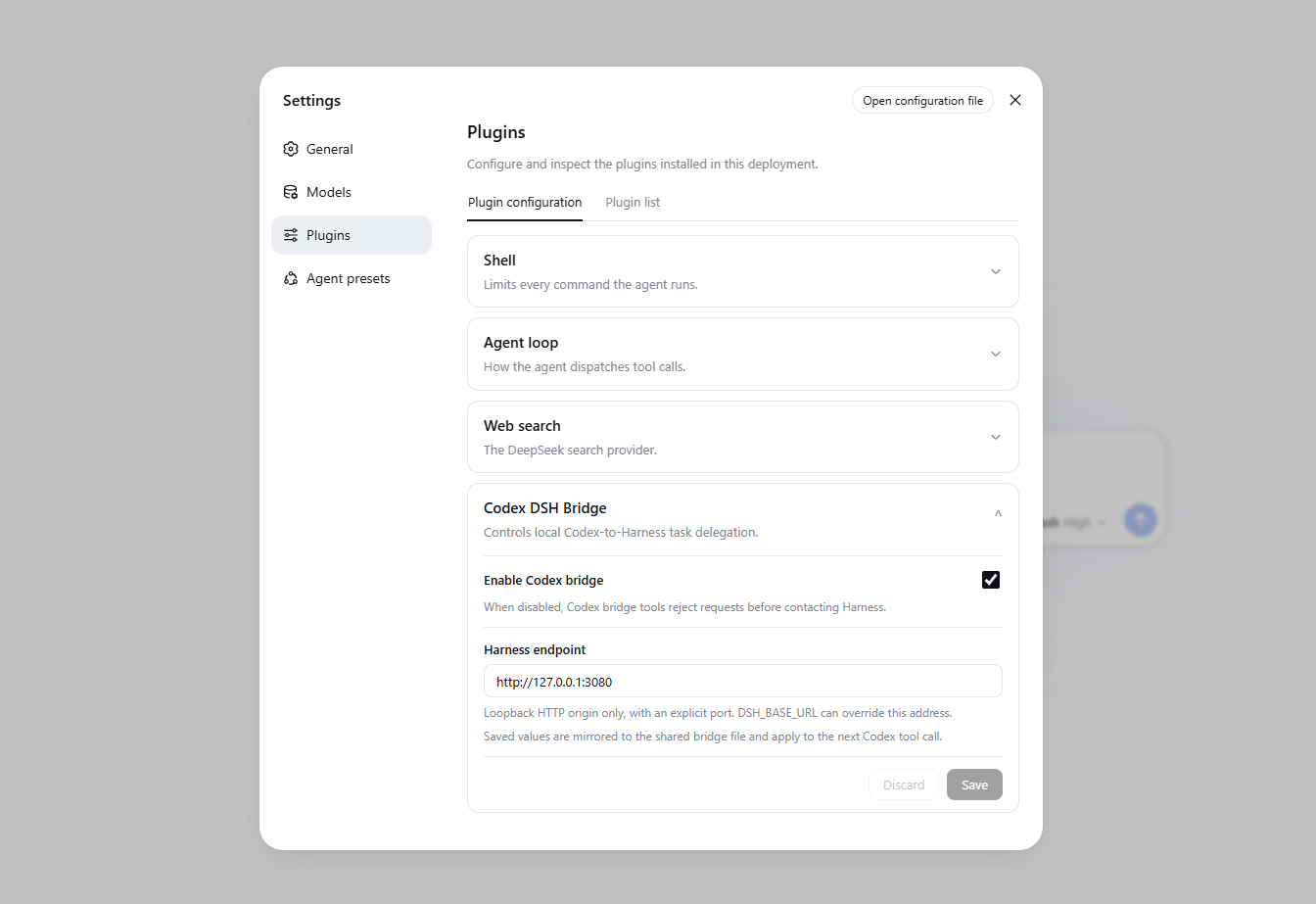
The companion adds a configuration card at:
Settings → Plugins → Plugin configuration → Codex DSH Bridge
The card controls:
- whether the Codex bridge is enabled;
- which local Harness endpoint the bridge uses.
Settings are mirrored to:
%DSH_HOME%\codex-dsh-bridge.json
When DSH_HOME is unset, the fallback location is:
%USERPROFILE%\.dsh\codex-dsh-bridge.json
The MCP process reads this file for every tool call, so endpoint and enabled-state changes apply without restarting Codex. The optional DSH_BASE_URL environment variable overrides the saved endpoint, while the Harness enabled switch still takes priority.
Local-only security boundary
The bridge accepts only loopback HTTP origins with an explicit port:
127.0.0.1localhost::1
HTTPS, LAN addresses, credentials, URL paths, query parameters, and fragments are rejected.
Troubleshooting
Codex tools do not appear
Start a new Codex task. Plugins and MCP tools are loaded when a task starts.
Harness settings card does not appear
Restart the Harness WebUI and verify the installed package:
dsh plugin --profile web list --depth 0
The list should contain codex-dsh-bridge-companion.
A required command is missing
Verify the commands independently:
node --version
codex --version
dsh --version
Install only one side
The installer supports:
.\install.ps1 -SkipDsh
.\install.ps1 -SkipCodex
Development
Run the complete test suite and package check from the repository root:
npm test
npm run pack:check
The suite covers bridge configuration, endpoint validation, Harness settings, revision conflicts, client registration, and distribution metadata.
安装
装一次目录插件,之后本站所有插件都能让 DeepSeek Harness 自动找、自动装:
dsh plugin add dshbase-catalog然后对 agent 说「帮我装 codex-dsh-bridge」,它会在目录里找到并自动安装。文档:dshbase-catalog · 已验证场景包。
该插件是 GitHub 源码(未发 npm)——直接从仓库装:
Web profile:
dsh plugin --profile web add github:knottttt/codex-dsh-bridgeHeadless(CLI)profile:
dsh plugin --profile headless add github:knottttt/codex-dsh-bridge实测报告
验证通过:从 GitHub 源码完成 L1 安装 + L2 加载 + L3 运行(dsh 0.1.0-rc.6)。
分享徽章
把这枚徽章粘进 README——它会链回本页,实测状态变化时自动更新:

[](https://dshbase.com/zh/plugins/codex-dsh-bridge/)<a href="https://dshbase.com/zh/plugins/codex-dsh-bridge/"><img src="https://dshbase.com/badges/codex-dsh-bridge.svg" alt="dshbase 实测可装"></a>