
插件目录 / Developer / deepseek-harness-matt-plugin
deepseek-harness-matt-plugin
已验证 · 实测可装 sa998aaron
功能简介
DeepSeek Harness 插件:内置 Matt Pocock 技能集 + 侧边栏可视化流水线面板(Idea→Triage→Grill→Spec→Tickets→Implement→Review),一键把 /技能 发进会话。Bundled matt skills + visual pipeline sidebar for DSH.
可用 — 实测通过,早期项目
DeepSeek Harness 插件:内置 Matt Pocock 技能集 + 侧边栏可视化流水线面板(Idea→Triage→Grill→Spec→Tickets→Implement→Review),一键把 /技能 发进会话。Bundled matt skills + visual pipeline sidebar for DSH. 实测能干净安装、正常启动。早期项目,但功能可用。
「已验证」表示我们的自动化 CI 在干净 profile 里实际执行了 dsh plugin add 并启动成功——仅此而已。功能描述与版本兼容性均为作者声明。这不是安全审计,也不代表对第三方代码的背书。
README
dsh-matt-pipeline
English | 简体中文
Matt Pocock's skill workflow pipeline for DeepSeek Harness (DSH).
The bundled skills come from Matt Pocock's mattpocock/skills repository — all credit for the skill content goes to him.
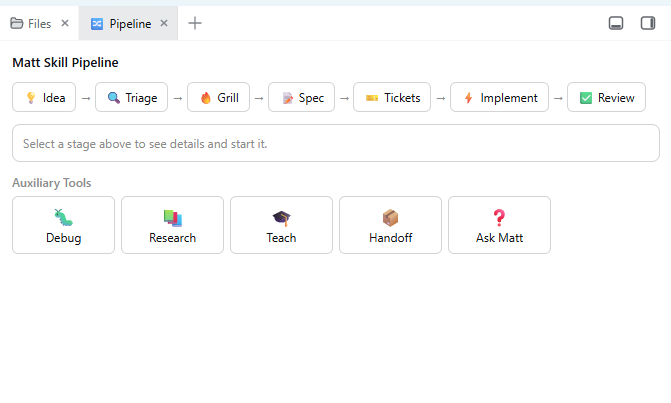
Server half: registers the bundled matt skill set (
matt-triage,matt-grill-me,matt-to-spec,matt-to-tickets,matt-tdd,matt-code-review,matt-research,matt-diagnosing-bugs, …) as model- and user-invocable DSH skills.Browser half: adds a 🔀 Pipeline tab to the dsh-better-sidebar showing the workflow
💡 Idea → 🔍 Triage → 🔥 Grill → 📝 Spec → 🎫 Tickets → ⚡ Implement → ✅ Reviewplus auxiliary tools (🐛 Debug / 📚 Research / 🎓 Teach / 📦 Handoff / ❓ Ask Matt). Clicking Start dispatches the official
/<skill>gesture straight into the active session (clipboard fallback if the connection API is unavailable).
Requirements
- A DSH web or desktop profile with
dsh-better-sidebarinstalled (the pipeline panel registers into it; the skills work without it).
Install
dsh plugin --profile web add https://github.com/sa998aaron/deepseek-harness-matt-plugin.git
For the DSH Desktop GUI use the desktop profile:
dsh plugin --profile desktop add https://github.com/sa998aaron/deepseek-harness-matt-plugin.git
Then restart DSH (or toggle the plugin off/on in Settings → Plugins) and hard-refresh the page (Ctrl+F5).
Manual install
- Clone this repo into
<profile>/node_modules/dsh-matt-pipeline(e.g.~/.dsh/profiles/desktop/node_modules/). - In
<profile>/package.jsonadd the dependency and the bundle entry:"dependencies": { "dsh-matt-pipeline": "file:./node_modules/dsh-matt-pipeline" }, "dsh": { "profile": { "bundles": [ ..., "dsh-matt-pipeline" ] } } - Restart DSH and hard-refresh.
The built bundles (dist/) are committed, so no build step is needed on install.
Usage
- Open the sidebar's + menu → 🔀 Pipeline.
- Click a stage to see its description and expected artifact.
- Click Start <Stage> — the panel sends
/<skill>to the current session and the agent follows that skill's workflow. - Auxiliary tools at the bottom can be triggered anytime (debugging, research, handoff, …).
The bundled skills are also available directly: type / in the composer and look for the matt-* entries, or invoke them by name in chat.
Development
pnpm install
pnpm build      # tsdown: server ESM (dist/index.mjs) + client CJS (dist/client.cjs)
pnpm dev        # watch mode
Layout:
src/index.ts     server half: registers bundled skills (ctx.skills)
src/skills.ts    SKILL.md frontmatter parsing + registration
src/stages.ts    pipeline stages & auxiliary tools (single source of truth)
client/index.tsx browser half: registers the Pipeline tab (ctx.betterSidebar)
assets/skills/   bundled matt SKILL.md files
cordis.patch.yml profile bundle patch (mounts the plugin row)
Note: ctx.betterSidebar only exists in the browser cordis context — UI must live in client/, never in the server half.
Acknowledgements
- Matt Pocock — the skills bundled in
assets/skills/are taken from his mattpocock/skills repository. This plugin only packages them for DSH and adds the visual pipeline panel; the workflows themselves are his work. Thank you, Matt! - dsh-better-sidebar — the sidebar host the pipeline panel registers into.
License
MIT
安装
装一次目录插件,之后本站所有插件都能让 DeepSeek Harness 自动找、自动装:
dsh plugin add dshbase-catalog然后对 agent 说「帮我装 deepseek-harness-matt-plugin」,它会在目录里找到并自动安装。文档:dshbase-catalog · 已验证场景包。
该插件是 GitHub 源码(未发 npm)——直接从仓库装:
Web profile:
dsh plugin --profile web add github:sa998aaron/deepseek-harness-matt-pluginHeadless(CLI)profile:
dsh plugin --profile headless add github:sa998aaron/deepseek-harness-matt-plugin实测报告
验证通过:从 GitHub 源码完成 L1 安装 + L2 加载 + L3 运行(dsh 0.1.0-rc.6)。
分享徽章
把这枚徽章粘进 README——它会链回本页,实测状态变化时自动更新:

[](https://dshbase.com/zh/plugins/deepseek-harness-matt-plugin/)<a href="https://dshbase.com/zh/plugins/deepseek-harness-matt-plugin/"><img src="https://dshbase.com/badges/deepseek-harness-matt-plugin.svg" alt="dshbase 实测可装"></a>