
插件目录 / Data / deepseek-harness-token
deepseek-harness-token
已验证 · 实测可装 zoyluoblue
功能简介
DeepSeek Harness (dsh) plugin for machine-wide token usage statistics — a Settings page with totals, a GitHub-style contribution heatmap, streaks, and a per-model breakdown. Folds session logs from every dsh home; no cost estimates.
可用 — 实测通过,早期项目
DeepSeek Harness (dsh) plugin for machine-wide token usage statistics — a Settings page with totals, a GitHub-style contribution heatmap, streaks, and a per-model breakdown. Folds session logs from every dsh home; no cost estimates. 实测能干净安装、正常启动。早期项目,但功能可用。
「已验证」表示我们的自动化 CI 在干净 profile 里实际执行了 dsh plugin add 并启动成功——仅此而已。功能描述与版本兼容性均为作者声明。这不是安全审计,也不代表对第三方代码的背书。
README
@zoytown/dsh-token
English | 中文
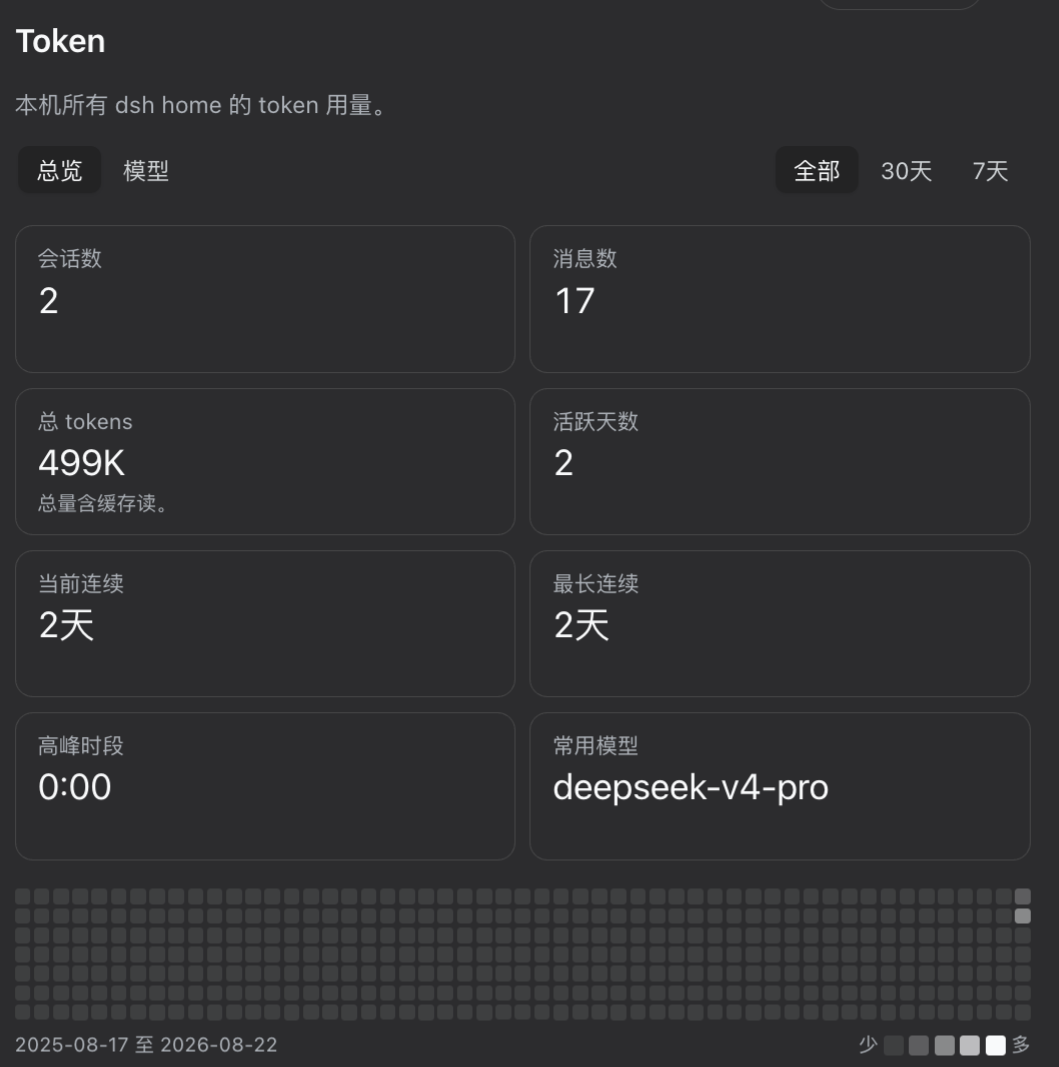
@zoytown/dsh-token is a DeepSeek Harness (dsh) plugin that reports your token usage across the whole machine. It folds the session logs of every dsh home — ~/.dsh and each ~/.dsh_desktop/<version> — into a Token page in Settings: headline totals, a GitHub-style contribution heatmap, current and longest streaks, peak hour, and a per-model breakdown of the four disjoint token buckets. It registers no model-facing tool and appends no session event, so mounting it costs the conversation nothing.
What it shows
- Sessions, Messages, Total tokens, Active days, current and longest streak, peak hour, and your most-used model
- A contribution heatmap of the last 53 weeks, or a day strip when a 7-day / 30-day window is selected
- A Models view splitting each model's usage into input / cache read / cache write / output
Everything is local and read-only: the plugin never writes to a session, never contacts a network service, and answers loopback callers only — the payload lists working directories, which is effectively a list of your projects.
What it deliberately does not show
Cost. The harness stores no price table — @deepseek-ai/dsh-llm-pi-ai hardcodes NO_COST and its own comment states the harness never reads a provider's cost metadata. Any currency figure here would be a local guess dressed up as a fact. Account balance is a separate concern, covered by @zoytown/dsh-billing.
Install
dsh plugin --profile web add @zoytown/dsh-token
Requires Node ^22.19 || >=24 and pnpm on PATH (dsh plugin is a thin pnpm forwarder). Then open Settings → Token.
No global dsh on your PATH? Either form works:
npx -y @deepseek-ai/dsh plugin --profile web add @zoytown/dsh-token   # published CLI
pnpm dsh plugin --profile web add @zoytown/dsh-token                  # from a harness checkout
Pick one and stay with it — both CLIs re-point the <DSH_HOME>/profiles/node_modules symlink farm at their own installation on every boot.
To remove it:
dsh plugin --profile web remove @zoytown/dsh-token
Desktop shells are not supported
This plugin targets dsh web. An Electron shell wrapping the harness may pin bare module resolution to its own bundle, which makes a profile-installed plugin unresolvable — and the plugin tree then fails to load outright rather than degrading, so the app will not start. Do not install this plugin into such a shell's DSH_HOME. You do not need one anyway: sessions recorded under ~/.dsh_desktop/<version>/ are read from dsh web all the same.
Configuration
Set on the dsh-token row in the profile's cordis.patch.yml:
| Key | Default | Meaning |
|---|---|---|
extraSessionRoots |
[] |
Extra dsh home directories to scan. Discovery covers ~/.dsh and ~/.dsh_desktop/<version>; a home reached through a $DSH_HOME that is not currently set needs listing here. |
includeCompaction |
true |
Count tokens spent generating compaction summaries — real spend the harness's own tokenUsage projection cannot see. Set false to reconcile 1:1 with it. |
refreshIntervalMs |
30000 |
How often to re-scan for appended sessions. |
indexChunkYieldMs |
16 |
Cooperative yield interval during a scan. |
How the numbers are defined
The rules matter more than the code, so they are stated plainly:
- Total tokens includes cache reads. The four provider buckets are disjoint, so their sum is the real throughput. The Models view splits them, because a total dominated by cache reads should be visible as such.
- Sessions excludes subagent sessions, but their tokens are counted. A delegated session is not one you opened; its count appears as a subtitle.
- Messages means human plus non-empty assistant messages — not log records. One step emits hundreds of streaming delta events, so a record count would be two to three orders of magnitude off.
- A usage report arrives twice per step — once while streaming, once on the final message. Samples are keyed by
(turn, step)and replaced, never accumulated, matching the harness's own projection. - Days and hours use your local calendar, computed with
Intlrather than UTC millisecond arithmetic, and streaks are measured between noon anchors so a daylight-saving transition cannot break one. - Retried steps under-count. When a provider request is retried inside a step the log keeps only the final usage report; the failed attempt was billed but its numbers are gone.
Metering coverage, retried steps, sessions still being written, and skipped logs are all disclosed in the page footer rather than silently absorbed.
How it works
A full scan is not viable on the read path: folding ~1,200 sessions / ~319 MB of compressed logs takes about 4 s, and the cost is frame-bound rather than byte-bound, so a faster decompressor does not fix it. So the host half folds once in the background and afterwards reads only the bytes appended since, keyed on (dev, ino, size, mtime). The browser half never sees a log byte — it renders a view model fetched from one loopback JSON route.
Session logs are a container of concatenated, independently decodable zstd frames, which is both why Node's stock zstd APIs cannot read them (they stop at the first frame) and why resuming from a stored byte cursor is sound.
Development
npm install
npm run typecheck
npm run build
License
MIT
安装
装一次目录插件,之后本站所有插件都能让 DeepSeek Harness 自动找、自动装:
dsh plugin add dshbase-catalog然后对 agent 说「帮我装 deepseek-harness-token」,它会在目录里找到并自动安装。文档:dshbase-catalog · 已验证场景包。
该插件是 GitHub 源码(未发 npm)——直接从仓库装:
Web profile:
dsh plugin --profile web add github:zoyluoblue/deepseek-harness-tokenHeadless(CLI)profile:
dsh plugin --profile headless add github:zoyluoblue/deepseek-harness-token实测报告
验证通过:从 GitHub 源码完成 L1 安装 + L2 加载 + L3 运行(dsh 0.1.0-rc.6)。
分享徽章
把这枚徽章粘进 README——它会链回本页,实测状态变化时自动更新:

[](https://dshbase.com/zh/plugins/deepseek-harness-token/)<a href="https://dshbase.com/zh/plugins/deepseek-harness-token/"><img src="https://dshbase.com/badges/deepseek-harness-token.svg" alt="dshbase 实测可装"></a>