
插件目录 / UI & Skins / dsh-advanced-model-editor
dsh-advanced-model-editor
已验证 · 实测可装 u9521
功能简介
DSH WebUI plugin for managing custom LLM providers, model parameters, thinking budgets, and request settings.
可用 — 实测通过,早期项目
DSH WebUI plugin for managing custom LLM providers, model parameters, thinking budgets, and request settings. 实测能干净安装、正常启动。早期项目,但功能可用。
「已验证」表示我们的自动化 CI 在干净 profile 里实际执行了 dsh plugin add 并启动成功——仅此而已。功能描述与版本兼容性均为作者声明。这不是安全审计,也不代表对第三方代码的背书。
README
dsh-advanced-model-editor
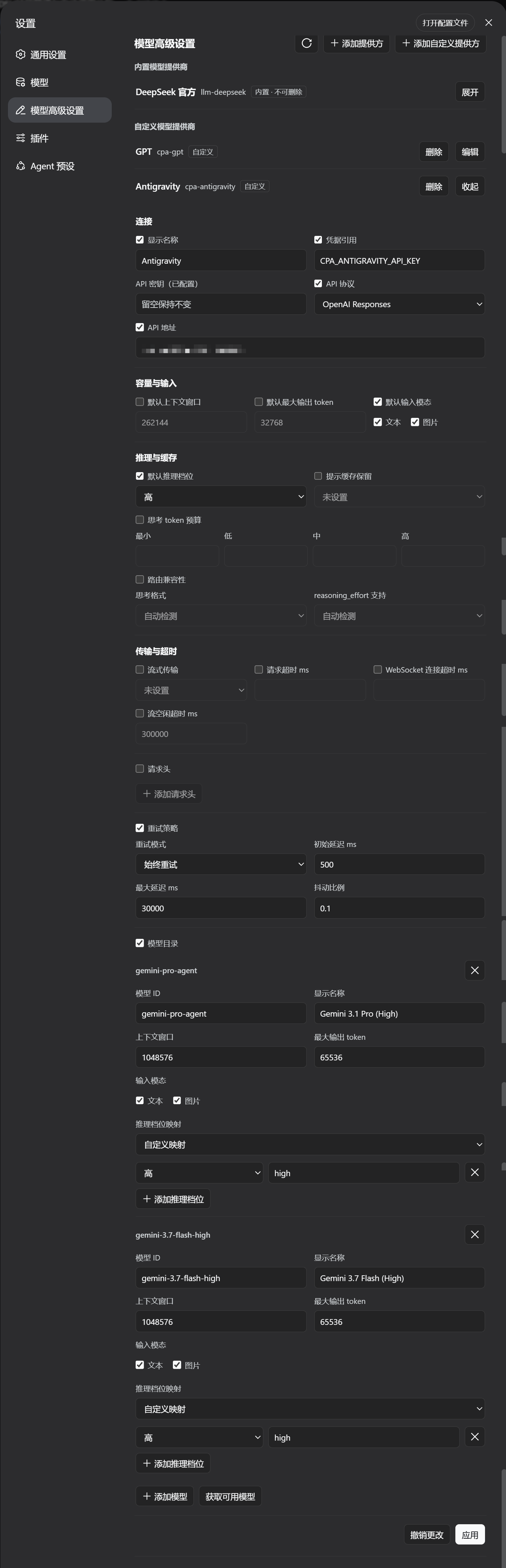
A DeepSeek Harness WebUI plugin that adds an Advanced Model Settings section to the
Settings page. It manages LLM provider profiles across the settings namespaces — the
custom provider namespace (llm-pi-ai) and the official provider namespace
(llm-deepseek) — including built-in and custom providers, model lists,
reasoning/thinking options, headers, retry policy and more, with the same validation
and conflict rules as the official settings UI.
Quick Install (Recommended / One-Line)
Install directly from the GitHub dist branch (pre-built by CI, no manual clone or compilation required):
dsh plugin --profile web add github:u9521/dsh-advanced-model-editor#dist
Then restart web (dsh web) and hard-refresh your browser (Cmd+Shift+R). The plugin appears as Advanced Model Settings in Settings.
Upgrade & Uninstall
# upgrade to the latest dist release
dsh plugin --profile web add github:u9521/dsh-advanced-model-editor#dist

# uninstall
dsh plugin --profile web remove @local/dsh-advanced-model-editor
Local Development & Manual Build
Prerequisites
- pnpm installed —
npx get-pnpm(see https://pnpm.io/installation; alternatives:corepack enableornpm install -g pnpm). Required both for building and becausedsh plugin --profile web addforwards to pnpm internally. - Node.js
^22.19 || >=24.
1. Clone
Clone the repository into the recommended location:
git clone https://github.com/u9521/dsh-advanced-model-editor.git ~/.dsh/plugins/cust-model-editor
cd ~/.dsh/plugins/cust-model-editor
2. Build
The build output (lib/) is not committed to the source branch — build it yourself for local development:
pnpm install
pnpm run build
The official DSH client-bundle preset is vendored underexternal/deepseek-harness/packages/client/, so no DSH source checkout is needed:pnpm run build runs tsc (type check + emit lib/types/) and tsdown (bundlelib/index.js + lib/client.js) with the project's own dependencies.
Verify the build with:
pnpm test
3. Local Install
dsh plugin --profile web add ~/.dsh/plugins/cust-model-editor
Then restart web (dsh web) and hard-refresh the browser (Cmd+Shift+R).
Development & Maintenance Commands
| Command | Description |
|---|---|
pnpm run build |
Full build (runs tsc type check + generates lib/ bundles) |
pnpm run check |
Type check only (tsc --noEmit) without emitting files |
pnpm test |
Full build, then run the test suite (node --test) |
pnpm run fmt |
Format source and config files with Prettier |
pnpm run fmt:check |
Check code formatting compliance |
pnpm run sync |
Sync the vendored DSH client-bundle preset from upstream (--check or --yes) |
Local Source Upgrade / Uninstall
# pull new sources, rebuild, then re-add
git -C ~/.dsh/plugins/cust-model-editor pull
cd ~/.dsh/plugins/cust-model-editor && pnpm run build
dsh plugin --profile web add ~/.dsh/plugins/cust-model-editor

# uninstall
dsh plugin --profile web remove @local/dsh-advanced-model-editor
Restart web and hard-refresh the browser afterwards.
License
安装
装一次目录插件,之后本站所有插件都能让 DeepSeek Harness 自动找、自动装:
dsh plugin add dshbase-catalog然后对 agent 说「帮我装 dsh-advanced-model-editor」,它会在目录里找到并自动安装。文档:dshbase-catalog · 已验证场景包。
该插件是 GitHub 源码(未发 npm)——直接从仓库装:
Web profile:
dsh plugin --profile web add github:u9521/dsh-advanced-model-editorHeadless(CLI)profile:
dsh plugin --profile headless add github:u9521/dsh-advanced-model-editor实测报告
验证通过:从 GitHub 源码完成 L1 安装 + L2 加载 + L3 运行(dsh 0.1.0-rc.6)。
分享徽章
把这枚徽章粘进 README——它会链回本页,实测状态变化时自动更新:

[](https://dshbase.com/zh/plugins/dsh-advanced-model-editor/)<a href="https://dshbase.com/zh/plugins/dsh-advanced-model-editor/"><img src="https://dshbase.com/badges/dsh-advanced-model-editor.svg" alt="dshbase 实测可装"></a>