
插件目录 / UI & Skins / dsh-capability-toggle-plugin
dsh-capability-toggle-plugin
已验证 · 实测可装 lifeopsgo
功能简介
Toggle individual agent capabilities (skills, MCP, tools, prompt, approval, guards) from the DSH WebUI composer — session / project / global, really enforced. DSH 各种能力(mcp/skill/tool等)多层级开关灵活控制
可用 — 实测通过,早期项目
Toggle individual agent capabilities (skills, MCP, tools, prompt, approval, guards) from the DSH WebUI composer — session / project / global, really enforced. DSH 各种能力(mcp/skill/tool等)多层级开关灵活控制 实测能干净安装、正常启动。早期项目,但功能可用。
「已验证」表示我们的自动化 CI 在干净 profile 里实际执行了 dsh plugin add 并启动成功——仅此而已。功能描述与版本兼容性均为作者声明。这不是安全审计,也不代表对第三方代码的背书。
README
dsh-capability-toggle-plugin
Control agent capabilities from the DSH WebUI — with real runtime enforcement.




English · 简体中文
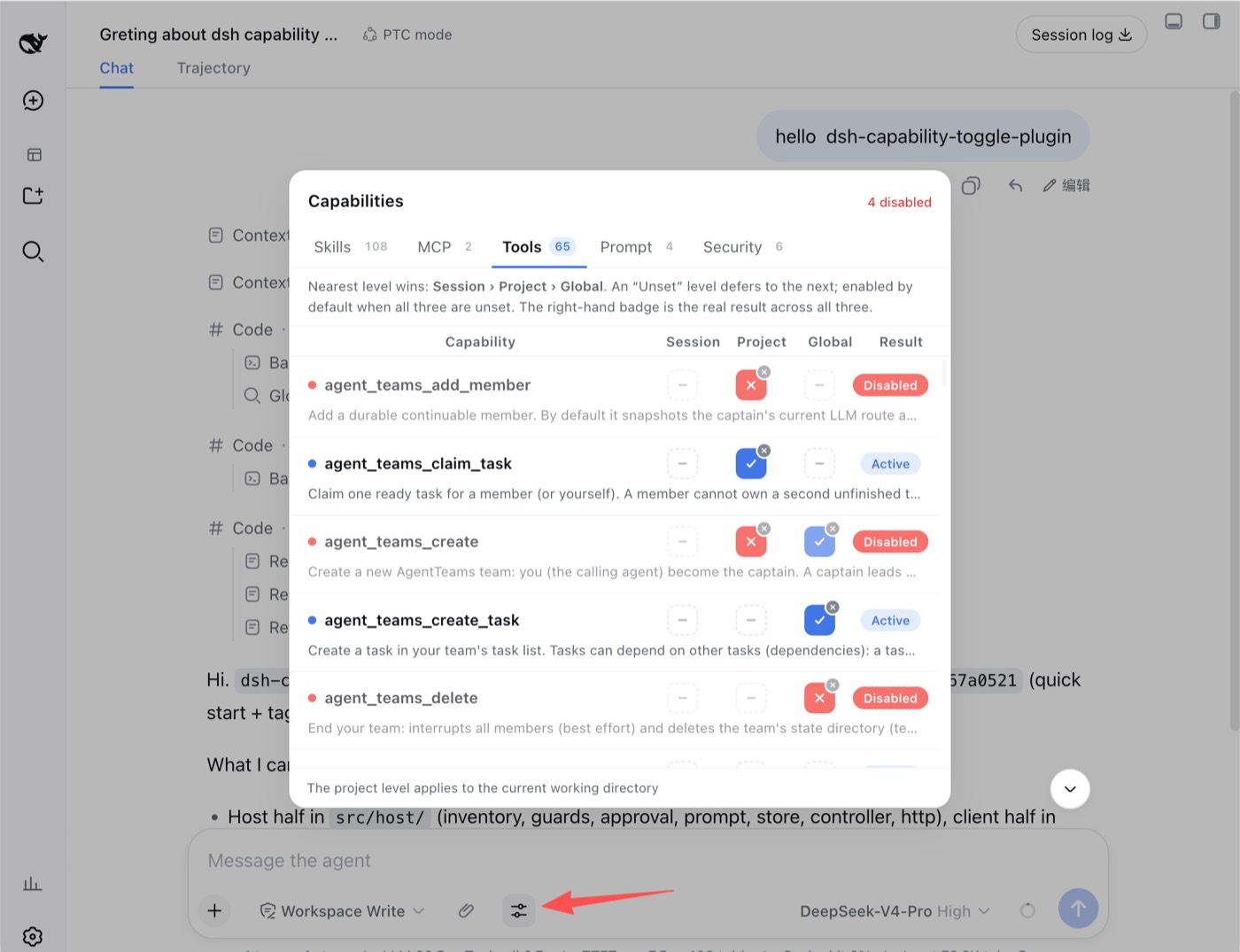
Session · Project · Global — blue check = on, red cross = off, dashed dash = unset.
What it is
A DeepSeek Harness (DSH) WebUI plugin for controlling skills, MCP servers, tools, prompt injections, approval escalation, and safety guards at session, project, or global scope. Depending on the family, disabling removes, suppresses, rejects, or intercepts the capability on the agent's next step.
Quick start
Requires Node.js ≥ 22.6.
dsh plugin --profile web add github:lifeopsgo/dsh-capability-toggle-plugin#v1.1.0
Restart the existing DSH Web GUI process, then refresh the page. Start it with the command below when it is stopped:
dsh --profile web web
Open the control beside the ➕ button while the agent is idle. Replace web with another profile name when needed.
Upgrade or remove
# Upgrade or downgrade: use any tag listed on the releases page
dsh plugin --profile web add github:lifeopsgo/dsh-capability-toggle-plugin#v1.1.0

# Remove
dsh plugin --profile web remove dsh-capability-toggle-plugin
Features
Three-level resolution
Each capability has three independent levels:
session › project › global › default (enabled)
The nearest explicit value wins. Unset defers to the next level; with every level unset, the capability remains enabled. The row badge always shows the resolved result.
The button displays only its current state: click to toggle on ↔ off, or use its small clear badge to return to unset.
Capability families
| Tab | Controls |
|---|---|
| Skills | Individual model-invocable skills, including project-level skills discovered from the session's workspace (.dsh/skills, .agents/skills) |
| MCP | MCP servers; expand a row to inspect member tools |
| Tools | Individual model-visible tools and their guidance sections |
| Prompt | A safe, presence-checked allowlist of prompt injections |
| Security | Approval escalation and five opt-in safety guards |
Enforcement
Every mechanism is scoped to the current agent; global registrations are not mutated.
| Family | Enforcement |
|---|---|
tool / mcp |
Removed with ctx.tools.restrict({ deny }); forced calls are refused |
skill |
Shadowed by a same-named modelInvocable:false runtime skill |
prompt |
Shadowed with empty text, or suppressed with suppressRuntimeContext() |
approval |
Scoped approval requests resolve to rejected |
guard |
tools/pre-execute blocks or requests confirmation for matching calls |
Security controls
Turning off Approval escalation rejects every approval request from that agent without changing the system /permission setting.
Safety guards are opt-in:
| Guard | Action |
|---|---|
| Read-only mode | Block file writes, creates, and edits |
| Protect secrets | Block access to common secret files and credentials |
| Dangerous shell | Confirm high-risk shell commands |
| Destructive git | Confirm history- or work-losing git commands |
| Outbound network | Confirm network tools and outbound shell actions |
Additional behavior: switches lock while the agent runs, state survives popup close and turn boundaries, and the UI follows the WebUI language.
Roadmap
Planned, not yet implemented:
- Cross-project config sync — copy or link project-level settings from another project instead of configuring each project from scratch.
Filter and select-all— shipped in v1.1.0: the toolbar's search box filters rows, and each level's bulk menu applies enable/disable/clear to every currently visible row.Bulk actions on a filtered selection— shipped in v1.1.0 together with the filter (search narrows, bulk acts on what's shown).
安装
装一次目录插件,之后本站所有插件都能让 DeepSeek Harness 自动找、自动装:
dsh plugin add dshbase-catalog然后对 agent 说「帮我装 dsh-capability-toggle-plugin」,它会在目录里找到并自动安装。文档:dshbase-catalog · 已验证场景包。
该插件是 GitHub 源码(未发 npm)——直接从仓库装:
Web profile:
dsh plugin --profile web add github:lifeopsgo/dsh-capability-toggle-pluginHeadless(CLI)profile:
dsh plugin --profile headless add github:lifeopsgo/dsh-capability-toggle-plugin实测报告
验证通过:从 GitHub 源码完成 L1 安装 + L2 加载 + L3 运行(dsh 0.1.0-rc.6)。
分享徽章
把这枚徽章粘进 README——它会链回本页,实测状态变化时自动更新:

[](https://dshbase.com/zh/plugins/dsh-capability-toggle-plugin/)<a href="https://dshbase.com/zh/plugins/dsh-capability-toggle-plugin/"><img src="https://dshbase.com/badges/dsh-capability-toggle-plugin.svg" alt="dshbase 实测可装"></a>