
插件目录 / UI & Skins / dsh-chatflow-rail
dsh-chatflow-rail
已验证 · 实测可装 veritas501
功能简介
Conversation-flow navigation rail for the dsh web GUI — one dash per user message with hover previews and smooth jumps, plus a docked "previous message" card.
可用 — 实测通过,早期项目
Conversation-flow navigation rail for the dsh web GUI — one dash per user message with hover previews and smooth jumps, plus a docked "previous message" card. 实测能干净安装、正常启动。早期项目,但功能可用。
「已验证」表示我们的自动化 CI 在干净 profile 里实际执行了 dsh plugin add 并启动成功——仅此而已。功能描述与版本兼容性均为作者声明。这不是安全审计,也不代表对第三方代码的背书。
README
dsh-chatflow-rail
中文 | English
A plugin for the dsh web GUI that adds a conversation-flow navigation rail on the left of the chat — one dash per user message, positioned 1:1 against the real content — plus a previous-message card docked at the top.
Screenshots
| Previous-message card + rail | Hover preview over the rail |
|---|---|
 |
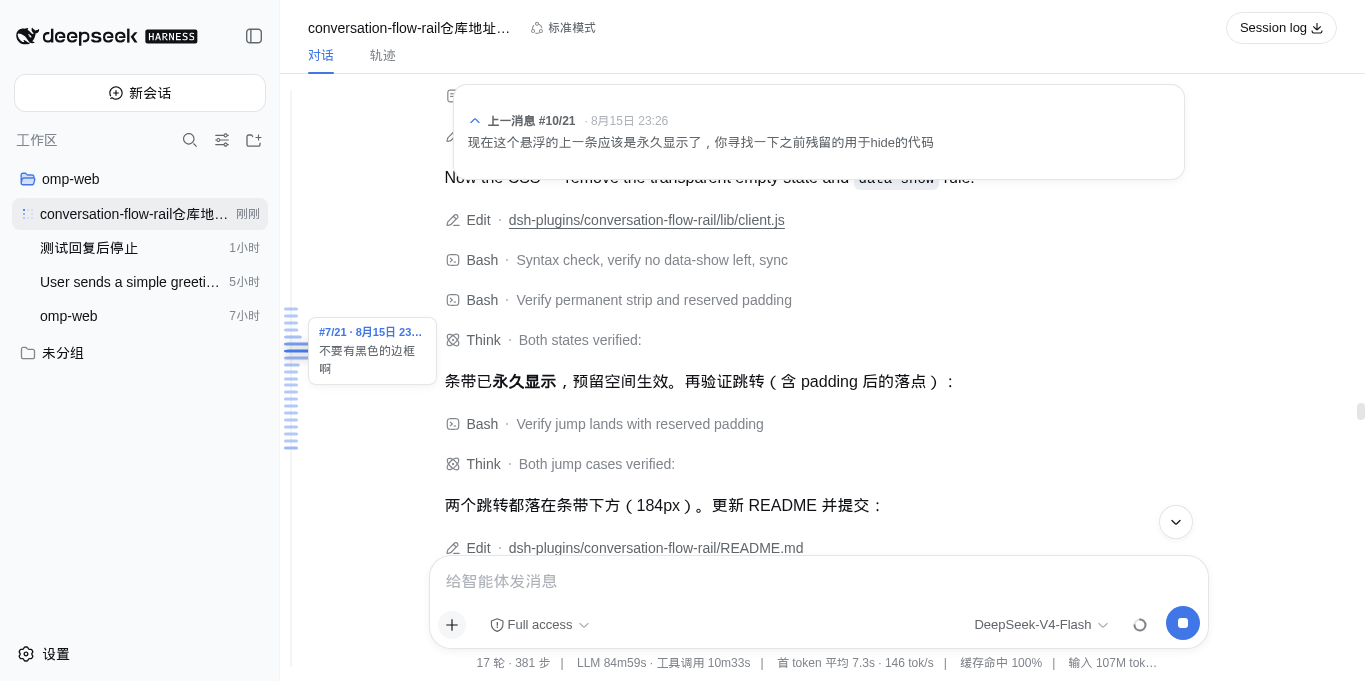 |
Instead of scrolling through a long transcript to find where you were, the rail gives you the whole conversation as a map: a tight cluster of dashes, each one a user message, and hovering fans the cluster out — dashes near the pointer widen and darken with a smooth falloff. Crossing the preview threshold floats a card with #N/M · time and the message content. Click a dash — or anywhere on the rail — and the view eases smoothly to that message, landing below the top card.
When you scroll a user message above the viewport, a native-styled floating card at the top shows 上一消息 #N/M · time with a 3-line preview; click it to jump back. The card is a floating overlay in the shell's click-through layer: the empty state is fully transparent, so the top of the conversation stays clean and nothing is reserved when there is nothing to show. Steering follow-ups (messages sent while a run is active) count as anchors too, and the plugin auto-expands dsh's history window so the rail covers the whole conversation — not just the tail window the transcript renders.
Install
The plugin is a git-hosted bundle whose build script pnpm blocks by default, so first allow it in the web profile's workspace file, then add the package.
# 1. Allow the plugin's build (prepare) script — add to
#    ~/.dsh/profiles/web/pnpm-workspace.yaml:
#      onlyBuiltDependencies:
#        - dsh-chatflow-rail

# 2. Install from the GitHub repo (prepare builds lib/ on install;
#    lib/ is a build artifact and not committed)
dsh plugin --profile web add github:veritas501/dsh-chatflow-rail

# 3. Restart dsh web, then refresh the page
dsh web
Notes:
dsh pluginbehaves like adding a dependency to your web profile. A bundle plugin is loaded once its full package name appears in the profile'sdsh.profile.bundleslist (recent dsh builds add it automatically; add it manually if yours does not). The bundle patch applies on the next boot, and the browser picks up the new bundle revision on refresh.- Developing the plugin itself? Install from a local checkout instead:
pnpm buildfirst, thendsh plugin --profile web add file:/path/to/dsh-chatflow-rail. - The rail is drawn by the browser half (
dsh.client→lib/client.js); the Node half (lib/index.js) is a no-op so the loader's root-module contract is satisfied.
Development
pnpm run build— emits the browser bundle (lib/client.js) and the Node half (lib/index.js) via tsc + tsdown.src/client/model/*— React-free pure logic (geometry, layout, chip selection, smooth scroll, anchor collection, paging); tunables live insrc/client/model/constants.ts.src/client/view/*— TSX components and CSS Modules (compiled by lightningcss, injected asstyle[data-plugin="dsh-chatflow-rail"]).pnpm test— vitest behavior tests for the model layer;pnpm run typecheck— type gate.- A
--devdsh webserver hot-reloads rebuilt bundles —pnpm run buildalone is usually enough to see changes.
License
MIT © veritas501
安装
装一次目录插件,之后本站所有插件都能让 DeepSeek Harness 自动找、自动装:
dsh plugin add dshbase-catalog然后对 agent 说「帮我装 dsh-chatflow-rail」,它会在目录里找到并自动安装。文档:dshbase-catalog · 已验证场景包。
该插件是 GitHub 源码(未发 npm)——直接从仓库装:
Web profile:
dsh plugin --profile web add github:veritas501/dsh-chatflow-railHeadless(CLI)profile:
dsh plugin --profile headless add github:veritas501/dsh-chatflow-rail实测报告
验证通过:从 GitHub 源码完成 L1 安装 + L2 加载 + L3 运行(dsh 0.1.0-rc.6)。
分享徽章
把这枚徽章粘进 README——它会链回本页,实测状态变化时自动更新:

[](https://dshbase.com/zh/plugins/dsh-chatflow-rail/)<a href="https://dshbase.com/zh/plugins/dsh-chatflow-rail/"><img src="https://dshbase.com/badges/dsh-chatflow-rail.svg" alt="dshbase 实测可装"></a>