
dsh-code
已验证 · 实测可装 UNLINEARITY
功能简介
Claude-Code-style TUI bundle for DeepSeek Harness. 充分结合 DSH 的核心机制与Codex CLI 、Claude Code 的优秀机制,打造的 DSH-Code.
可用 — 实测通过,社区增长中
Claude-Code-style TUI bundle for DeepSeek Harness. 充分结合 DSH 的核心机制与Codex CLI 、Claude Code 的优秀机制,打造的 DSH-Code. 实测能干净安装、正常启动。社区在增长,是个稳妥选择。
「已验证」表示我们的自动化 CI 在干净 profile 里实际执行了 dsh plugin add 并启动成功——仅此而已。功能描述与版本兼容性均为作者声明。这不是安全审计,也不代表对第三方代码的背书。
README
DSH-Code
English | 中文
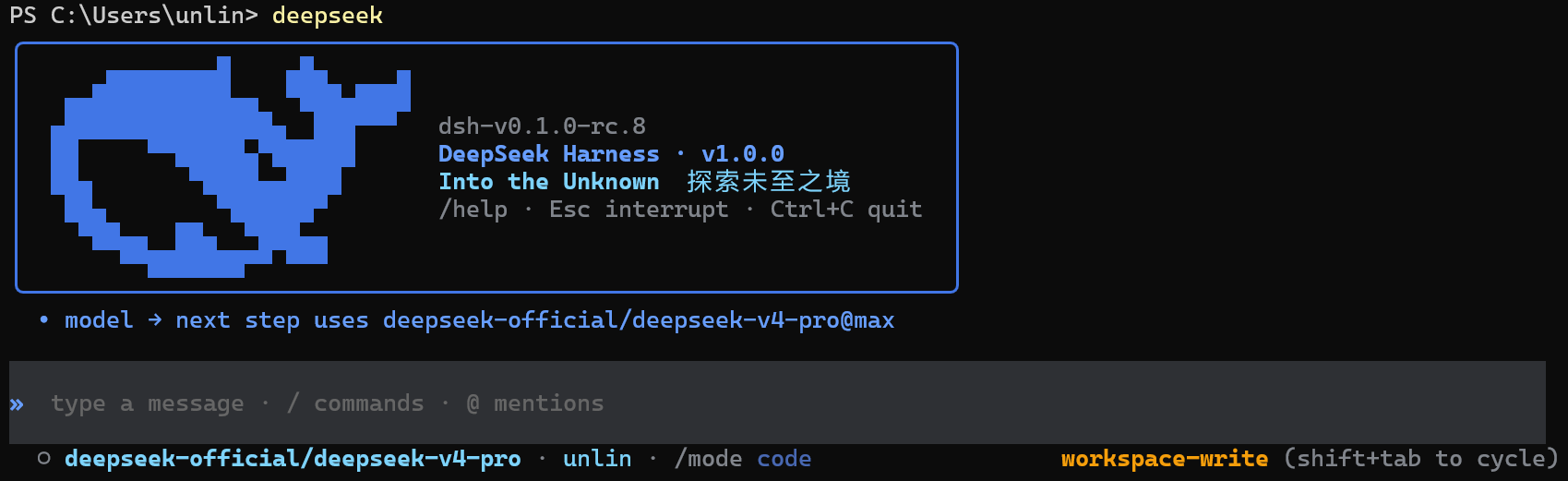


1. Project overview
DSH-Code is a terminal coding interface for DeepSeek Harness (dsh). It is composed as an out-of-tree bundle on top of the official @deepseek-ai/dsh-base and uses the same Agent, Session, tool, command, skill, permission, sandbox, context-compaction, and plugin services as the Harness Web UI.
DeepSeek Harness registers models, tools, storage, policies, and interfaces as plugins through Cordis. Durable session events record the information required to restore conversations and runtime state. DSH-Code preserves that architecture while adding a terminal workflow suited to coding tasks. The interface follows terminal conventions familiar to developers, while runtime behavior remains governed by DSH services and configuration.
2. Quick start
Requires Node ^22.19 || >=24 and the preview dsh CLI (current release line: @deepseek-ai/dsh@0.2.0-rc.2). You can still enter the TUI, browse sessions, and use non-model features without configuring a model; press Tab in /model to manage API keys, OAuth, device-code sign-in, endpoints, and models.
1. Install and update
Install from npm (recommended). /update and deepseek update --apply both work afterwards: they check npm for a newer version and walk you through the upgrade.
npm install -g @deepseek-ai/dsh@0.2.0-rc.2 pnpm
npm install -g dsh-code@2.0.0
dsh plugin --profile cli add dsh-code@2.0.0
When npm is unreachable (restricted network, a mirror outage), install the GitHub Release tarball instead. CI builds it on every tag and attaches it to the release; lib is prebuilt, so the installing machine needs no toolchain:
npm install -g @deepseek-ai/dsh@0.2.0-rc.2 pnpm
npm install -g https://github.com/unlinearity/dsh-code/releases/download/2.0.0/dsh-code-2.0.0.tgz
dsh plugin --profile cli add https://github.com/unlinearity/dsh-code/releases/download/2.0.0/dsh-code-2.0.0.tgz
npm script prompts: npm 11.6+ may print
npm warn install-scriptsduring a global install (unapproved build scripts for node-pty, koffi, and friends). The host ships prebuilt artifacts, so common platforms can ignore the warning; if a native-module error appears after installing, follow npm's own hint and rerun withnpm install -g --allow-scripts=<package list>.Version alignment: dsh-code targets dsh
0.2.0-rc.2, with every Harness dependency pinned exactly to0.2.0-rc.2. A locallink:mount should be rebuilt withgit pull && pnpm install && pnpm build; do not run the updater against a checkout.Upgrade notes: sessions and startup arguments recorded under the legacy
codepreset map automatically to the upstream-renamedptc— no manual migration. The session-log reader follows upstream to format v4: older logs migrate in the kernel on read (v3 to v4), and the original files on disk stay untouched.Settings migration: on the first boot of a dsh 0.1.7-targeting build, the host imports the retired global
settings.yamlinto the active profile once (the file is then renamed tosettings.yaml.imported). Upgrade dsh and dsh-code together so no degraded boot falls in between. If provider/model configuration goes missing after an upgrade, the TUI detects it at startup and re-imports the stranded sections automatically through the host's own settings pipe — no manual steps, no re-login (credentials are unaffected). Only when the settings service is unwritable do you need the manual fallback: copysettings.yaml.importedtosettings.yamlunder the dsh home and restart.A GitHub tarball install can lead npm by one release (until the registry carries the same version). The updater only reads npm, so it reports that this install is newer and refuses to downgrade, instead of claiming everything is up to date; use
/updateonce npm catches up.
2. Launch commands
Available launch commands:
dsh --profile cli
deepseek
dsh-code
dsh --profile cli, deepseek, and dsh-code are equivalent launch commands. deepseek and dsh-code are global aliases for dsh --profile cli, and all additional arguments are forwarded unchanged, for example deepseek --resume abc123.
DeepSeek Harness is still a developer preview and may introduce compatibility-breaking changes. DSH-Code will continue to track the evolution of its plugin interfaces.
For installation, native-module, and plugin-loading issues, run deepseek doctor first, then see Troubleshooting.
3. Core features and usage
DSH-Code brings DSH Agents, models, tools, and durable sessions directly into the terminal, covering the complete workflow from writing code to reviewing changes.
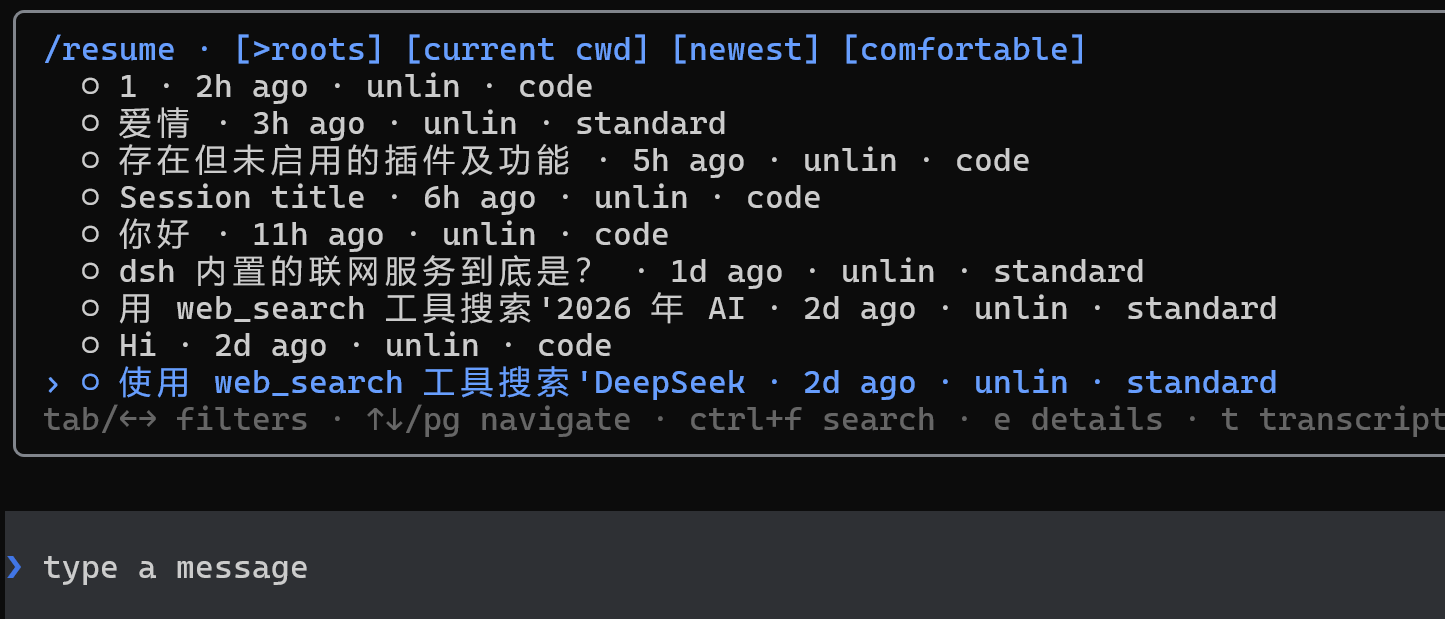
1. Session management
- Create sessions with
/new, or restore existing sessions with/resumeand--continue - Create a new work branch from a historical point with
/forkwhile preserving the original session - Search history by current directory, update time, and session scope
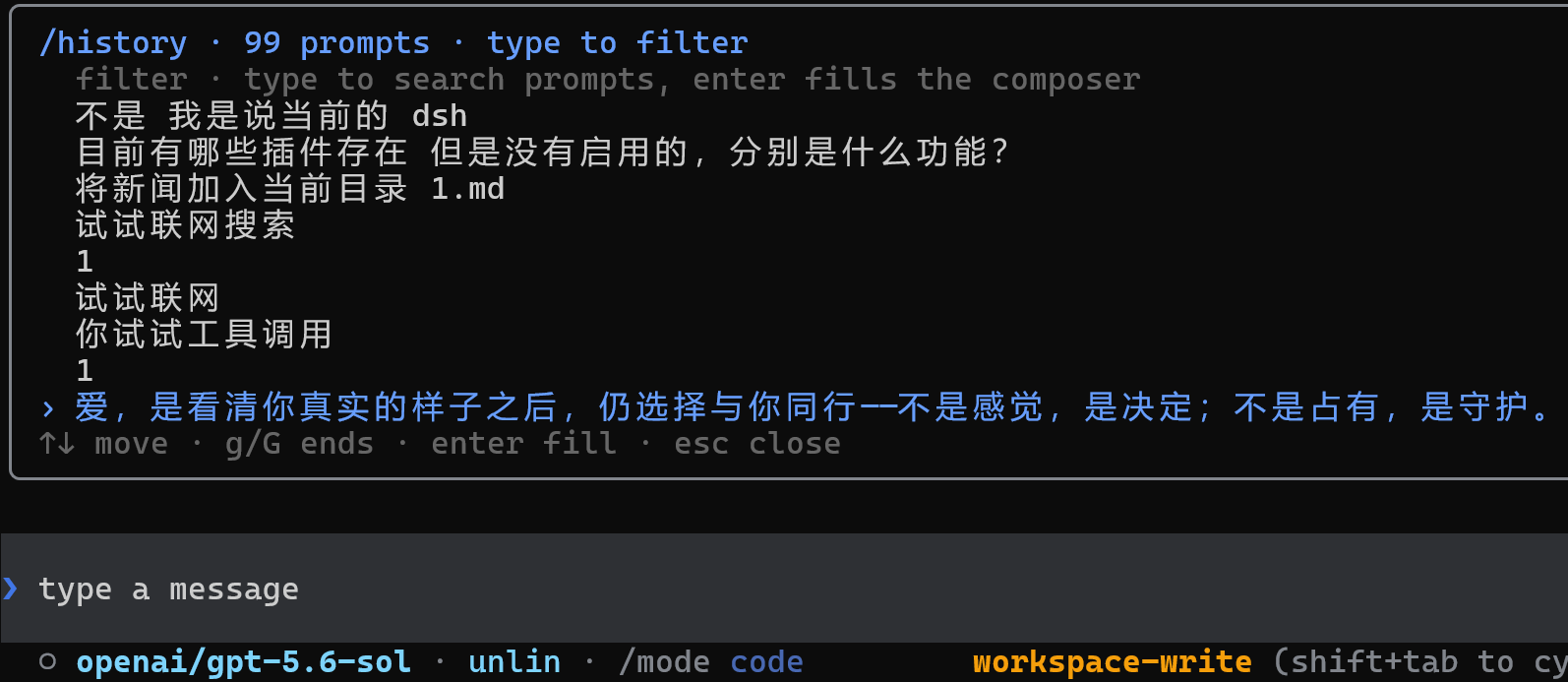
- Recall input history with Up/Down (typed slash commands included), or search previous prompts and commands with
/history - Use persistent titles, Markdown export, context occupancy, token, cache, TTFT, and elapsed-time metrics;
/usagereports the harness token meter's four disjoint buckets, the totals merged by model, and a per-turn breakdown - The status bar's
incounts only uncached input, andcacheshows both the cache-read volume and the hit share — together they are the billed prompt side - Restore the session's Agent Preset, model selection, and subagent list when resuming it; the welcome header shows both the dsh and dsh-code versions
2. Agents, models, and extensions
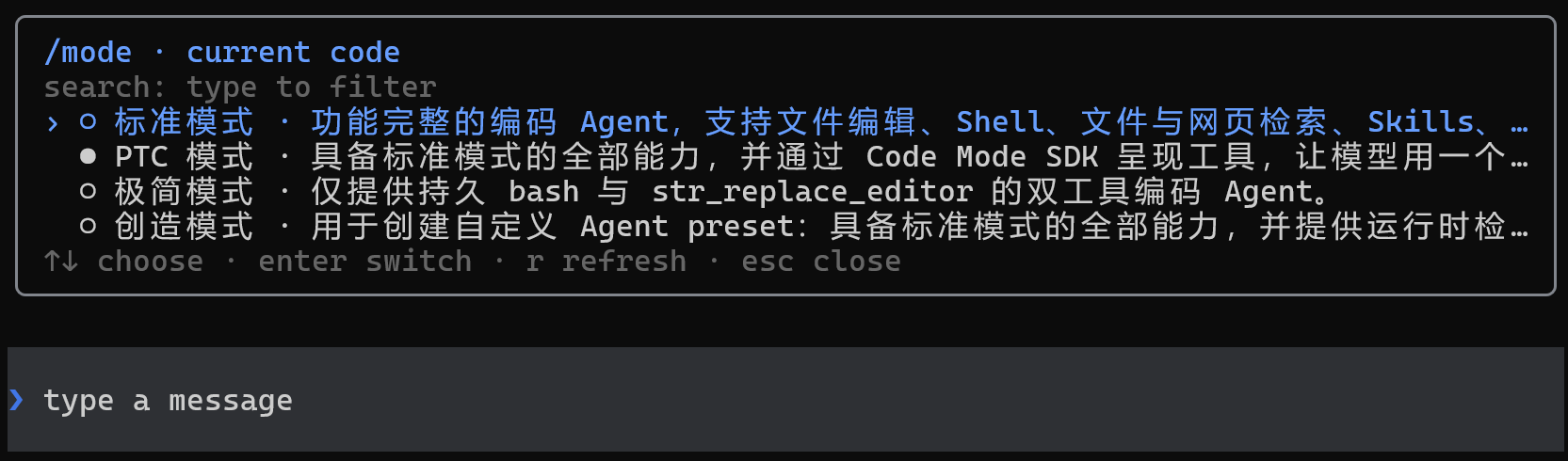
- Select an independent Agent Preset for each session to compose tools, prompt sections, skills, context compaction, plan mode, and subagent capabilities
- Use
/modeto selectstandard,ptc,minimal,cordis, or a user-defined Preset (the legacycodeid maps toptc) - Use
/modelto switch models and manage providers, API keys, OAuth/device-code sign-in, endpoints, available models, and context windows - In the
/modelprovider list, Enter manages a manual API key,lstarts sign-in, andologs out after confirmation - Automatically load commands and skills available in DSH; use
/helpto find them and/pluginto inspect extension status - Use plans, goals, todos, permissions, sandboxes, subagents, and additional instructions while a task is running
3. Model-switch animations
The composer plays Wave, Aurora, or Pulse when the model or reasoning effort changes under the following conditions:
| Scenario | Trigger | Animation text | Effect tier |
|---|---|---|---|
| Official DeepSeek model | Switch to the model, or change its reasoning effort | deepseek |
Flash uses the single-band tier; other DeepSeek models use the multi-band tier |
| Other models | After changing the model or reasoning effort, the effective effort is strictly above high |
Into the Unknown |
Uses the same multi-band tier as non-Flash DeepSeek models |
Levels above high include xhigh, x-high, very-high, max, maximum, and ultra. For non-DeepSeek models, high, medium, low, and off do not trigger an animation.
| Style | Flash | Other DeepSeek / Into the Unknown |
|---|---|---|
| Wave | One blue crest sweeps from left to right, about 1.2 seconds | Two offset blue crests sweep across in sequence with trailing · ✦ ✧ sparkles, about 1.5 seconds |
| Aurora | Two blue light bands drift across one another, about 1.5 seconds | Three differently hued light bands drift across one another, about 1.8 seconds |
| Pulse | One ring expands outward from the center of the composer, about 1.1 seconds | Two rings expand outward in sequence, about 1.45 seconds |
/animation off disables purely decorative effects such as Wave/Pulse, animated theme flow, and rainbow bursts. The input cursor, streaming caret, busy chase, Thinking/Deep Diving shimmer, and Deep diving... clock remain live so an active turn never looks frozen.
4. Coding workflow
- Use
@to reference workspace files or existing sessions; selecting PNG, JPEG, WebP, or GIF files attaches the real image automatically - Attach images through the initial prompt, repeated
--imagearguments, or by dragging one or more images into the terminal - Inspect changes by file with
/diff, and start a read-only code review with/review(a range picker; diffs use full-row green/red) run_codelists nested tool calls as they run; workflow runs list their member agents until they finish- Copy the latest complete response with
/copy, and inspect history and full tool details with Ctrl+O; intermediate replies that contain reasoning but no final text do not occupy their own inspector entry - Handle tool approvals, structured questions, plan reviews, multiple selections, and custom answers
- Control what the Agent may do with permission Presets and sandboxes; add instructions or interrupt while a task is running
5. Queued and steered messages
While a turn is running you can keep typing. There are two ways to send what you type:
- Queue — it waits until the turn finishes and then runs as a new turn. Use it for "do this once you are done with that".
- Steer — it reaches the model before the next step of the running turn, as part of that request. Use it when the work has gone the wrong way and you want it corrected now.
The difference is when the model sees it: a queued message is read once the turn has finished, a steered one before the turn makes its next move.
How to send each way:
- Press
Tabon an empty composer to switch between them. The prompt glyph (❯/↳), the placeholder text, and the notice shown on switching all say which one is selected. With text in the box,Tabstill completes commands and references. /queueopens the queue panel: pressEnteron a message to send it as steering instead,eto edit its text (attachments are kept as they are), ordto remove it.- Press
Deleteon an empty composer to cancel the newest queued message. - Pressing
Escto cancel the turn keeps queued messages and sends them next, while steered messages are dropped with the turn.
Every prompt in the transcript is a full-width coloured row, and the colour says how it was sent: the theme's bright brand colour for an ordinary message, its warning colour for a queued one, and its third accent for a steered one, each labelled with "queued" or "steered". The colour is computed from the theme, so switching themes or rerolling rainbow changes it too.
A message counts as queued or steered only when a turn was already running at the moment you sent it. A message sent while idle is an ordinary one even if the composer is set to steer, because it starts a new turn straight away.
See Queued and steered messages for the queue behaviour, the order the upstream queues are read in, and the colour values per theme.
6. Commands and key bindings
Start the TUI:
dsh --profile cli                    # create a standard session
dsh --profile cli --mode ptc         # start with the specified Agent Preset (standard/minimal/cordis/ptc)
dsh --profile cli --continue         # resume the latest session for the current directory
dsh --profile cli --resume abc123    # resume by id or unique prefix
dsh --profile cli --session my-id    # create a session with an explicit id
The following built-in commands are available inside the TUI. Additional Harness commands and user skills depend on the active profile and installed packages; use /help for the complete current list.
Sessions and history
| Command | Purpose |
|---|---|
/new [preset] |
Create a session, optionally selecting an Agent Preset |
/resume [id|prefix] |
Search for or restore an existing session |
/search [query] |
Full-text search across persisted sessions (Enter resumes the hit) |
/resume cancel |
Cancel a pending session switch |
/fork [event-seq] |
Create a session branch from the latest completed turn or a specified event position |
/delete [id|prefix] |
Delete a session and its subagent sessions |
/title <text> |
Change the current session title |
/export [path] |
Export the current session as Markdown |
/history |
Search and reuse previously submitted prompts and slash commands |
/clear |
Clear the current terminal display without deleting the durable session |
Agents, models, and permissions
| Command | Purpose |
|---|---|
/mode [preset] |
Inspect or select the current session's Agent Preset |
/model |
Switch models and manage providers, API keys, browser sign-in, endpoints, and available models |
/effort |
Adjust the current model's reasoning effort |
/permission [preset] |
Inspect or switch the permission Preset |
/subagent |
Select the model used when a subagent performs a task |
Coding, tasks, and background work
| Command | Purpose |
|---|---|
/diff [--staged|ref] |
Inspect the working-tree, staged, or specified-ref Git diff by file |
/review [note] |
Bare /review opens a candidate picker (uncommitted changes / pick a branch / pick a commit / custom focus); any argument becomes a review note over the uncommitted diff (/review in Chinese). The diff is pasted into the current session under read-only permissions, and findings arrive with P0-P3 priorities and file anchors |
/todos |
View the complete todo list for the current session |
/queue |
See the messages waiting for the next turn: enter sends one as steering instead, e edits its text, d removes it; ↑↓/PageUp/PageDown/g/G move |
/usage |
See this session's token usage: the four disjoint buckets (uncached input, cache write, cache read, output), the totals merged by model, and the per-turn breakdown |
/agents |
View subagent sessions created by the current session |
/jobs |
View background jobs and their runtime status |
/copy |
Copy the latest complete assistant response |
Extensions, display, and exit
| Command | Purpose |
|---|---|
/plugin [query] |
Inspect loaded extensions and their status |
/update |
Checks npm for a newer version and confirms the upgrade. A GitHub tarball install can lead npm, in which case it says so and refuses to downgrade |
/statusline |
Select the items displayed in the status bar |
/vscode-keys |
Pass Ctrl+R through VS Code-family terminals (idempotent user-level keybindings.json write) |
/theme |
Switch colors: dark / light / prismatic / rainbow / auto |
/rainbow [seed] |
Reroll or pin the rainbow theme seed; a bare /rainbow rolls a new seed and switches to rainbow |
/language [en|zh] |
Switch the interface language, default English; model prompts and factual status values stay in English |
/animation |
Toggle decorative animations; input cursors and activity indicators stay live, /animation [on|off] |
/help |
View key bindings, built-in commands, Harness commands, and user skills |
/quit |
Exit DSH-Code |
Input and key bindings
| Action | Purpose |
|---|---|
Enter |
Submit the current input |
Ctrl+J / Alt+Enter |
Insert a newline in the composer (with the enhanced keyboard protocol, Shift+Enter / Ctrl+Enter work too) |
Up / Down |
Recall the previous or next input-history entry |
Tab |
Complete commands, skills, or @ references; on an empty composer, switch the next message between queue and steer |
@ |
Reference workspace files or existing sessions; image files are sent as attachments |
Ctrl+O |
Inspect history and full tool details; intermediate replies with reasoning but no final text do not occupy their own entry |
Ctrl/Alt+R |
Fold or expand model reasoning; run /vscode-keys first in VS Code-family terminals to pass Ctrl+R through |
Shift+Tab |
Cycle permission Presets, and the plan station when /plan is available |
Delete |
Cancel the newest queued message when the composer is empty (steering is not in the queue; press Esc to end the turn instead) |
Ctrl+K |
Delete from the cursor to the end of the line |
Ctrl+U |
Clear the current input line |
Ctrl+A / Ctrl+E |
Move to the beginning or end of the current line |
Esc |
Close the current menu or interrupt the running turn; queued messages are kept and sent next, steered ones are dropped with the turn |
Ctrl+C |
Cancel a task, clear the input, or exit, depending on the current state |
Ctrl+D |
Exit DSH-Code |
Status indicators
| Indicator | Trigger |
|---|---|
✻ Deep diving... |
The turn is running while nothing is streaming (waiting for the first token, gaps during tool runs); an elapsed clock appears after 15 seconds |
✻ Thinking… |
Model reasoning is streaming; collapsed into the shimmer marker by default, expand with Ctrl/Alt+R |
4. How DSH-Code integrates with DSH
1. Runtime composition
DSH-Code reads the live Harness registries instead of maintaining a separate local copy. Model adapters, tool providers, skill sources, commands, permission policies, persistence backends, sandboxes, and subagent providers can all be added or replaced through DSH composition.
/plugin provides a read-only view of the current Cordis loader state.
2. Bundled and optional official plugins
The following official plugins ship with DSH-Code and are enabled in the composition by default:
- Session search: the model gets five read-only tools —
session_search,session_event_search,session_trace,session_event_trace,session_event_read— over prior session logs (the index persists under the dsh home: the first search builds it once and later searches maintain it incrementally; cross-session access is scoped by exact working directory; on Node 22 the first search prints a one-timenode:sqliteexperimental warning, which is expected).
The following official plugins are installed but opt-in (append rows in the user layer ~/.dsh/profiles/cli/cordis.patch.yml, or install as noted):
MCP servers (
@deepseek-ai/dsh-mcp-client, one row per server; tools register asmcp__<server>__<tool>):- insert: - id: mcp-memory name: '@deepseek-ai/dsh-mcp-client' config: transport: stdio serverName: memory command: mcp-server-memory(HTTP transports use
transport: streamable-httpplusurl; an unreachable server degrades to a reconnect loop and never breaks startup.)Claude Code / Codex hooks bridges (
@deepseek-ai/dsh-hooks-claude-code/-codex): run existing hooks configurations at the interception seams; a missing hooks file is a silent no-op:- insert: - id: hooks-claude name: '@deepseek-ai/dsh-hooks-claude-code' config: configPath: C:/Users/you/.claude/hooks.jsonLSP navigation: the composition carries
lsp/lsp-stdio/tool-lsprows in a disabled state — language-server binaries resolve at mount, and a missing binary would fail the whole composition boot. The host CLI does not bundle the three packages: install them into the profile first (dsh plugin --profile cli add @deepseek-ai/dsh-lsp @deepseek-ai/dsh-lsp-stdio @deepseek-ai/dsh-tool-lsp), then flip the three rows todisabled: falsein the user layer and configurelsp-stdioservers(extension to language to server command); the model then gets thelsptool (goToDefinition / findReferences / goToImplementation / hover).Persistent terminals: the PTY service and platform backends (pwsh dialect on Windows, bash on POSIX) mount by default, but the six model tools
terminal_open/terminal_send/terminal_read/terminal_signal/terminal_close/terminal_listship DISABLED — enabling them grants shell capability to every session, which the preset layer is supposed to gate, so deployments opt in explicitly.@deepseek-ai/dsh-tool-terminalis likewise not bundled by the host: rundsh plugin --profile cli add @deepseek-ai/dsh-tool-terminalfirst, then enable in the user layer:- id: tool-terminal disabled: false(Background sends appear in the /jobs panel.)
tmux pane context (
@deepseek-ai/dsh-tmux-context): injects the current tmux pane into the model context when running inside tmux (config: { refreshIntervalMs: 60000 }); outside tmux every step degrades to a harmless no-op:- insert: - id: tmux-context name: '@deepseek-ai/dsh-tmux-context' config: refreshIntervalMs: 60000External CLI delegation:
dsh plugin --profile cli add @deepseek-ai/dsh-subagent-claude-code(or-codex) installs the dormant provider; following the upstream contract, copy the preset and enable thetool-subagent-claude-code/tool-subagent-codexrow to let the model delegate tasks to the claude / codex CLIs.
3. Session-scoped Agent Presets
The Host owns the shared infrastructure—registries, persistence, session queries, permissions, and sandbox policies—while each session receives an isolated Agent scope composed by an Agent Preset:
standard— a full-featured general-purpose coding Agentptc— multi-operation workflows designed for PTC (formerly Code Mode); the legacycodeid still worksminimal— a single-tool composition keeping only the persistent shellcordis— the full Agent plus runtime inspection and Preset-authoring guidance- user Presets — custom tools, prompt sections, skills, context compaction, plan mode, and subagent behavior
Use /mode before the first turn, or start directly with --mode <preset>. The selected Preset is written to the session and restored when the session resumes.
4. Session history and recovery
Prompts, streaming chunks, tool calls and results, model selections, plan state, permissions, titles, and Preset selections are all projected from durable Session events. Session recovery, export, history inspection, context metrics, and terminal replay use the same record.
React state stores only temporary interface details such as the input draft, cursor, active panel, selection, and scroll position.
dsh profile
└─ Host plane: registries · persistence · queries · permissions · sandbox
   ├─ Agent session A + preset code
   ├─ Agent session B + preset minimal
   └─ DSH-Code TUI
      durable events → pure projection → append-only transcript
                                  └→ bounded panels → composer → status bar
5. Development
pnpm install
pnpm lint            # type-aware ESLint over src, tests, scripts, and the root configs
pnpm typecheck       # the build project (src)
pnpm typecheck:tests # the spec suite and scripts
pnpm test
pnpm test:coverage   # coverage report (trend visibility; no percentage gate)
pnpm build
pnpm verify          # lint + both typechecks + tests in one pass
pnpm run gen:whale   # regenerate src/whale-glyph.ts from the vendored logo path
tsconfig.test.json puts the specs inside a TypeScript project, so a fixture that drifts from the interface it fakes fails pnpm typecheck:tests instead of surfacing (or not) at runtime.
The whale glyph is generated from the DeepSeek FishLogo geometry vendored in scripts/fish-logo.ts (source: DeepSeek Harness, MIT).
1. Source development installation
For a local checkout:
dsh plugin --profile cli add file:C:/path/to/dsh-code
GitHub installation is available for source development:
dsh plugin --profile cli add github:unlinearity/dsh-code
The Git package builds during installation. If pnpm asks for an allowBuilds entry, copy the complete entry it prints into ~/.dsh/profiles/cli/pnpm-workspace.yaml, then run the command again. The key contains the Git URL and commit, so it cannot be replaced with only dsh-code.
2. Uninstall
dsh plugin --profile cli remove dsh-code   # unmount the plugin from the cli profile
npm uninstall -g dsh-code                  # remove the global package and the deepseek / dsh-code commands
Both commands are required for a complete uninstall. The first only removes the profile mount, so the deepseek command still exists and reports "the cli profile does not mount dsh-code yet". The second removes the global npm package and its launch aliases. Uninstalling does not affect @deepseek-ai/dsh itself or any persisted session data.
3. References
- Runtime services, events, plugin scopes, and the persistence model follow DeepSeek Harness.
- Session navigation, overlay sizing, scrollback, bottom layout, and resize handling refer to Codex CLI.
- Slash-command discovery, turn steering, reasoning folds, approvals, and question flows refer to Claude Code.
DSH-Code is an independent MIT-licensed community project and is not affiliated with OpenAI or Anthropic.
Communities:
- Linux DO: Learn AI at L Station!
- DeepSeek Harness: the official DSH website
License
MIT. The vendored FishLogo geometry comes from DeepSeek Harness (MIT).
安装
装一次目录插件,之后本站所有插件都能让 DeepSeek Harness 自动找、自动装:
dsh plugin add dshbase-catalog然后对 agent 说「帮我装 dsh-code」,它会在目录里找到并自动安装。文档:dshbase-catalog · 已验证场景包。
该插件是 GitHub 源码(未发 npm)——直接从仓库装:
Web profile:
dsh plugin --profile web add github:UNLINEARITY/dsh-codeHeadless(CLI)profile:
dsh plugin --profile headless add github:UNLINEARITY/dsh-code实测报告
验证通过:从 GitHub 源码完成 L1 安装 + L2 加载 + L3 运行(dsh 0.1.0-rc.6)。
使用场景
扩展 agent 的编码能力面——给它一个新工具、工作流或集成,让它接手以前做不了的开发任务。
适合谁
想让 dsh 在真实代码库上像队友一样干活的开发者——能改、能跑、能验证,而不只是回答问题。
二次开发建议
工具/命令面就是缝:暴露更多 SDK 能力、加更聪明的上下文接线,或收紧改代码与验证之间的循环。
分享徽章
把这枚徽章粘进 README——它会链回本页,实测状态变化时自动更新:

[](https://dshbase.com/zh/plugins/dsh-code/)<a href="https://dshbase.com/zh/plugins/dsh-code/"><img src="https://dshbase.com/badges/dsh-code.svg" alt="dshbase 实测可装"></a>