
插件目录 / UI & Skins / dsh-custom-logo
dsh-custom-logo
已验证 · 实测可装 dawsondx
功能简介
DSH web plugin: replace branding (favicon + sidebar logo) with your own images via an in-app upload panel
可用 — 实测通过,早期项目
DSH web plugin: replace branding (favicon + sidebar logo) with your own images via an in-app upload panel 实测能干净安装、正常启动。早期项目,但功能可用。
「已验证」表示我们的自动化 CI 在干净 profile 里实际执行了 dsh plugin add 并启动成功——仅此而已。功能描述与版本兼容性均为作者声明。这不是安全审计,也不代表对第三方代码的背书。
README
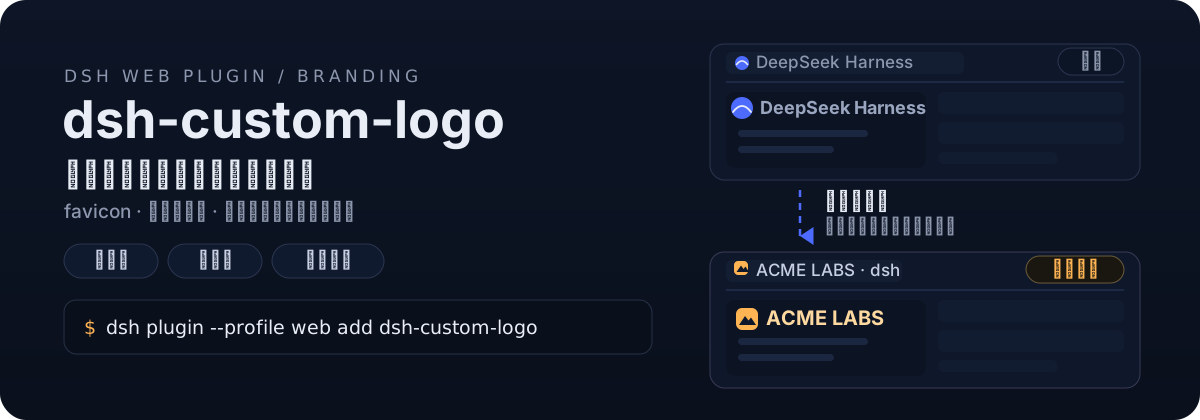
上传两张图,换掉 DeepSeek Harness 整套品牌标识




English · 简体中文
给 DeepSeek Harness(dsh)换上你自己的品牌:安装后在设置弹窗里多一个「品牌设置」分区(与「通用 / 模型 / 插件」并列),选一张方形图、一张横向宽图,插件自动裁切缩放并替换 favicon 与侧边栏 Logo——免切图、免重启、升级不丢。
两张图,三处生效
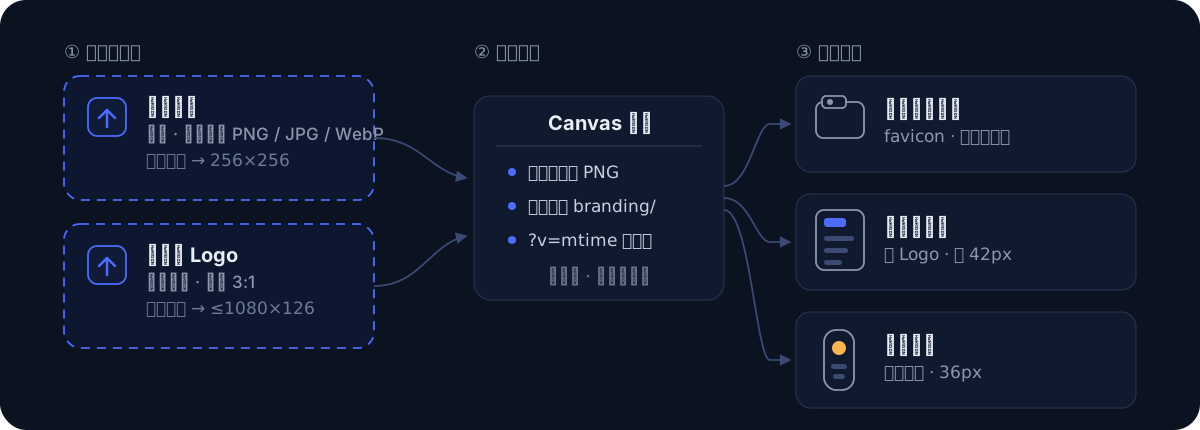
- 浏览器标签页 — 方形图居中裁切为 favicon,收藏夹图标同步更新
- 展开侧边栏 — 横向宽图等比缩放,以 42px 高度替换原生文字标
- 折叠窄栏 — 方形图缩为 36px 圆形图标
图片处理全部在浏览器端完成,上传后页面自动刷新生效,不需要重启服务,也不需要手动准备任何尺寸的切图。
安装
方式一:从 npm 安装(推荐)
dsh plugin --profile web add dsh-custom-logo
方式二:直接从 GitHub 添加
dsh plugin --profile web add github:dawsondx/dsh-custom-logo
方式三:clone 后安装(审阅源码 / 参与贡献)
git clone https://github.com/dawsondx/dsh-custom-logo.git
dsh plugin --profile web add ./dsh-custom-logo
安装后重启 dsh(dsh start --profile web 或你的启动脚本),设置弹窗即出现「品牌设置」分区。
使用
- 打开设置弹窗,在左侧导航选择「品牌设置」
- 「网页图标」卡片 → 选择图片 → 自动处理并刷新
- 「侧边栏 Logo」卡片 → 选择图片 → 自动处理并刷新
- 不满意随时重传;想回原版点「恢复默认」
两张卡片的当前图会以缩略图预览;面板支持中英文,跟随 dsh 界面语言。
工作原理
- 客户端把选中的图片用 canvas 缩放为标准 PNG(方形 256×256 居中裁切;宽图 ≤1080×126 等比),POST 到本机 dsh 服务
- 服务端写入
<DSH_HOME>/branding/(logo-128.png/logo-64.png/logo-wide.png),原子落盘 - 每次 index 请求时动态注入:favicon
<link>重写 + CSS 隐藏原生 SVG(按稳定的viewBox属性匹配,不受构建哈希/类名顺序影响)、以背景图绘制自定义 Logo,URL 带?v=<mtime>自动破缓存 - 图片保存在 dsh 用户目录而非插件包内,插件升级不丢品牌图;dsh 升级也不覆盖本插件(patch 层挂载在用户 profile)
安全性
- 上传/重置接口仅接受 loopback 来源(校验 peer socket 地址,非可伪造的 Host 头),局域网访问者无法改你的品牌图
- 仅接受 PNG(魔数校验),单次上传上限 8MB,文件名白名单,不接受任意路径写入
常见问题
上传后没变化? 硬刷新一次(Ctrl+Shift+R)。注入 URL 已带版本号,一般普通刷新即可。
宽图比例多少合适? 侧边栏品牌区高 42px,3:1(如 126×42、540×180)最饱满;更宽的图会按高度等比缩窄,不会变形。
折叠窄栏的图标好小? 窄栏是 36px 圆形位,方形图会被缩到这个尺寸,建议主体图形不要太贴边。
怎么卸载? dsh plugin --profile web remove dsh-custom-logo,再删掉 ~/.dsh/branding/ 下的 logo-*.png 即完全还原。
升级 dsh 后还生效吗? 插件通过用户 profile 的 patch 层挂载,dsh 自身升级不覆盖;CSS 锚点使用稳定属性,小版本 UI 更新通常无需跟进。若 dsh 大改版重画了品牌区,欢迎提 issue。
开发
git clone https://github.com/dawsondx/dsh-custom-logo.git
cd dsh-custom-logo
npm run check   # 语法检查 lib/index.js 与 lib/client.js
无构建步骤:lib/index.js(服务端,ESM)与 lib/client.js(浏览器,手写 __ModuleLoader__ bundle)均为单文件、零第三方依赖。
致谢
- 灵感与交互模式参考 dsh-token-data 的侧边栏面板实现
许可证
安装
装一次目录插件,之后本站所有插件都能让 DeepSeek Harness 自动找、自动装:
dsh plugin add dshbase-catalog然后对 agent 说「帮我装 dsh-custom-logo」,它会在目录里找到并自动安装。文档:dshbase-catalog · 已验证场景包。
该插件是 GitHub 源码(未发 npm)——直接从仓库装:
Web profile:
dsh plugin --profile web add github:dawsondx/dsh-custom-logoHeadless(CLI)profile:
dsh plugin --profile headless add github:dawsondx/dsh-custom-logo实测报告
验证通过:从 GitHub 源码完成 L1 安装 + L2 加载 + L3 运行(dsh 0.1.0-rc.6)。
分享徽章
把这枚徽章粘进 README——它会链回本页,实测状态变化时自动更新:

[](https://dshbase.com/zh/plugins/dsh-custom-logo/)<a href="https://dshbase.com/zh/plugins/dsh-custom-logo/"><img src="https://dshbase.com/badges/dsh-custom-logo.svg" alt="dshbase 实测可装"></a>