
插件目录 / UI & Skins / dsh-file-explorer-preview-code
dsh-file-explorer-preview-code
已验证 · 实测可装 wolfsonliu
功能简介
DSH Web file-explorer preview plugin: code preview & editor for DSH Web — per-language syntax highlighting, in-place editing with autosave, and dark/light themes. Overrides dsh-file-explorer's plain-text preview. | DSH Web 文件浏览器插件: 代码预览与编辑插件——按语言语法高亮、就地编辑自动保存、深色/浅色主题,覆盖 dsh-file-explorer 的纯文本预览。
可用 — 实测通过,早期项目
DSH Web file-explorer preview plugin: code preview & editor for DSH Web — per-language syntax highlighting, in-place editing with autosave, and dark/light themes. Overrides dsh-file-explorer's plain-text preview. | DSH Web 文件浏览器插件: 代码预览与编辑插件——按语言语法高亮、就地编辑自动保存、深色/浅色主题,覆盖 dsh-file-explorer 的纯文本预览。 实测能干净安装、正常启动。早期项目,但功能可用。
「已验证」表示我们的自动化 CI 在干净 profile 里实际执行了 dsh plugin add 并启动成功——仅此而已。功能描述与版本兼容性均为作者声明。这不是安全审计,也不代表对第三方代码的背书。
README
dsh-file-explorer-preview-code
中文 | English
A CodeMirror 6 code preview and editor for DSH Web, built on codemirror (basicSetup) + @codemirror/language-data (per-language highlighting) + @codemirror/theme-one-dark (dark theme). It registers a named Code Editor viewer and overrides dsh-file-explorer's built-in plain-text preview (priority 0) at priority 10, giving code files syntax highlighting plus in-place editing with autosave.
Screenshots
| Dark theme | Light theme |
|---|---|
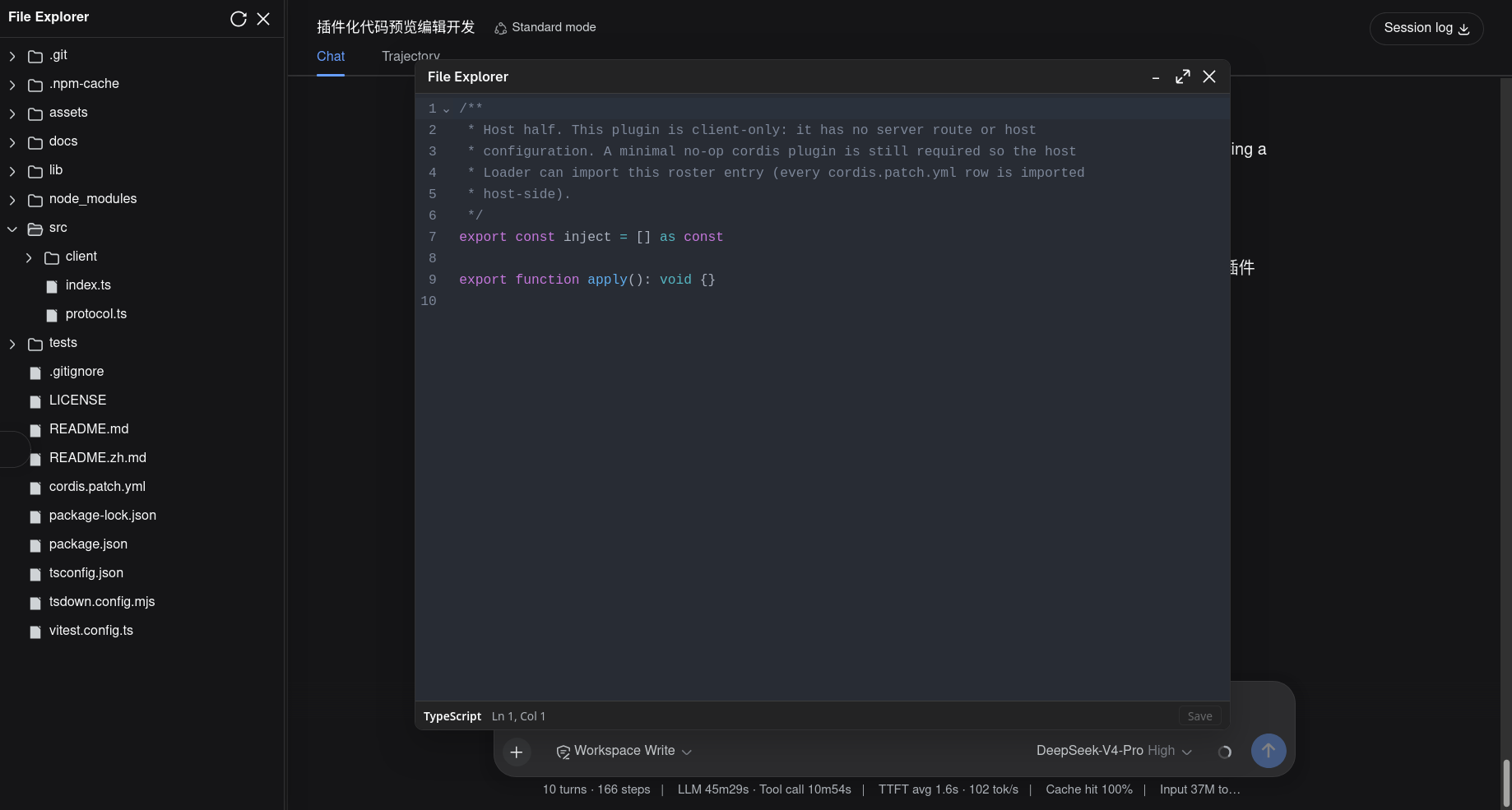 |
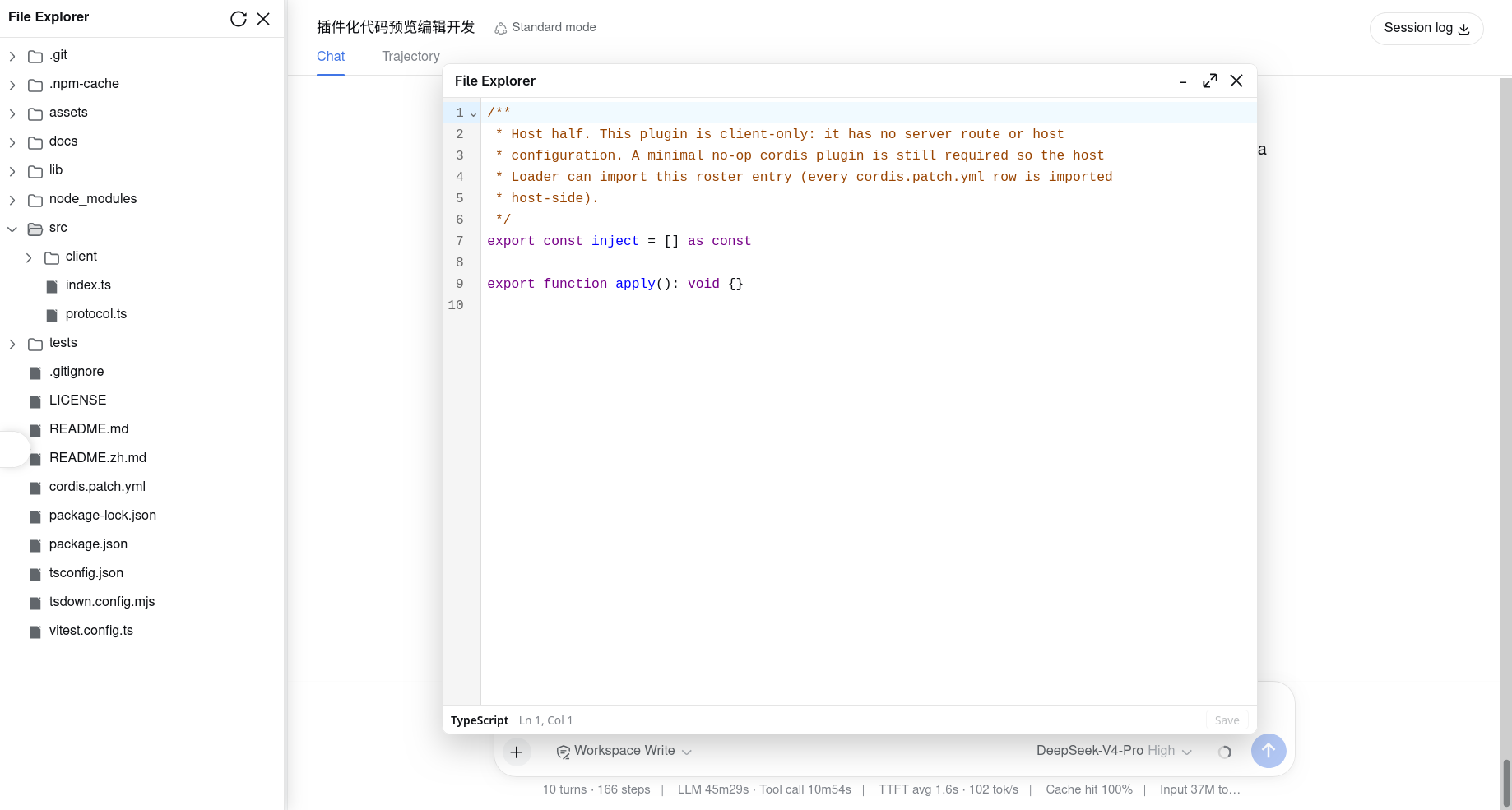 |
Features
- Syntax highlighting: resolves the language from the file name via
@codemirror/language-data(~90 languages), so.ts/.tsx/.js/.jsx/.json/.css/.html/.py/.yaml/.yml/.toml/.sh/.go/.rs/.java/.c/.cpp/.h/.xml/.sql/.inieach get the right tokens. - In-place editing: the preview is a real CodeMirror editor (line numbers, undo/redo, line wrapping), not a read-only
<pre>. - Autosave: edits save 500ms after the last keystroke, plus
Ctrl/Cmd+Ssaves immediately. - Save status bar: a slim footer shows the language,
Ln/Colcursor position, and the save state (Unsaved/Saving…/Saved/Save failed) with a manual Save button. - Theme-aware: highlighting follows DSH's dark/light toggle (
data-ds-dark-theme) live. - Selectable viewer: registered as one named "Code Editor" viewer via
registerViewer, so it appears alongside the built-in "Text" viewer in the file row's Open with… menu and the preview-panel switcher.
Dependencies
This plugin requires @dsh-external/dsh-file-explorer — it injects the fileExplorer cordis service, which provides registerViewer (named viewers), registerPreview (legacy anonymous override), readRawFile, and writeFile (the save path). The named "Code Editor" viewer needs core v0.9.0+; older cores fall back to the anonymous per-extension override. Install and enable dsh-file-explorer before this plugin:
git clone https://github.com/wolfsonliu/dsh-file-explorer.git
cd dsh-file-explorer
npm install && npm run build
dsh plugin --profile web add .
@dsh-external/dsh-file-exploreris installed from git (github:wolfsonliu/dsh-file-explorer) sotscresolves its./clienttype definitions. To develop against an unpublished local checkout instead, point that dependency at your own path.
Install
From the git repository:
git clone https://github.com/wolfsonliu/dsh-file-explorer-preview-code.git
cd dsh-file-explorer-preview-code
npm install && npm run build
dsh plugin --profile web add .
dsh web
How it works
The client entry injects fileExplorer and locale, then registers one CodePreview component for every code extension at priority 10. On core v0.9.0+ it uses registerViewer, exposing a single named Code Editor viewer in Open with…; on older cores it falls back to the anonymous per-extension registerPreview loop:
export const inject = ['fileExplorer', 'locale']

export function apply(ctx) {
  ctx.effect(() => {
    const readRaw = typeof ctx.fileExplorer.readRawFile === 'function'
      ? ctx.fileExplorer.readRawFile.bind(ctx.fileExplorer)
      : undefined
    const component = makeCodePreview(ctx.fileExplorer.writeFile, readRaw, ctx.locale.bind(CODE_NS))
    const dispose = registerCodeViewer(ctx.fileExplorer, component)
    return () => dispose()
  })
}

function registerCodeViewer(fileExplorer, component) {
  if (typeof fileExplorer.registerViewer === 'function') {
    return fileExplorer.registerViewer({
      id: 'code-editor', label: 'Code Editor', exts: CODE_EXTS, component, priority: 10,
    })
  }
  const disposers = CODE_EXTS.map(ext => fileExplorer.registerPreview(ext, component, 10))
  return () => { for (const d of disposers) d() }
}
Registered extensions (CODE_EXTS): ts tsx js jsx json css html py yaml yml toml env sh go rs java c cpp h xml sql graphql cfg ini.
The editor component handles four preview kinds:
| Kind | Behavior |
|---|---|
text |
Uses preview.content directly (files ≤ 2 MiB) |
text-large |
Calls readRawFile(filePath), decodes the ArrayBuffer as UTF-8, and opens the editor (text files over 2 MiB) |
binary |
Same as text-large — readRawFile + decode |
too-large |
Same as text-large — readRawFile + decode (images over their cap; not delivered to this plugin's registered code extensions) |
When readRawFile is unavailable (older dsh-file-explorer core), text-large and binary files show an upgrade prompt. Edits always flow back through fileExplorer.writeFile(filePath, content).
Configuration
The bundle inserts a single roster row (no host-side configuration):
- insert:
    - id: file-explorer-preview-code
      name: '@dsh-external/dsh-file-explorer-preview-code'
Language coverage
@codemirror/language-data matches 21 of the 24 extensions to a language. env and graphql have no language support and open as a plain (un-highlighted) editable buffer; cfg matches language-data's legacy TTCN_CFG (a matching artifact, not a semantic ini match). All still open in the editor.
Known Limitations
- Bundle size: all
@codemirror/*language packages are inlined into a singlelib/client.js(~2.7 MB raw, loaded lazily on demand). - No Markdown:
.md/.mdxstay with dsh-file-explorer's built-in markdown preview. - Write-through: editing writes directly back to the workspace file; there is no diff/preview-before-save or multi-tab.
- Large files: files above dsh-file-explorer's
maxTextBytes(2 MiB) arrive aspreview.kind === 'text-large'and are fetched viareadRawFilethen loaded into the editor. Very large files (hundreds of MiB) may cause browser performance issues due to the single-buffer CodeMirror model.readRawFileis part of the stable service contract (added in v0.1.0).
Developing preview plugins
This repo is the reference implementation for building a preview plugin. See docs/developing-preview-plugins.md (中文) for the contract, a minimal skeleton, bundling notes, and i18n.
Related
- dsh-file-explorer — the core file explorer this plugin extends.
- dsh-file-explorer-preview-code — this repository.
- dsh-file-explorer-preview-molstar — a Mol* structure preview for
.cif/.pdb, built on the samefileExplorercontract.
Development
npm install
npm run check     # tsc type check
npm test          # vitest unit tests
npm run build     # tsc + tsdown (host ESM stub + client CJS bundle)
After
npm run build, hard-refresh the browser (Ctrl/Cmd+Shift+R):dsh webmay keep serving a cached plugin bundle, so a soft reload can leave your latest build unused.
License
安装
装一次目录插件,之后本站所有插件都能让 DeepSeek Harness 自动找、自动装:
dsh plugin add dshbase-catalog然后对 agent 说「帮我装 dsh-file-explorer-preview-code」,它会在目录里找到并自动安装。文档:dshbase-catalog · 已验证场景包。
该插件是 GitHub 源码(未发 npm)——直接从仓库装:
Web profile:
dsh plugin --profile web add github:wolfsonliu/dsh-file-explorer-preview-codeHeadless(CLI)profile:
dsh plugin --profile headless add github:wolfsonliu/dsh-file-explorer-preview-code实测报告
验证通过:从 GitHub 源码完成 L1 安装 + L2 加载 + L3 运行(dsh 0.1.0-rc.6)。
分享徽章
把这枚徽章粘进 README——它会链回本页,实测状态变化时自动更新:

[](https://dshbase.com/zh/plugins/dsh-file-explorer-preview-code/)<a href="https://dshbase.com/zh/plugins/dsh-file-explorer-preview-code/"><img src="https://dshbase.com/badges/dsh-file-explorer-preview-code.svg" alt="dshbase 实测可装"></a>