
插件目录 / UI & Skins / dsh-frosted-window
dsh-frosted-window
已验证 · 实测可装 SenryLee
功能简介
Upload an image as a full-window frosted-glass theme for DeepSeek Harness Web.
可用 — 实测通过,早期项目
Upload an image as a full-window frosted-glass theme for DeepSeek Harness Web. 实测能干净安装、正常启动。早期项目,但功能可用。
「已验证」表示我们的自动化 CI 在干净 profile 里实际执行了 dsh plugin add 并启动成功——仅此而已。功能描述与版本兼容性均为作者声明。这不是安全审计,也不代表对第三方代码的背书。
README
dsh-frosted-window
English | 中文
A DeepSeek Harness Web theme plugin. Upload an image, fill the window, and sit the sidebar, conversation, and details on one frosted-glass layer. Official Light / Dark / System stay in charge.
dsh plugin --profile web add github:SenryLee/dsh-frosted-window
Restart dsh web, then open Settings → Frosted.
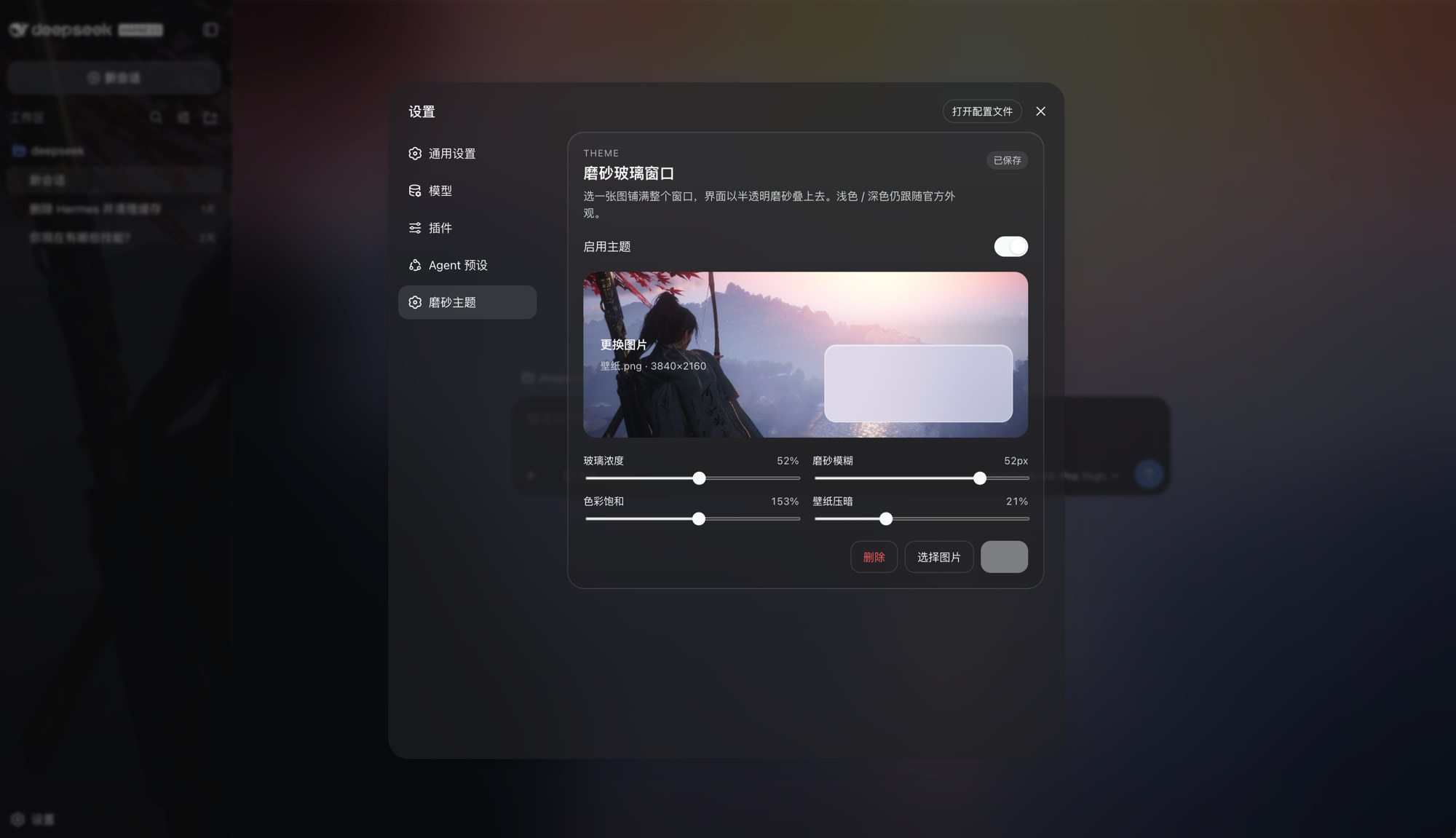
Features
- Local JPEG / PNG / WebP / GIF upload, no file-size cap
- Full-window wallpaper with the same frost on sidebar, conversation, and details
- Sliders: glass density, blur, saturation, wallpaper dim
- Save / Delete so you can preview, then persist, then replace
- Toggle: green on, gray off; turn it off to restore the official look
- Does not steal official appearance:
overrideTokensonly, neversetTheme('custom')
The image lives in IndexedDB; knobs live in localStorage. Nothing is written to $DSH_HOME/settings.yaml, and nothing is fetched from a URL.
Install
dsh web must already run (the usual profile name is web).
A. From GitHub (recommended)
dsh plugin --profile web add github:SenryLee/dsh-frosted-window
pnpm ≥ 10 refuses git prepare scripts until you allow them. If the first add fails, put this in the profile's pnpm-workspace.yaml (usually ~/.dsh/profiles/web/pnpm-workspace.yaml) and add again:
allowBuilds:
  dsh-frosted-window: true
The repo already ships lib/. Allowing the build only recompiles on a source install.
B. From a Release tarball
No allowBuilds needed:
dsh plugin --profile web add https://github.com/SenryLee/dsh-frosted-window/releases/latest/download/dsh-frosted-window-0.1.0.tgz
If dsh is not on PATH
npx @deepseek-ai/dsh plugin --profile web add github:SenryLee/dsh-frosted-window
pnpm must be on PATH as well.
Use
- Quit and start
dsh webagain (a page refresh is not enough). - Open Settings at the bottom of the left rail.
- Open Frosted (or the same panel under General, below Appearance).
- Enable the theme, drop an image, tune the sliders.
- Click Save. The chip reads Saved when the next launch will restore it.
Replace: pick another image → Save. Clear: Delete.
Settings → Plugins lists the technical name frosted-window / dsh-frosted-window. Upload lives on the Frosted settings page, not in that catalog.
Uninstall
dsh plugin --profile web remove dsh-frosted-window
Then restart dsh web.
Develop
npm install
npm test
npm run build
Ships as dsh.bundle + dsh.client per the official package-and-install contract.
License
MIT
安装
装一次目录插件,之后本站所有插件都能让 DeepSeek Harness 自动找、自动装:
dsh plugin add dshbase-catalog然后对 agent 说「帮我装 dsh-frosted-window」,它会在目录里找到并自动安装。文档:dshbase-catalog · 已验证场景包。
该插件是 GitHub 源码(未发 npm)——直接从仓库装:
Web profile:
dsh plugin --profile web add github:SenryLee/dsh-frosted-windowHeadless(CLI)profile:
dsh plugin --profile headless add github:SenryLee/dsh-frosted-window实测报告
验证通过:从 GitHub 源码完成 L1 安装 + L2 加载 + L3 运行(dsh 0.1.0-rc.6)。
分享徽章
把这枚徽章粘进 README——它会链回本页,实测状态变化时自动更新:

[](https://dshbase.com/zh/plugins/dsh-frosted-window/)<a href="https://dshbase.com/zh/plugins/dsh-frosted-window/"><img src="https://dshbase.com/badges/dsh-frosted-window.svg" alt="dshbase 实测可装"></a>