
插件目录 / UI & Skins / dsh-github-picker
dsh-github-picker
已验证 · 实测可装 bitxeno
功能简介
GitHub issue and pull request references for the DeepSeek Harness web GUI
可用 — 实测通过,早期项目
GitHub issue and pull request references for the DeepSeek Harness web GUI 实测能干净安装、正常启动。早期项目,但功能可用。
「已验证」表示我们的自动化 CI 在干净 profile 里实际执行了 dsh plugin add 并启动成功——仅此而已。功能描述与版本兼容性均为作者声明。这不是安全审计,也不代表对第三方代码的背书。
README
dsh-github-picker
English | 中文
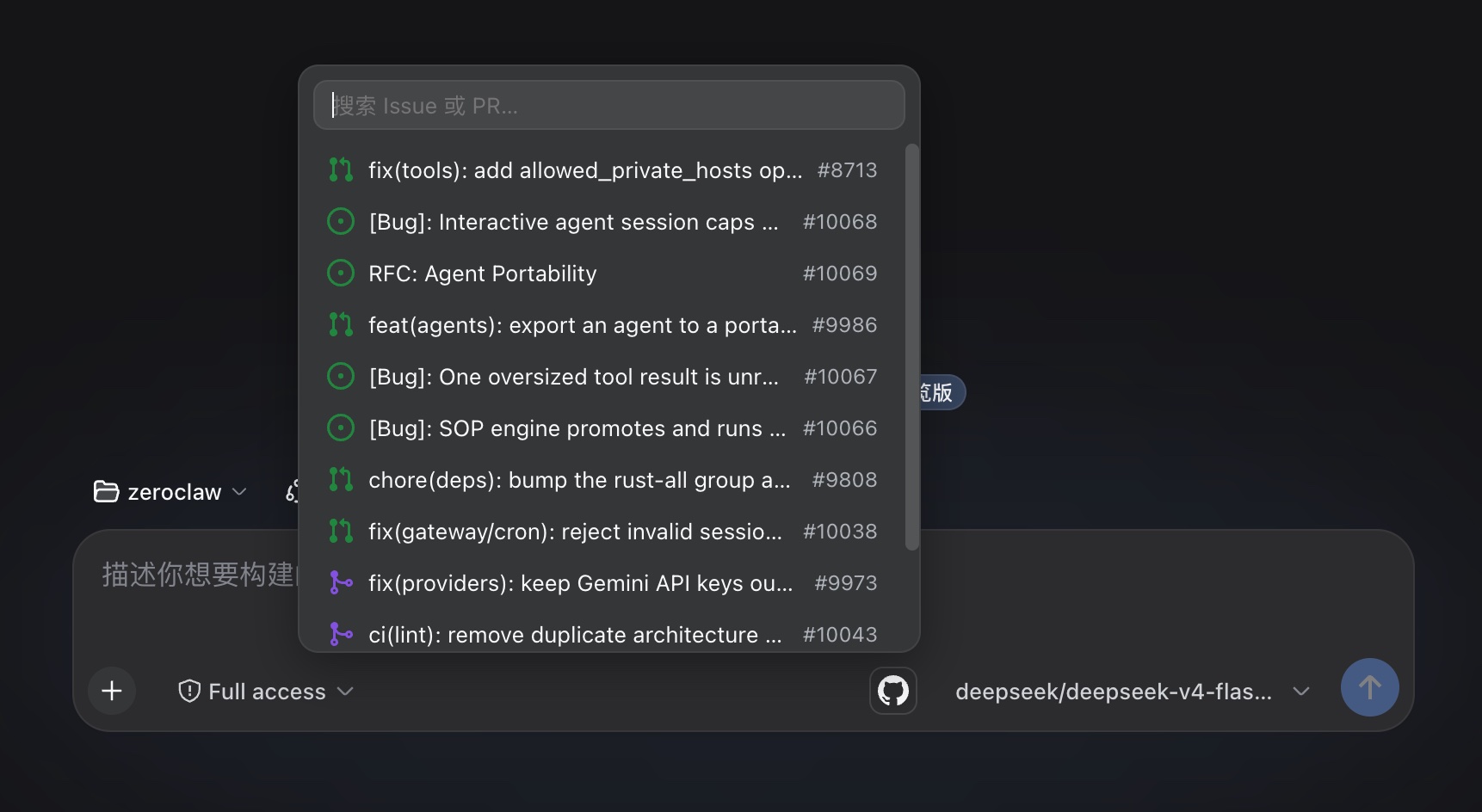
GitHub issue and pull request references for the DeepSeek Harness web GUI. Click the GitHub icon next to the send button to search the current workspace repository's issues and PRs, and insert a reference — a GitHub URL or an @owner/repo#number mention.
Install
dsh plugin --profile web add dsh-github-picker
The same command updates an existing installation to the latest published version; append @<version> to pin one. Restart dsh web after installing.
Usage
Click the GitHub icon in the composer's tool row. The popup lists the repository's recent issues and PRs — 12 per page, loading the next page as you scroll to the bottom, no result cap — filtered locally as you type by number or title (a number prefix ranks first). Click a row to insert the reference; Escape or a click outside closes the popup. A search failure (gh CLI missing, not authenticated, rate limited, network error, unresolved repository) renders as one localized hint row instead of a silent close.
Each row shows GitHub's state icon, the title, and the #number tag:
| State | Icon |
|---|---|
| Open issue | issue-opened (green) |
| Closed issue | issue-closed (purple) |
| Open PR | git-pull-request (green) |
| Draft PR | git-pull-request-draft (gray) |
| Closed, unmerged PR | git-pull-request-closed (red) |
| Merged PR | git-merge (purple) |
Picking inserts the text chosen as insert format in Settings:
@owner/name#125                                 # ref (default)
https://github.com/owner/name/issues/125        # url
Before each step, the Host scans the draft for GitHub references — URLs, @owner/repo#number, and bare #number — and adds a short message per match:
<github-reference repo="owner/name" number="125" />
Only the repository and number are passed; issue bodies are never fetched.
Data Source
The gh CLI only: it reuses the local gh login and calls gh api search/issues (issues and PRs in one query). No device flow, OAuth app, or stored credential. The repository is resolved from the workspace's git remote get-url origin (https, ssh, git@ forms); without a resolvable remote, the popup shows a hint row on adding one.
Settings
The plugin card — titled "GitHub 引用" (or "GitHub Picker" in English) — lives in the official configurable-plugins tab. It shows the gh connection status (which accounts gh auth status reports) and the insert format (@owner/repo#number or GitHub URL). That is the only setting: there is no enable switch — the picker is always on — and no result limit.
Configuration
Host options go into the selected profile's cordis.patch.yml:
- id: dsh-github-picker
  config:
    searchTimeoutMs: 15000
    repoCacheTtl: 30000
searchTimeoutMsbounds provider calls (default 15000).repoCacheTtlcaches the resolved repository per workspace (default 30000 ms).
A Host config change needs a dsh web restart; a client-only change just needs a browser refresh.
Development
pnpm install
pnpm run check
The check ladder is typecheck + tests + build with 100% coverage per source file; lib/ is committed, so profile installs run without a build. For a local checkout, add the package to ~/.dsh/profiles/web/package.json (dependency + dsh.profile.bundles), pnpm install, restart dsh web. The plugin serves at /plugins/dsh-github-picker/client.js, the gateway routes /api/githubPicker/*.
License
MIT
安装
装一次目录插件,之后本站所有插件都能让 DeepSeek Harness 自动找、自动装:
dsh plugin add dshbase-catalog然后对 agent 说「帮我装 dsh-github-picker」,它会在目录里找到并自动安装。文档:dshbase-catalog · 已验证场景包。
该插件是 GitHub 源码(未发 npm)——直接从仓库装:
Web profile:
dsh plugin --profile web add github:bitxeno/dsh-github-pickerHeadless(CLI)profile:
dsh plugin --profile headless add github:bitxeno/dsh-github-picker实测报告
验证通过:从 GitHub 源码完成 L1 安装 + L2 加载 + L3 运行(dsh 0.1.0-rc.6)。
分享徽章
把这枚徽章粘进 README——它会链回本页,实测状态变化时自动更新:

[](https://dshbase.com/zh/plugins/dsh-github-picker/)<a href="https://dshbase.com/zh/plugins/dsh-github-picker/"><img src="https://dshbase.com/badges/dsh-github-picker.svg" alt="dshbase 实测可装"></a>