
插件目录 / UI & Skins / dsh-jump-rail
dsh-jump-rail
已验证 · 实测可装 Memory455
功能简介
DSH Web GUI conversation jump rail plugin
可用 — 实测通过,早期项目
DSH Web GUI conversation jump rail plugin 实测能干净安装、正常启动。早期项目,但功能可用。
「已验证」表示我们的自动化 CI 在干净 profile 里实际执行了 dsh plugin add 并启动成功——仅此而已。功能描述与版本兼容性均为作者声明。这不是安全审计,也不代表对第三方代码的背书。
README
@memory455/dsh-jump-rail · 轮次跳转条
简体中文 | English
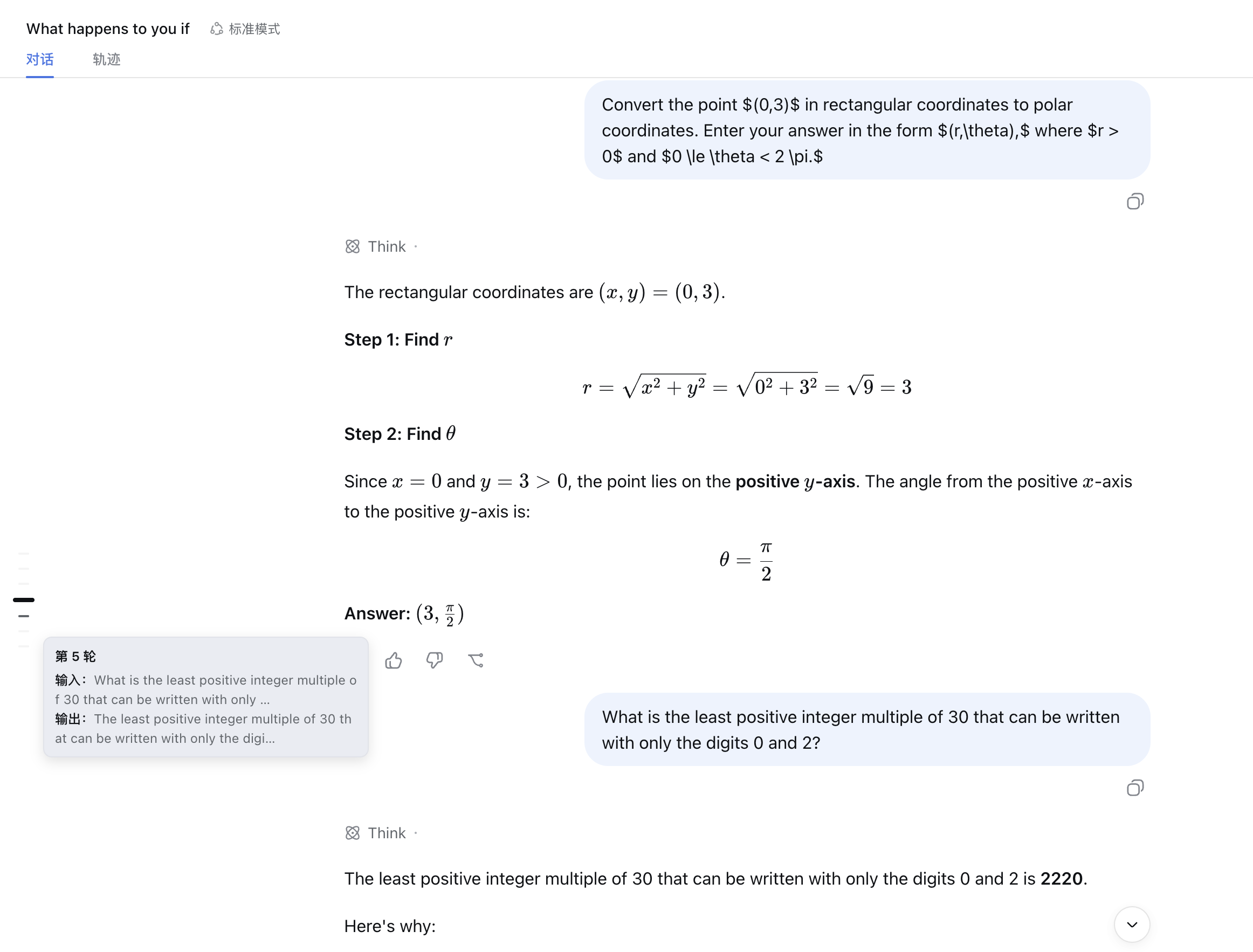
为 DSH Web GUI 提供轻量的对话轮次导航:在聊天区域左侧显示一列短横线,帮助你快速确认当前位置,并在长对话中一键跳转到任意轮次。
功能
- 每轮对话对应一根短横线,常驻聊天区域左侧;
- 当前视口所在轮次会以更亮、更粗、更长的横线突出显示;
- 悬停横线可查看该轮输入与输出摘要;
- 点击横线可立即跳转到对应轮次的输入位置;
- 仅在包含至少两轮对话的聊天视图中显示;
- 会随窗口、侧栏和对话内容变化自动调整位置。
安装
推荐从 npm 安装:
dsh plugin --profile web add @memory455/dsh-jump-rail
也可以直接从 GitHub 安装:
dsh plugin --profile web add https://github.com/Memory455/dsh-jump-rail
如果希望拉取源码后在本地构建并安装:
# 拉取源码
git clone https://github.com/Memory455/dsh-jump-rail.git
cd dsh-jump-rail

# 安装依赖并构建
pnpm install
pnpm build

# 链接到 DSH Web profile
dsh plugin --profile web add link:$PWD
安装完成后,重启 DSH Web 即可生效。
使用
打开一个包含至少两轮对话的聊天会话,轮次跳转条会自动出现在聊天区域左侧:
- 滚动对话时,当前轮次对应的横线会自动突出显示;
- 将鼠标悬停在横线上,可以预览该轮的输入与输出;
- 点击任意横线,可以快速返回对应轮次。
切换到轨迹等非聊天视图时,跳转条会自动隐藏。
开发与构建
# 安装依赖
pnpm install

# 类型检查、测试与构建
pnpm typecheck
pnpm test
pnpm build

# 监听源码变化
pnpm watch
本地构建后,可以将当前目录链接到 DSH Web profile:
dsh plugin --profile web add link:$PWD
完成链接后重启 DSH Web。
License
安装
装一次目录插件,之后本站所有插件都能让 DeepSeek Harness 自动找、自动装:
dsh plugin add dshbase-catalog然后对 agent 说「帮我装 dsh-jump-rail」,它会在目录里找到并自动安装。文档:dshbase-catalog · 已验证场景包。
该插件是 GitHub 源码(未发 npm)——直接从仓库装:
Web profile:
dsh plugin --profile web add github:Memory455/dsh-jump-railHeadless(CLI)profile:
dsh plugin --profile headless add github:Memory455/dsh-jump-rail实测报告
验证通过:从 GitHub 源码完成 L1 安装 + L2 加载 + L3 运行(dsh 0.1.0-rc.6)。
分享徽章
把这枚徽章粘进 README——它会链回本页,实测状态变化时自动更新:

[](https://dshbase.com/zh/plugins/dsh-jump-rail/)<a href="https://dshbase.com/zh/plugins/dsh-jump-rail/"><img src="https://dshbase.com/badges/dsh-jump-rail.svg" alt="dshbase 实测可装"></a>