
插件目录 / UI & Skins / dsh-model-garden
dsh-model-garden
已验证 · 实测可装 mrdevlorx
功能简介
A searchable, sortable model picker for the DeepSeek Harness Web UI — provider groups, favorites, models.dev prices, context windows, live per-task token cost and a local-model filter. One-command install: dsh plugin add dsh-model-garden.
可用 — 实测通过,早期项目
A searchable, sortable model picker for the DeepSeek Harness Web UI — provider groups, favorites, models.dev prices, context windows, live per-task token cost and a local-model filter. One-command install: dsh plugin add dsh-model-garden. 实测能干净安装、正常启动。早期项目,但功能可用。
「已验证」表示我们的自动化 CI 在干净 profile 里实际执行了 dsh plugin add 并启动成功——仅此而已。功能描述与版本兼容性均为作者声明。这不是安全审计,也不代表对第三方代码的背书。
README
dsh-model-garden
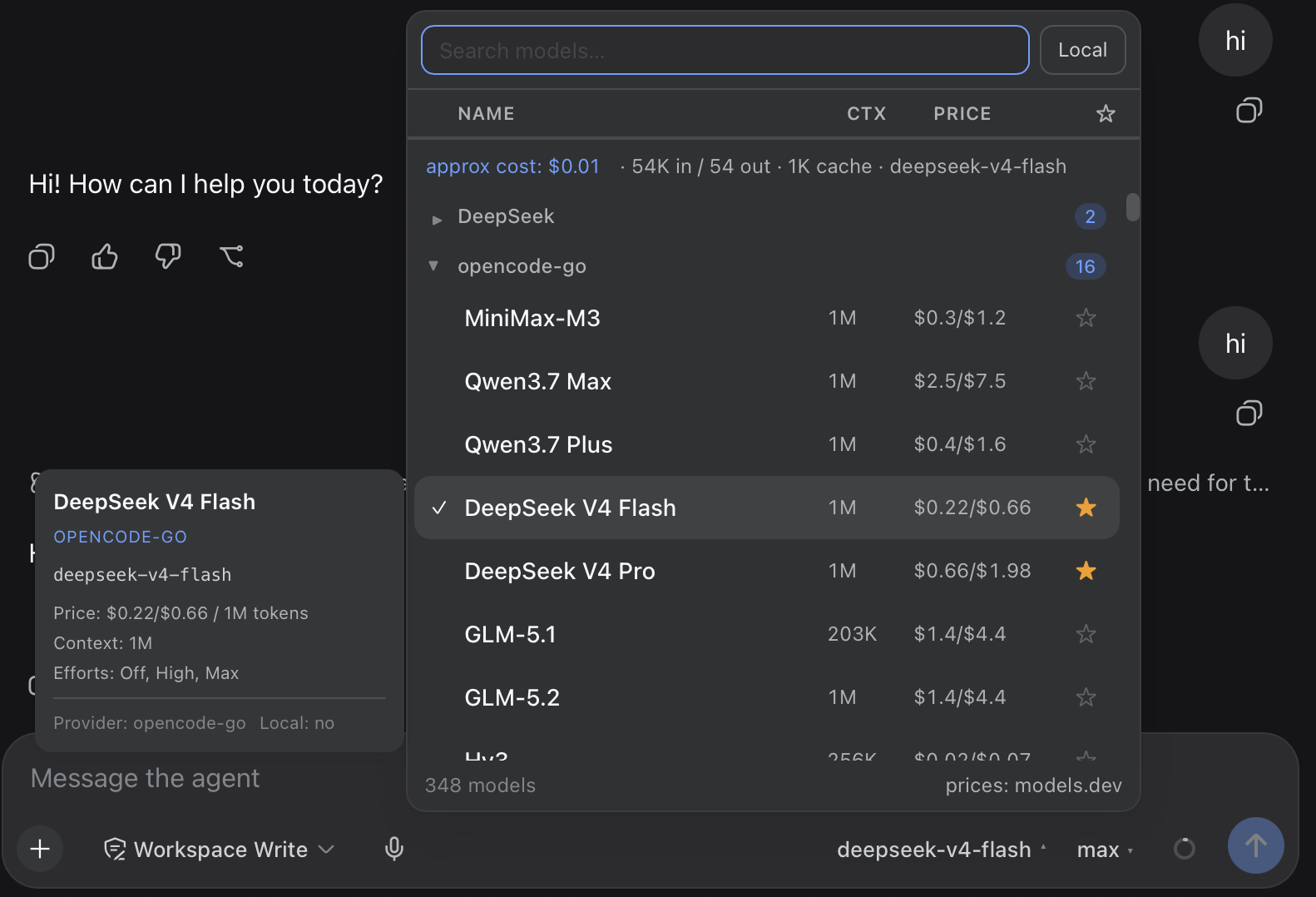
A searchable, sortable model picker for the DeepSeek Harness Web UI (dsh web). It replaces the native composer model seat with a table-style picker that adds everything the stock selector is missing:


 |
 |
Features
- 🔍 Instant search across model names and descriptions
- 📊 Sortable table columns — click
Name,CtxorPriceto sort asc/desc; a third click returns to the provider-grouped view - ⭐ Favorites — star models, toggle favorites-only from the table header; persisted in
localStorage - 🏠 Local tag — providers are flagged local by their real endpoint (baseURL from settings: loopback / RFC1918 / LAN hostnames), never by price guesswork; the Local box next to the search input filters to them
- ▾ Collapsible provider groups — collapse state is persisted per provider
- 🔄 Auto model-list update — while the picker is mounted, the provider/model directory is re-loaded automatically every 5 minutes (configurable), so locally added models show up without reopening the panel
- 💰 Model prices from models.dev (the same source OpenCode uses), shown as
$input/$outputper 1M tokens, cached for 24 h. Subscription routes (all-zero cost in the catalog, e.g. coding-plan providers) resolve a reference price from their pay-as-you-go provider viaPROVIDER_ALIASES, so plan models still show what their tokens would cost at API rates; only true local models stay unpriced - 🧠 Context windows — read live from the host
llmservice (adapter-owned data, works for local providers like llama.cpp / Ollama-style gateways too), with models.dev as fallback - 🎚️ Reasoning effort picker — models that support reasoning levels get a compact dropdown right next to the model name in the chat composer, styled and opening exactly like the model picker (same trigger pill, same floating menu surface, ✓ marks the active level, click outside /
Esc/ selecting closes it). Picking a model always starts it at its strongest reasoning level; the dropdown re-selects the current model with the chosen effort — no clutter inside the picker panel - 💸 Live per-task usage & cost — real provider-reported token usage (from the session log) is always shown while the panel is open (
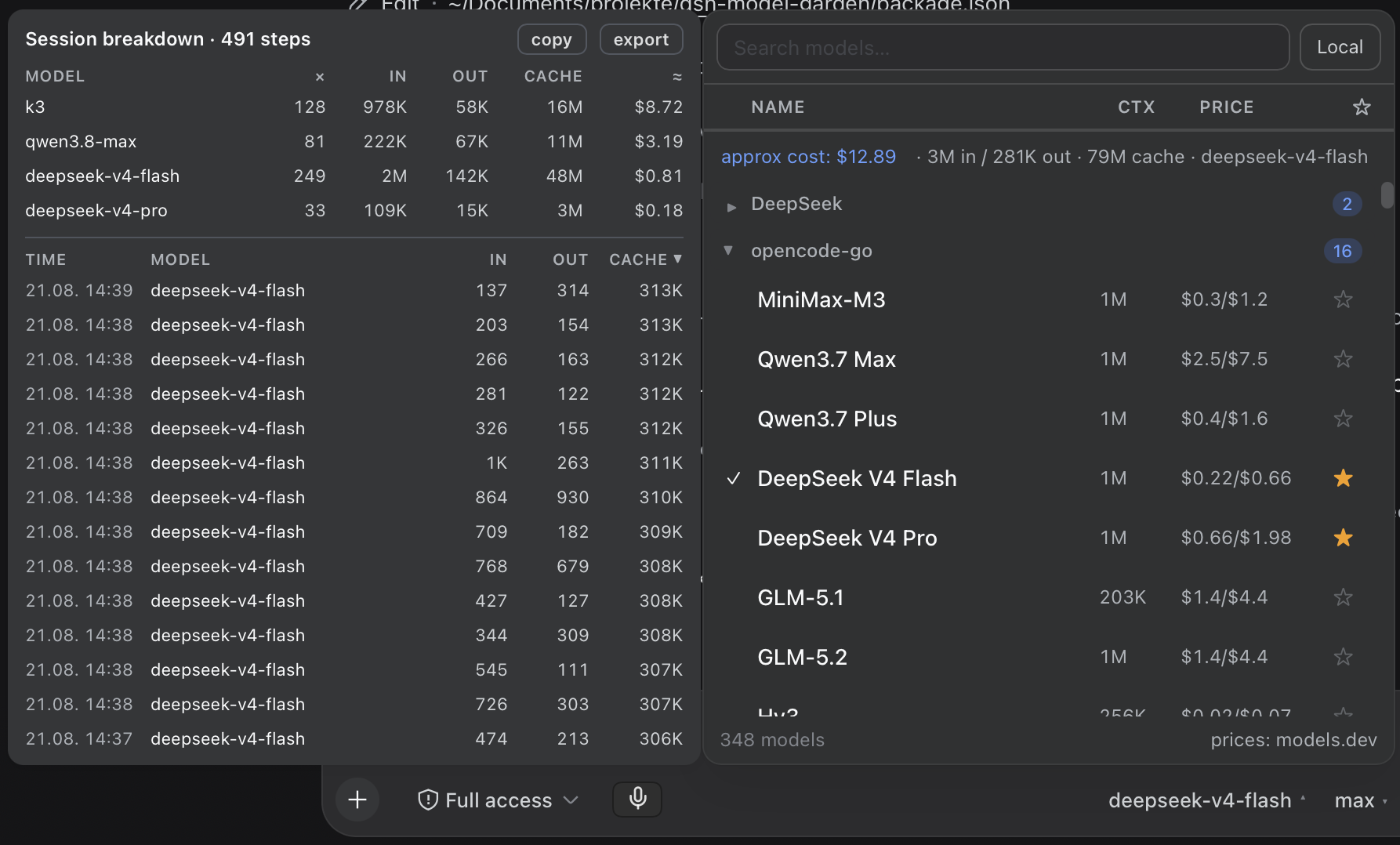
in / out / cache). Each model's usage is multiplied by its own (reference) price — properly attributed even when a session switched models mid-way — the same math OpenCode uses (usage × price, not a heuristic) - 🧾 Session cost breakdown — hover the
approx costfigure for a popup sized like the picker and parked parallel on its left (1 px gap): a table-style breakdown with per-model totals (steps, In/Out/Cache in their own columns, ≈ cost) and a timestamped step table. Clickable column headers work like Excel / the main list (asc → desc → off, ▲/▼ indicator) on both tables; copy the summary or export the (sorted) step list as CSV (Excel-ready). The invisible hover target spans the cost row all the way to its left edge. Attribution of each step to its model comes straight from the session log (request/contextevents); nothing extra is stored - 🖱️ Detail tooltip that opens beside the panel (never covers the list): description, price, context window, max output, reasoning efforts
- 🎨 Native look — built entirely on the harness design tokens (
--dsw-alias-*); the picker panel, the effort menu, the detail tooltip and the cost popup all share the same surface color and geometry, matching light & dark theme automatically
How it works
The package is a static profile plugin with two halves:
| Half | File | Role |
|---|---|---|
| Client | client.js |
Registers the conversation.input.model slot (priority -1, shadowing the native seat) and renders the picker |
| Host | index.js |
Serves three same-origin JSON routes on the harness webServer service |
Host endpoints
GET /model-garden/cost?session=<sessionId>
  → { inputTokens, outputTokens, cacheReadTokens, cacheWriteTokens, reasoningTokens, steps }

GET /model-garden/cost-history?session=<sessionId>&limit=<n>
  → { steps: [ { time, provider, model, turn, step, inputTokens, outputTokens, cacheReadTokens, cacheWriteTokens, reasoningTokens } ] (newest first, capped),
      models: [ { provider, model, steps, inputTokens, outputTokens, cacheReadTokens, cacheWriteTokens } ],
      totalSteps }

GET /model-garden/catalog
  → { "provider::model": { local, context?, maxOutput? } }   (cached 10 min)
The cost endpoint aggregates the real usage payloads of assistant/message events from the durable session log — no estimation. The cost-history endpoint additionally attributes each usage step to the model in effect: assistant/message events carry usage but not the model, so it tracks request/context (and request/header) events, which precede the request they describe with { provider, model } — a single pass over the same in-memory events, no extra persistence. The catalog endpoint resolves contextWindow / defaultMaxTokens per model through the host llm service (resolveModelInfo), so local/self-hosted providers report their real limits.
Installation
One command — the official plugin CLI installs the package and mounts it (the package carries a dsh.bundle.patch layer, so the CLI automatically appends it to the profile's bundle stack):
dsh plugin --profile <profile> add dsh-model-garden
Then restart the DSH server and hard-refresh the browser (Cmd/Ctrl+Shift+R).
The host half needs the web stack (
webServerservice). In minimal/TUI profiles without it the plugin stays inert by design — boot is never blocked.
Upgrading from a manual install? Remove the old
model-gardendependency and any manual- insert:row for it from your profile'scordis.patch.ymlfirst — otherwise the plugin mounts twice.
Verify
curl -s http://127.0.0.1:3080/model-garden/catalog | head -c 200
# → {"deepseek::deepseek-chat":{"local":false,"context":...}, ...}  (JSON, not HTML)
Manual install (without the CLI)
If you manage the profile with plain npm: add the dependency, list dsh-model-garden in dsh.profile.bundles in the profile package.json, reinstall, restart. The bundle patch inside the package inserts the loader row for you — no cordis.patch.yml edit needed.
Configuration
No configuration is required. Several tweakable constants live at the top of the respective file:
- Auto model-list update interval —
MODEL_LIST_REFRESH_MSinclient.js(default 5 min) controls how often the provider/model directory is reloaded while the picker is mounted. - Hidden provider routes —
HIDDEN_PROVIDER_PREFIXESinclient.js(andSKIP_PREFIXESinindex.js). Some plugins mirror providers as internal routes (e.g. a vision toolkit duplicating every provider asvision-toolkit-<id>); such prefixes are excluded from the picker and the catalog. - Price aliases —
PROVIDER_ALIASES/MODEL_ALIASESinclient.jsmap DSH route ids to models.dev catalog ids. They serve two cases: renamed routes (deepseek-official→deepseek) and subscription routes whose catalog entry is all-zero (kimi-for-coding→moonshotai,alibaba-tp→alibaba-cn,oneprovider→anthropic), giving plan models their pay-as-you-go reference price. - Price cache TTL —
PRICE_TTL(default 24 h) and catalog TTL —CATALOG_TTL(default 10 min).
Favorites, collapsed providers and the price cache live in the browser's localStorage under dsh.modelgarden.*.
Compatibility
Developed and tested against DeepSeek Harness 0.1.0-rc.8 (@deepseek-ai/dsh-host-webserver, dsh-session, dsh-llm, dsh-client-ui-model-selection); first released against 0.1.0-rc.6. The client half is plain React via window.__ModuleLoader__ — no build step, no dependencies.
Credits
- Pricing data: models.dev API (also used by OpenCode)
- Design tokens & slot API: DeepSeek Harness
License
安装
装一次目录插件,之后本站所有插件都能让 DeepSeek Harness 自动找、自动装:
dsh plugin add dshbase-catalog然后对 agent 说「帮我装 dsh-model-garden」,它会在目录里找到并自动安装。文档:dshbase-catalog · 已验证场景包。
该插件是 GitHub 源码(未发 npm)——直接从仓库装:
Web profile:
dsh plugin --profile web add github:mrdevlorx/dsh-model-gardenHeadless(CLI)profile:
dsh plugin --profile headless add github:mrdevlorx/dsh-model-garden实测报告
验证通过:从 GitHub 源码完成 L1 安装 + L2 加载 + L3 运行(dsh 0.1.0-rc.6)。
分享徽章
把这枚徽章粘进 README——它会链回本页,实测状态变化时自动更新:

[](https://dshbase.com/zh/plugins/dsh-model-garden/)<a href="https://dshbase.com/zh/plugins/dsh-model-garden/"><img src="https://dshbase.com/badges/dsh-model-garden.svg" alt="dshbase 实测可装"></a>