
插件目录 / UI & Skins / dsh-palenight-theme
dsh-palenight-theme
已验证 · 实测可装 youyli03
功能简介
A dynamic Cordis plugin that themes the dsh Harness Web UI — Palenight dark + warm-neutral light
可用 — 实测通过,早期项目
A dynamic Cordis plugin that themes the dsh Harness Web UI — Palenight dark + warm-neutral light 实测能干净安装、正常启动。早期项目,但功能可用。
「已验证」表示我们的自动化 CI 在干净 profile 里实际执行了 dsh plugin add 并启动成功——仅此而已。功能描述与版本兼容性均为作者声明。这不是安全审计,也不代表对第三方代码的背书。
README
DeepSeek Palenight Theme
A theme for the dsh Harness Web UI, delivered in two forms:
- Persistent dsh bundle (recommended) —
package.jsondeclaresdsh.bundle.patch+dsh.client, so installing the package into a dsh
profile makes the theme part of the host composition: it is served at/plugins/dsh-palenight-theme/client.js, listed inwindow.__DSH_BOOT__,
and survives host restarts (same mechanism as@liustack/modlens). - Dynamic Cordis plugin — the original form (
plugin/client.js+plugin/host.js), activated per-session viacordis_define/cordis_run;
it dies with the process and is only kept for reference.
Both forms stack a token layer over the active theme — no rebuild of the
harness shell is needed.
- Dark mode — Community Material Theme Palenight: indigo
#292D3E
surfaces, periwinkle text#A6ACCD, teal accent#80CBC4. - Light mode — warm neutral: parchment
#F5F4F0, warm grey text#4F4B45,
teal accent#00897B. - Code blocks get clear contrast in both modes.
- ~100 theme variables covered (surfaces, tabs/headers, inputs, menus,
text tiers, borders, buttons, interactive states, code, scrollbars).
Preview
| Light | Dark |
|---|---|
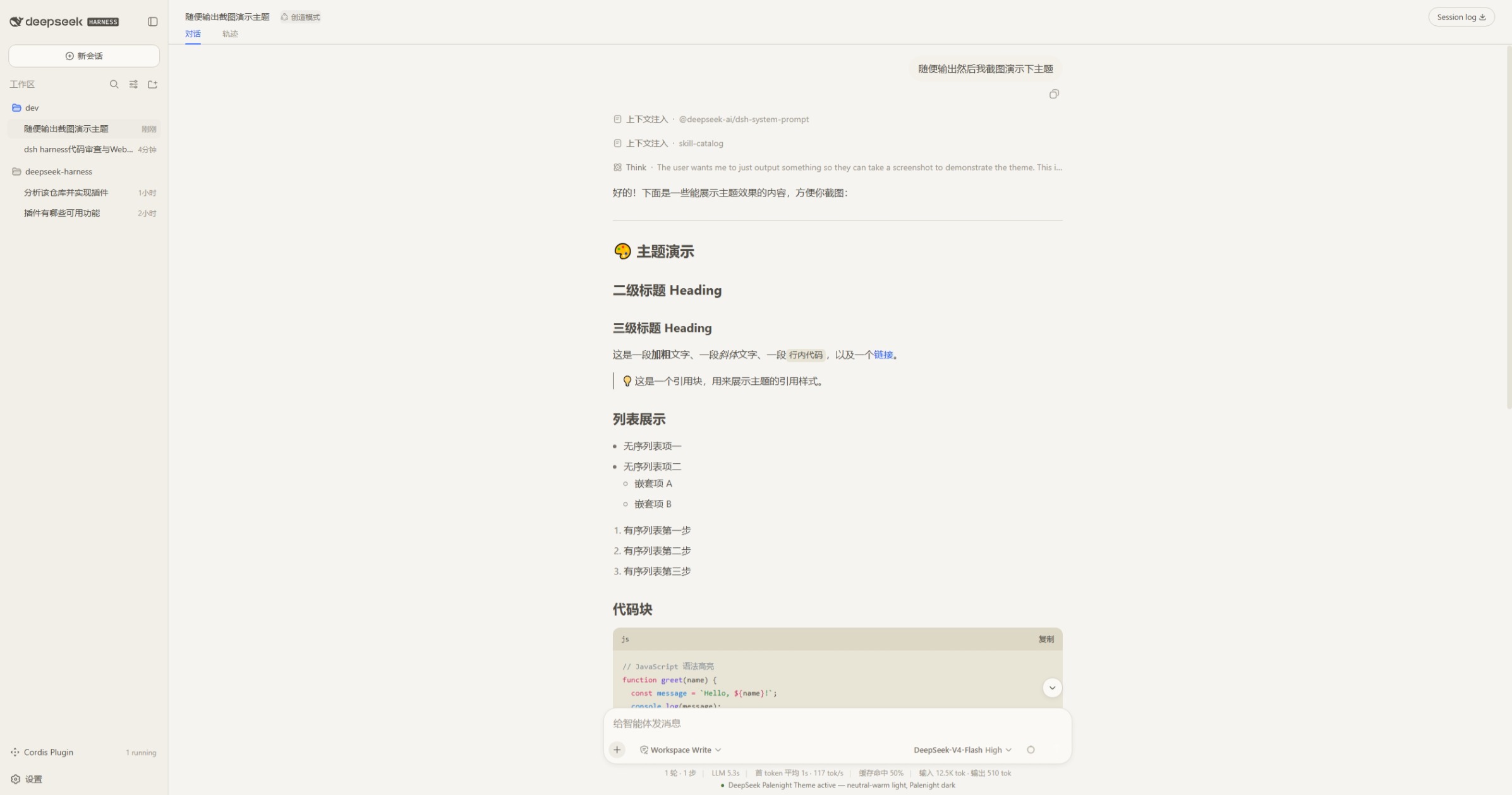 |
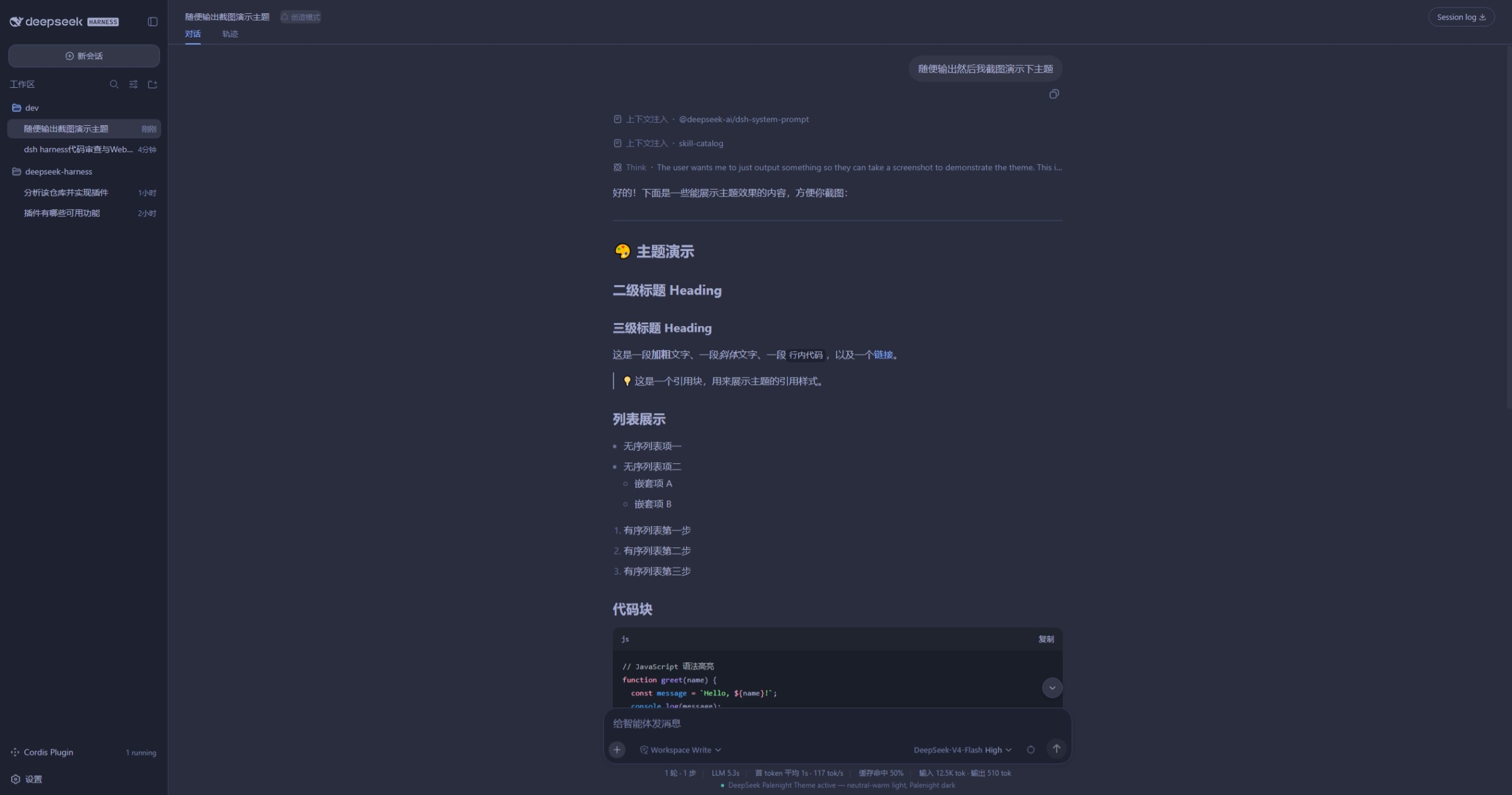 |
How it works
The dsh web frontend exposes a theme client service. overrideTokens(source, tokens) stacks a per-token CSS-variable layer on top of the active theme:
theme.overrideTokens('deepseek-palenight-theme', {
  '--dsw-alias-bg-base': { light: '#F5F4F0', dark: '#292D3E' },
  '--dsw-alias-brand-primary': { light: '#00897B', dark: '#80CBC4' },
  // ... ~100 tokens total
})
The browser half (plugin/client.js) applies the layer and registers small UI
(run-card panel, composer status line). The host half (plugin/host.js)
registers two package-private RPC handlers (demo/ping, demo/hello) and a
model-visible demo tool (demo_greet) to prove both halves are live.
Activation (persistent bundle form — survives restarts)
The package is a dsh bundle: package.json declares dsh.bundle.patch
(its cordis.patch.yml row) and dsh.client (the web client bundle). Install
it so the dsh profile can resolve it:
- Resolve the package from the profile. Either install it with pnpm in
the profile directory (dsh plugin --profile web add dsh-palenight-theme,
once published), or — for a local checkout — copy the package directory
into the profile's dependency store and register it:- copy to
~/.dsh/profiles/node_modules/dsh-palenight-theme/ - add
"dsh-palenight-theme": "1.0.0"todependenciesin~/.dsh/profiles/web/package.json - append
dsh-palenight-themetodsh.profile.bundlesin the same file
- copy to
- Restart dsh. The row
- id: dsh-palenight-themecomposes into the host
tree, and the client-modules registry adds/plugins/dsh-palenight-theme/client.jsto the boot manifest
(dsh.client.platform: web,immediately: true). - The theme applies at every boot. Switch dsh Appearance to
Light/Dark/System — both palettes are themed.
To remove: drop the dependency and bundle entry, then restart.
Activation gate. The client bundle declares
inject: ['theme'], so the
plugin activates only after thethemeservice (provided by@deepseek-ai/dsh-client-ui-theme) is available. Do not remove it: withinject: []theimmediately: truebundle runs beforeui-themeprovides
the service,ctx.get('theme')isundefined, and the token layer silently
never applies.Hot updates.
dsh-client-hmrwatches served bundle files, so replacingplugin/client-module.js(same package, new content hash) reaches the graph
without a host restart.
Activation (dynamic form, deprecated — dies on restart)
cordis_definea new Plugin (kind: new, anyidPrefix), pastingplugin/host.jsascode.hostandplugin/client.jsascode.client.cordis_runthe returnedpluginId/packageId(mode: run).- Approve the browser-side
cordis/request-runprompt (client code only runs
after you approve it). - The theme applies immediately. Switch dsh Appearance to Light/Dark/System —
both palettes are themed.
To revert: cordis_stop <pluginId> restores the default theme and removes all
effects (badge, cards, tools). cordis_undefine removes it permanently.
Repository layout
dsh-palenight-theme/
├── README.md            This file
├── README.zh-CN.md      中文说明
├── LICENSE              MIT
├── package.json         Bundle manifest: dsh.bundle.patch + dsh.client
├── cordis.patch.yml     Host row insert (- id: dsh-palenight-theme)
└── plugin/
    ├── client-module.js Persistent bundle: browser half (token layer only,
    │                    module protocol, inject: ['theme'])
    ├── host-module.js   Persistent bundle: minimal host row (no-op)
    ├── client.js        Dynamic form: browser half (theme + demo UI)
    └── host.js          Dynamic form: host half (RPC handlers + demo tool)
Notes
- Both halves are plain JavaScript (no TS/JSX/import). The client uses
React.createElementonly. Theme.listTokensexposes only 13 tokens; the frontend actually consumes
~100.overrideTokensaccepts any token name (only the{ light, dark }
pair shape is validated), so the full set is overridable.- Dark palette values are taken from the Community Material Theme Palenight
VS Code extension (equinusocio.vsc-community-material-theme-1.4.7), whose
license governs those colors; the code here is MIT.
License
MIT — see LICENSE.
安装
装一次目录插件,之后本站所有插件都能让 DeepSeek Harness 自动找、自动装:
dsh plugin add dshbase-catalog然后对 agent 说「帮我装 dsh-palenight-theme」,它会在目录里找到并自动安装。文档:dshbase-catalog · 已验证场景包。
该插件是 GitHub 源码(未发 npm)——直接从仓库装:
Web profile:
dsh plugin --profile web add github:youyli03/dsh-palenight-themeHeadless(CLI)profile:
dsh plugin --profile headless add github:youyli03/dsh-palenight-theme实测报告
验证通过:从 GitHub 源码完成 L1 安装 + L2 加载 + L3 运行(dsh 0.1.0-rc.6)。
分享徽章
把这枚徽章粘进 README——它会链回本页,实测状态变化时自动更新:

[](https://dshbase.com/zh/plugins/dsh-palenight-theme/)<a href="https://dshbase.com/zh/plugins/dsh-palenight-theme/"><img src="https://dshbase.com/badges/dsh-palenight-theme.svg" alt="dshbase 实测可装"></a>