
插件目录 / UI & Skins / dsh-quote-selection
dsh-quote-selection
已验证 · 实测可装 lianginx
功能简介
❝ Quote selected chat text into the composer as a Markdown blockquote · DeepSeek Harness Web UI 插件:选中会话文字,一键引用
可用 — 实测通过,早期项目
❝ Quote selected chat text into the composer as a Markdown blockquote · DeepSeek Harness Web UI 插件:选中会话文字,一键引用 实测能干净安装、正常启动。早期项目,但功能可用。
「已验证」表示我们的自动化 CI 在干净 profile 里实际执行了 dsh plugin add 并启动成功——仅此而已。功能描述与版本兼容性均为作者声明。这不是安全审计,也不代表对第三方代码的背书。
README
dsh-quote-selection
❝ Quote selected chat text into the composer · A DeepSeek Harness Web UI plugin



Install
dsh plugin --profile web add github:lianginx/dsh-quote-selection
Features · Install · Usage · How it works
English · 简体中文
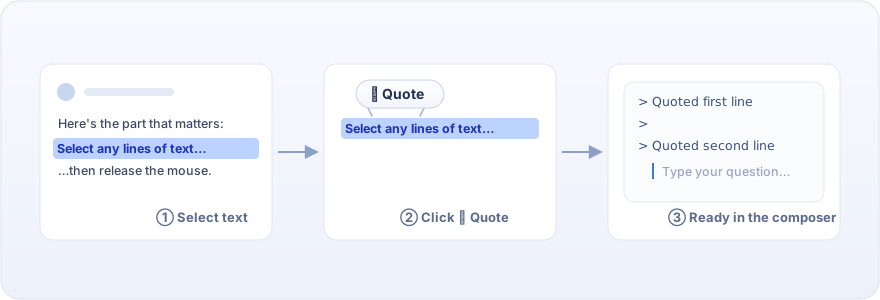
Inspired by ChatGPT's "Ask ChatGPT" selection popover: select any text in a conversation reply — one line or many — and a floating ❝ 引用 (Quote) button appears above the selection's first line. Click it and the selection lands in the composer as a Markdown blockquote, with the caret ready on the line right below. Type your follow-up question immediately.
Features
- Floating quote button — appears on selection over conversation text; hides on scroll, resize, or clicking elsewhere
- Clean Markdown output — one
>per line; multi-line selections carry proper>continuation lines and render as a standard blockquote after sending - Chained quotes — quoting again appends a new block separated by exactly one blank line, handy for asking about several passages at once
- Writes through the front door — inserts via
inputActions.setDraft, the input machine's single public write path, so undo history, reference chips, and draft stats all keep working - Follows the app language — the button label renders through DSH's locale service: 「引用」 on a Chinese UI, "Quote" on an English one
- Zero dependencies, zero build — plain JavaScript shipped as-is; installing from GitHub runs no code and needs no pnpm
allowBuildspermission
Install
# From GitHub (pinning to a tag or commit is recommended)
dsh plugin --profile web add github:lianginx/dsh-quote-selection
# Or locked:
dsh plugin --profile web add github:lianginx/dsh-quote-selection#v0.1.0

dsh --profile web   # or: dsh web
Local development install (with this checkout kept next to deepseek-harness):
dsh plugin --profile web add ../dsh-quote-selection
addlinks the checkout (link:semantics), so editingclient.jstakes effect after restartingdsh web— no reinstall needed.
Requires node ^22.19 || >=24 and a profile containing the official @deepseek-ai/dsh-web-app layer (the shipped web template has it).
Usage
Select some text in any assistant reply;
Click the floating ❝ 引用 button;
The composer now holds:
> The quoted first line
>
> The second line
with the caret on the line below — start typing your question;
Select other text and quote again: the new block joins with exactly one blank line between quotes.
Uninstall / upgrade
dsh plugin --profile web remove dsh-quote-selection
dsh plugin --profile web update dsh-quote-selection
How it works
| Piece | Slot / mechanism |
|---|---|
| Floating button | shell.overlay (additive list slot, click-through by default); selection validated against the product anchors [data-conversation-scroll] / [data-composer-seat] |
| Draft write | An invisible bridge component on conversation.composer.dock holding inputActions.setDraft — the input machine's only public write path |
| Styling | A data-plugin-tagged stylesheet injected inside the factory closure, built on theme tokens (--dsw-alias-*) so light and dark both adapt |
| Timers | The Cordis timer service (inject: ['timer']); no native timer globals |
| Copy | A plugin-private locale namespace registered through the Cordis locale service (zh/en, English fallback) |
The browser half depends only on baseline module-table entries (react) and Cordis services (slots, timer) — no other @deepseek-ai/* value imports. The package follows the DSH publishing conventions (publish tutorial): manifest dual declaration dsh.bundle.patch + dsh.client { platform: 'web' }, and a patch that only inserts rows.
License
安装
装一次目录插件,之后本站所有插件都能让 DeepSeek Harness 自动找、自动装:
dsh plugin add dshbase-catalog然后对 agent 说「帮我装 dsh-quote-selection」,它会在目录里找到并自动安装。文档:dshbase-catalog · 已验证场景包。
该插件是 GitHub 源码(未发 npm)——直接从仓库装:
Web profile:
dsh plugin --profile web add github:lianginx/dsh-quote-selectionHeadless(CLI)profile:
dsh plugin --profile headless add github:lianginx/dsh-quote-selection实测报告
验证通过:从 GitHub 源码完成 L1 安装 + L2 加载 + L3 运行(dsh 0.1.0-rc.6)。
分享徽章
把这枚徽章粘进 README——它会链回本页,实测状态变化时自动更新:

[](https://dshbase.com/zh/plugins/dsh-quote-selection/)<a href="https://dshbase.com/zh/plugins/dsh-quote-selection/"><img src="https://dshbase.com/badges/dsh-quote-selection.svg" alt="dshbase 实测可装"></a>