
插件目录 / Knowledge / dsh-search-enhance
dsh-search-enhance
已验证 · 实测可装 KKKneko
功能简介
提供 Grok-compatible 网页搜索、保留来源分页、Context7 与 Exa 文档检索、有界网页提取、站点映射、离线研究计划和只读诊断。
可用 — 实测通过,早期项目
提供 Grok-compatible 网页搜索、保留来源分页、Context7 与 Exa 文档检索、有界网页提取、站点映射、离线研究计划和只读诊断。 实测能干净安装、正常启动。早期项目,但功能可用。
「已验证」表示我们的自动化 CI 在干净 profile 里实际执行了 dsh plugin add 并启动成功——仅此而已。功能描述与版本兼容性均为作者声明。这不是安全审计,也不代表对第三方代码的背书。
README
Search Enhance for DeepSeek Harness
English | 简体中文
@kkkneko/dsh-search-enhance is a search extension for DeepSeek Harness. It uses a Grok-compatible Search API for primary web answers and can optionally use Context7, Exa, Tavily, and Firecrawl for documentation lookup, supplementary discovery, page extraction, and site mapping.
The plugin handles search, source retention, and page retrieval as separate steps. web_search and docs_search return an answer or documentation snippets with visible sources; the complete source record can be stored under a source_ref and paged later. Important pages can then be retrieved with web_extract, so search snippets remain distinct from fetched page content.
Bring your own endpoints and credentials. The plugin ships no API keys. A Grok-compatible endpoint is required for
web_search; Context7, Exa, Tavily, and Firecrawl are optional.
Key characteristics
web_searchuses the Grok-compatible endpoint for the main answer, adds Exa for documentation-oriented queries, and uses Tavily or Firecrawl within the configured supplementary budget.- Sources are normalized, de-duplicated, and reordered using source category, requested version, and publication-time signals before they are shown.
source_refkeeps the complete source record in private durable storage, allowing the Agent to paginate beyond the links included in the initial result.docs_searchuses Context7 only with an explicitlibrary_nameorlibrary_id; requests without a library identity use Exa discovery.web_extractfollows the fixed Tavily → Firecrawl →smart_direct→directroute and reports the retrieval route, evidence level, and available page metadata.- Source pagination, Context7 detail operations, site mapping, research planning, and diagnostics are disclosed on demand through
search_toolsandsearch_call. - Native Tool Mode and Code Mode use the same fixed tool surface and canonical outputs. DSH Settings, Credentials, Agent Presets, guards, and lifecycle cleanup continue to apply.
- Optional Providers are skipped when unconfigured. Tavily and Firecrawl supplementary-search budgets default to
0, and optional Provider failures remain visible in the result.
For the complete routing, evidence, and progressive-disclosure flow, see Search workflow architecture.
Quick start
1. Install
Requires DSH ^0.1.2-rc.1; older DSH releases are no longer supported.
If migrating from the unscoped dsh-search-enhance package, first run dsh plugin --profile web remove dsh-search-enhance.
Install the published bundle into the DSH web profile:
dsh plugin --profile web add @kkkneko/dsh-search-enhance@latest
2. Start DSH Web
dsh web
3. Configure search
Open:
Settings → Plugins → Plugin configuration → dsh-search-enhance
Under Grok search backend, configure:
- the xAI endpoint or an explicit Grok-compatible gateway;
- the matching
completionsorresponsesprotocol; - a model supported by that endpoint;
- the Grok credential in the card's Credentials section.
The default credential reference is SEARCH_API_KEY. Credential values are stored through DSH Credentials and are not exposed as model parameters.
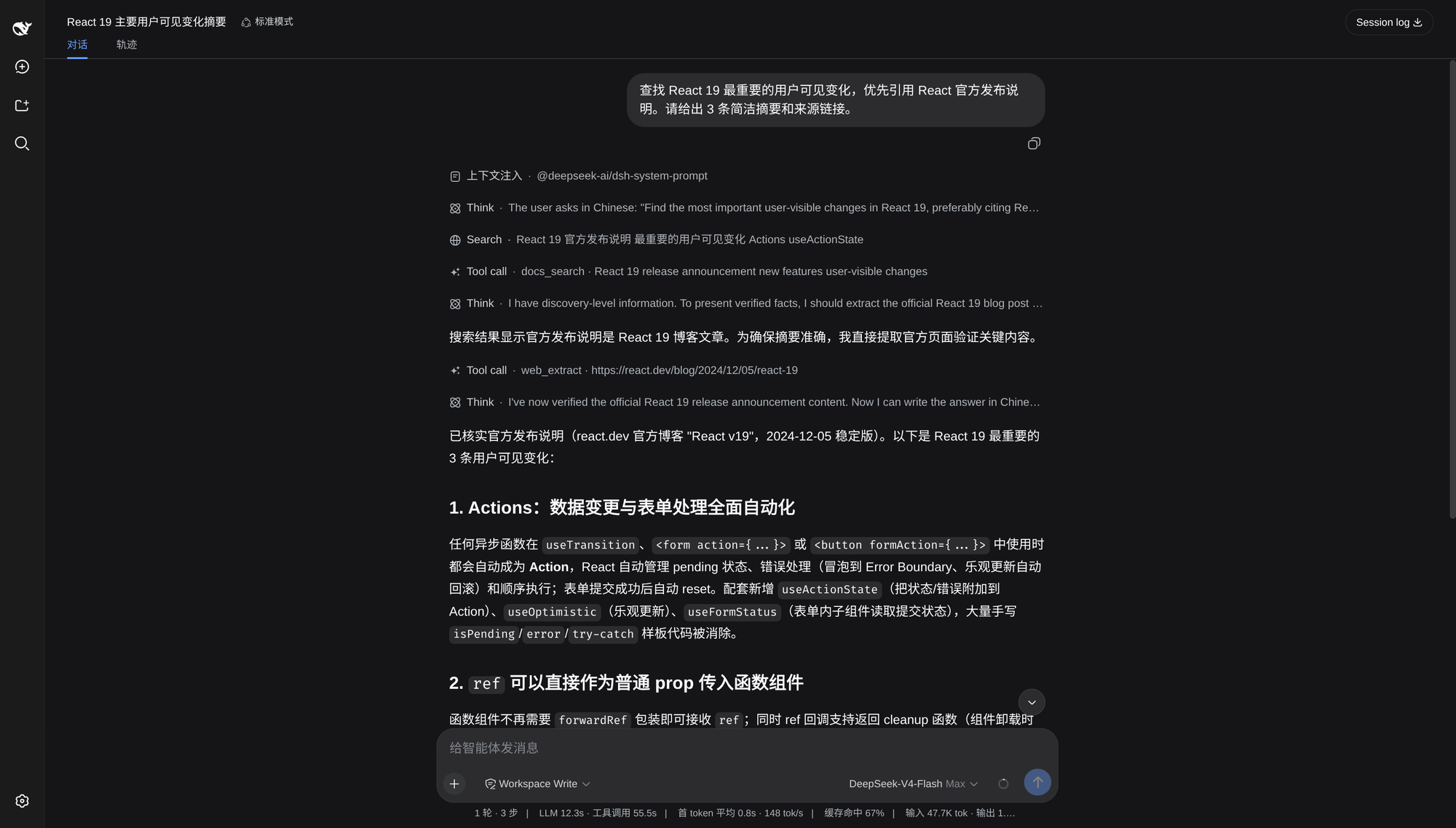
Save the settings, restart DSH, and ask a current-information question. A successful run shows a Search tool row, an answer, and source links.
Example requests
Use normal language; the plugin gives the Agent routing guidance.
- “Find the most important React 19 user-visible changes. Prefer official release notes and include source links.”
- “Look up the current FastAPI JWT authentication API and show a minimal example from the official documentation.”
- “Read and summarize
https://example.com/article, separating what the page states from your inference.”
Ask explicitly when you need complete source pagination, site discovery, a research plan, or Provider diagnostics.
Providers
Configure only the routes you need.
| Provider | Used for | Default credential reference | Required? |
|---|---|---|---|
| Grok-compatible Search API | Main web_search answer and sources |
SEARCH_API_KEY |
For web_search |
| Context7 | Documentation lookup for an explicit library | CONTEXT7_API_KEY |
No |
| Exa | Broad documentation and supplementary discovery | EXA_API_KEY |
No |
| Tavily | Supplementary search, page extraction, and site mapping | TAVILY_API_KEY |
No |
| Firecrawl | Supplementary search and page extraction | FIRECRAWL_API_KEY |
No |
Unconfigured optional Providers are skipped. Tavily and Firecrawl supplementary-search budgets default to 0 for every search profile; explicit web_extract and web_map requests use their own routes.
For docs_search, Context7 requires an explicit library_name or library_id. Without one, provider: "auto" uses Exa instead of guessing a package name from the full question.
Tool disclosure
The model-facing surface remains five tools: web_search, docs_search, web_extract, search_tools, and search_call. Advanced operations are disclosed through manifests rather than registered as additional model tools.
The default progressive mode activates a newly disclosed capability on the next model step. In all mode, deferred operations are active immediately. Native Tool Mode and Code Mode use the same schemas, execution policy, and canonical outputs.
When web_search or docs_search returns a source_ref, the plugin automatically activates source pagination and appends its real operation manifest.
Update and uninstall
To update, run the installation command above again. To remove the plugin:
dsh plugin --profile web remove @kkkneko/dsh-search-enhance
Restart DSH after updating or removing the bundle.
安装
装一次目录插件,之后本站所有插件都能让 DeepSeek Harness 自动找、自动装:
dsh plugin add dshbase-catalog然后对 agent 说「帮我装 dsh-search-enhance」,它会在目录里找到并自动安装。文档:dshbase-catalog · 已验证场景包。
该插件是 GitHub 源码(未发 npm)——直接从仓库装:
Web profile:
dsh plugin --profile web add github:KKKneko/dsh-search-enhanceHeadless(CLI)profile:
dsh plugin --profile headless add github:KKKneko/dsh-search-enhance实测报告
验证通过:从 GitHub 源码完成 L1 安装 + L2 加载 + L3 运行(dsh 0.1.0-rc.6)。
分享徽章
把这枚徽章粘进 README——它会链回本页,实测状态变化时自动更新:

[](https://dshbase.com/zh/plugins/dsh-search-enhance/)<a href="https://dshbase.com/zh/plugins/dsh-search-enhance/"><img src="https://dshbase.com/badges/dsh-search-enhance.svg" alt="dshbase 实测可装"></a>