
插件目录 / Automation / dsh-sentinel
dsh-sentinel
已验证 · 实测可装 fuhefei
功能简介
DeepSeek Harness 的条件驱动唤醒插件:持久的文件/命令/http/进程/webhook 监听唤醒 Agent,附带 dock、侧边栏分支与全局仪表盘。
可用 — 实测通过,早期项目
DeepSeek Harness 的条件驱动唤醒插件:持久的文件/命令/http/进程/webhook 监听唤醒 Agent,附带 dock、侧边栏分支与全局仪表盘。 实测能干净安装、正常启动。早期项目,但功能可用。
「已验证」表示我们的自动化 CI 在干净 profile 里实际执行了 dsh plugin add 并启动成功——仅此而已。功能描述与版本兼容性均为作者声明。这不是安全审计,也不代表对第三方代码的背书。
README
dsh-sentinel
English | 中文
Condition-driven wakeup for DeepSeek Harness: the agent registers a watch, goes to sleep — even closes the session — and the sentinel wakes it when the condition happens. Every subscription and every fire is a user-visible session event, and the browser dock shows what is on duty.

How it works
The node half owns one server-lifetime runtime that folds a plugin-owned sidecar log ($DSH_HOME/sentinel.jsonl) into live subscriptions, probes every sensor on a shared 5s heartbeat, and delivers wakeups through the official followup channel — resuming a dormant session's agent first when needed. Subscriptions therefore survive process restarts, and conditions that become true while the server is down late-fire on the next probe.
Watching is a resident-process concern: probing and fire delivery only run while a long-running dsh process (typically dsh web) is up. Headless one-shot runs load the plugin and can create, list and cancel watches, but nothing probes after the process exits — those watches become active once a resident process starts.
One duty owner per $DSH_HOME: a lease file (sentinel.lease) makes the first process own probing and delivery; a second dsh process on the same home stays passive (tools work, writes persist to the shared sidecar) and takes over within one lease TTL of the owner dying. The owner re-reads the sidecar every heartbeat, so watches created on a passive instance are adopted automatically. Delivery is at-least-once: a fire logged but not delivered before a crash is requeued on the next boot from its delivered watermark.
The browser half is a dock card above the composer (the conversation.input.dock family) listing the session's active watches — sensor, target, live probe state, fire budget, next-probe countdown — plus recent fire history when expanded. It polls the read-only state route and renders nothing when the session has no watches.
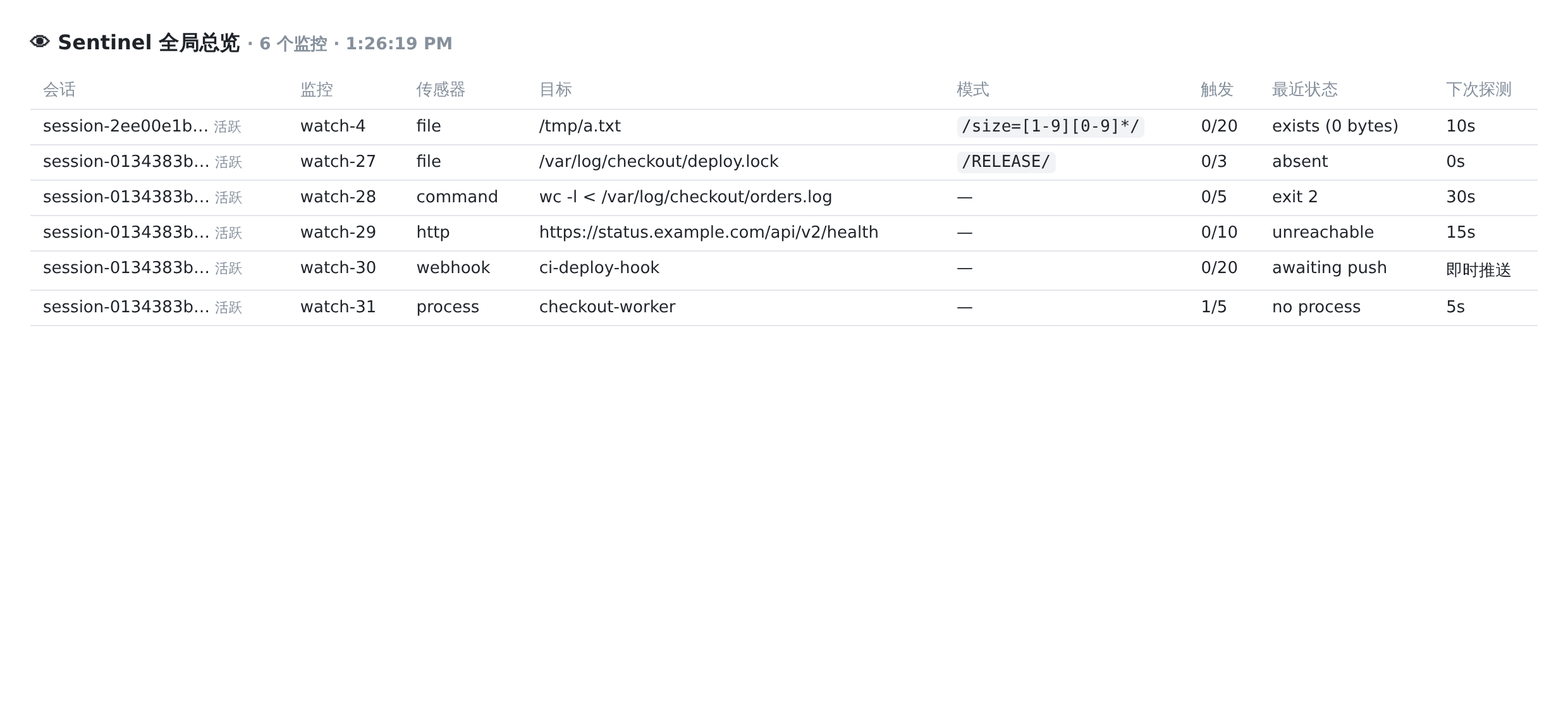
Two surfaces make the server-global watch set visible. A Sentinel entry in the sidebar's global panel list (sidebar.panellist, id sentinel) opens the watch table in the central column (main, the same id) — its glyph carries a state dot while any watch is active. The dashboard is a standalone table of every watch across every session: session (active/dormant), sensor, target, pattern, fire budget, last probe state, next probe.
Sensors
| Kind | Engine | Fires on |
|---|---|---|
file |
path snapshot + inotify push | snapshot change (sub-second); accelerated by fs events |
command |
read-only shell line, probed on an interval | output/exit-code change |
http |
URL probed on an interval | status/body change |
process |
pgrep -f pattern, probed on an interval |
match-set change |
port |
TCP connect to [host:]port, probed on an interval |
reachability change (open/closed/timeout) |
webhook |
pure push | any POST to the returned hook URL |
With pattern, probe kinds fire on the no-match→match edge of that regex and webhooks accept only matching payloads; without it, probe kinds fire on any change after the baseline.
Configuration
All deployment-tunable knobs live in the plugin's config schema (defaults in parentheses); override them on the bundle row in your profile's cordis.patch.yml:
- id: dsh-sentinel
  name: dsh-sentinel
  config:
    heartbeatMs: 5000            # probe round interval
    probeConcurrency: 8          # in-flight probes per round
    maxSubscriptionsPerSession: 16
    maxPendingWakeups: 8         # queued wakeups per session before dropping oldest
    defaultIntervalSeconds: 30   # when a watch does not specify one (5–86400)
    defaultCooldownSeconds: 60
    dutyLeaseTtlMs: 30000        # passive-instance takeover window after the owner dies
    notifyWebhookUrl: ''         # optional: POST every fire here as JSON
Invalid values fail plugin load with a schema error rather than misbehaving at runtime.
notifyWebhookUrl fans every fire out of the harness as a JSON POST ({plugin, event, sessionId, id, kind, target, note, fireNumber, maxFires, summary, after}) — point it at a Lark/WeCom/Slack bot or any receiver. Delivery is at-most-once: a failed POST warns in the log and never blocks the in-harness wakeup.
Tools
sentinel_watch— register a watch:kind,target, optionalpattern,interval(1–3600s, default 30),note(delivered verbatim with every wakeup),maxFires(default 1: one-shot),cooldown(default 60s), optionalttl.sentinel_list— active watches with live probe state.sentinel_cancel— cancel one watch by id.
Routes
GET /plugins/dsh-sentinel/state?sessionId=…— read-only state for the dock and the sidebar panel (omitsessionIdfor every session).GET /plugins/dsh-sentinel/dashboard— the server-global watch table.POST /plugins/dsh-sentinel/hook?id=watch-N&s=<sessionId>— webhook entry; put acurlinto a CI job, git hook, or another machine's script to wake the agent. Watch ids are per session, so thesqualifier is what keeps two sessions'watch-1hooks from colliding (the tool hands out the full URL). URLs withoutsstill work and resolve to the first matching webhook watch.POST /plugins/dsh-sentinel/cancel?sessionId=…&id=watch-N— manual cancel. The dashboard table and every UI row carry a ✕ that calls this, so a watch can always be stopped by hand — including orphaned ones whose session (and agent) is long gone; the host has no session-deleted event, so this is the kill switch of last resort.- All four routes enforce a browser-trust fence: browser-marked cross-site requests (a malicious page can form-POST to localhost) and DNS-rebinding attempts (Host/Origin naming a DNS host) get 403. Headerless clients such as
curland CI jobs are unaffected. The state route also reportsduty(lease heartbeat age) anddroppedWakeupsper session (queued wakeups dropped by themaxPendingWakeupscap).
First-probe semantics: a pattern-less watch absorbs its first observation as the baseline (no fire), while a pattern watch whose target already matches fires on the first probe — the condition already holds.
Compatibility
Verified against these harness versions (plugin loads, duty lease is held, web routes answer):
0.2.1-alpha.1— 2026-10-07, rehearsal on a copy of the live profile: the plugin activates, holds the duty lease, serves its client half and answers the state route (68 boot rows). Reaching it needed the peer range widened — see the0.2.0-rc.2note below — and the host's version gate was checked directly againstevaluatePluginCompatibility: the current range admits0.2.0-rc.2and0.2.1-alpha.1while still refusing0.2.0-rc.1and older.0.2.0-rc.2— 2026-09-30, runtime and client build dependencies aligned with this release; npm and pnpm lockfiles regenerated. Dormant-session wakeups restore the saved preset from the session projection and preserve the complete default model selection, including reasoning effort. Duty leases stay in the runtime's original home; startup and probe rounds settle before disposal releases the lease. 2026-10-07: the three harness peers were widened from a single exact version to>=0.2.0-rc.2 <0.3.0, so one build serves the whole 0.2 line instead of exactly one release — an exact pin left the plugin uninstallable on the very next 0.2.x, which is what happened going from 0.1.7 to 0.2.0.0.1.7-rc.2— 2026-09-29, clean-profile upgrade rehearsal against a copy of the live profile: 0.1.7 removed the shared catch-allpluginmessage-source kind (every producer now declares its own), so a wakeup carries{ kind: 'sentinel' }— samecontextplacement in the transcript, and it renders as "Sentinel" on both lines. The harness dependency range was also re-pinned to the 0.1.7 line, because under strict semver>=0.1.5-rc.2 <0.2.0does not admit0.1.7-rc.2(the prerelease rule); left alone, a 0.1.7 host would have resolved this plugin's harness imports to 0.1.5 copies — the exact drift the 0.1.5 alignment removed. Verified:pnpm typecheckand all 63 tests pass, the plugin activates and holds the duty lease, the web routes answer, and the served client bundle carriessidebar.panellist(65 boot rows)0.1.5-rc.2— 2026-09-15, live web deployment after the 0.1.5 alignment: the plugin's whole runtime import closure resolves to the deployed line (its harness imports are declared dependencies, so a profile's older hoisted copies can no longer shadow them), the client half builds against the real 0.1.5 types with no shims,pnpm typecheckand all 63 tests pass, and a live file watch fired through inotify 1s after the change and the wakeup was delivered into the session as a plugin-sourced message; after the restart the deployment serves the new client half (bundle rev changed,sidebar.panellistpresent, 54 boot rows)0.1.5-alpha.2— 2026-09-09, temporary web-profile smoke: Node plugin load, duty lease, state/dashboard routes, and the browser plugin bundle all worked with no browser-console errors;conversation.input.dockremains a supported session-scoped list slot, and the plugin sidecar is unaffected by the Session V3 migration0.1.1-rc.2— 2026-08-26, source-build smoke: git install into a web profile, duty lease held, state and dashboard routes answer0.1.0-rc.8— 2026-08-20, scratch-profile smoke0.1.0-rc.7— 2026-08-20, live web deployment
Compatibility means the cordis loader entries, the ctx.agents followup channel, the declared slot seats, and the web routes keep working; file an issue if a harness version breaks any of them. Its harness imports (@deepseek-ai/dsh-tools, @deepseek-ai/dsh-llm, @deepseek-ai/dsh-scope) are declared dependencies pinned to the verified line, so the plugin carries aligned copies instead of inheriting whatever a profile's hoisted store happens to hold; @deepseek-ai/cordis stays a peer because service identity must come from the running host.
Install
One line through the official bundle channel:
dsh plugin --profile web add dsh-sentinel
Or straight from git (build artifacts are committed, so the git-source install runs no build):
dsh plugin --profile web add "github:fuhefei/dsh-sentinel#v0.11.0"
Alternatively, add the node half manually through a patch-list configuration over the shipped base:
# cordis.patch.yml
- insert:
    - id: dsh-sentinel
      name: dsh-sentinel
The browser half ships in the same package (./client) and is injected by the Web UI's plugin loader.
Sidebar surface (0.1.5 and later)
The dock, the sidebar entry and the dashboard all work on a stock host: the entry registers into the official sidebar.panellist seat and its panel into the layout's main slot, with no host patch.
Through 0.1.2 the global view instead grew a branch under each watched session row, which needed the session-row holes the official tree never declared; that path is retired with patches/session-row-holes.patch kept only for those older trees. 0.1.5 dropped the hole, so a plugin built for it must use the panel seat above.
better-sidebar integration (optional)
When dsh-better-sidebar is installed in the same profile, sentinel registers its global watch table as a sidebar tab (dsh-sentinel:watches, in the + menu) through better-sidebar's documented ctx.betterSidebar.registerTab extension surface: every watch server-wide with live probe state, fire budgets and recent fire history, fed by one shared poller. No configuration needed; without better-sidebar the registration is silently skipped and the dock / panel / dashboard keep working as before.

Plays well with
Install dsh-notification alongside sentinel and the whole wakeup loop reaches your desktop: sentinel wakes the agent, the agent works the turn, and the turn's completion fires a desktop notification — no integration needed, the two plugins compose on their own.
Develop
npm install
npm run build     # tsc -b + tsdown (lib/index.js, lib/client.js)
npm test          # vitest: domain fold/normalize, sensors, dashboard escaping, e2e wakeup flow
License
BSD 3-Clause. See LICENSE.
安装
装一次目录插件,之后本站所有插件都能让 DeepSeek Harness 自动找、自动装:
dsh plugin add dshbase-catalog然后对 agent 说「帮我装 dsh-sentinel」,它会在目录里找到并自动安装。文档:dshbase-catalog · 已验证场景包。
该插件是 GitHub 源码(未发 npm)——直接从仓库装:
Web profile:
dsh plugin --profile web add github:fuhefei/dsh-sentinelHeadless(CLI)profile:
dsh plugin --profile headless add github:fuhefei/dsh-sentinel实测报告
验证通过:从 GitHub 源码完成 L1 安装 + L2 加载 + L3 运行(dsh 0.1.0-rc.6)。
使用场景
自动化一项重复工作——调度、串联任务或响应事件——不用你亲手启动。
适合谁
有周期性工作、想 cron 式无人值守而非手动触发的人。
二次开发建议
触发器和任务模板是缝——加事件驱动或文件监听触发,以及更丰富的流程编排。
分享徽章
把这枚徽章粘进 README——它会链回本页,实测状态变化时自动更新:

[](https://dshbase.com/zh/plugins/dsh-sentinel/)<a href="https://dshbase.com/zh/plugins/dsh-sentinel/"><img src="https://dshbase.com/badges/dsh-sentinel.svg" alt="dshbase 实测可装"></a>