
插件目录 / Developer / dsh-usage-card
dsh-usage-card
已验证 · 实测可装 kazma258
功能简介
DSH web sidebar usage card: 7d/30d tokens, spend, and remaining DeepSeek balance
可用 — 实测通过,早期项目
DSH web sidebar usage card: 7d/30d tokens, spend, and remaining DeepSeek balance 实测能干净安装、正常启动。早期项目,但功能可用。
「已验证」表示我们的自动化 CI 在干净 profile 里实际执行了 dsh plugin add 并启动成功——仅此而已。功能描述与版本兼容性均为作者声明。这不是安全审计,也不代表对第三方代码的背书。
README
dsh-usage-card
在 DeepSeek Harness 側欄的「設置」上方,放一張用量卡片:最近花了多少 token、多少錢、還剩多少額度。
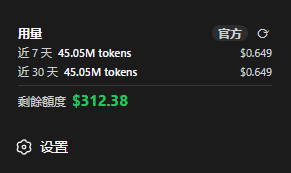
- 近 7 天 / 近 30 天:token 用量與消費
- 剩餘額度:沿用你在設置裡填的 DeepSeek API Key
- 官方或估算:有平台登入 token 就跟 DeepSeek 用量頁 對齊;沒有就用本機對話紀錄估算
- 側欄收合時變成小圖示,點一下仍可設定
安裝
適用 DeepSeek Harness Web 介面(0.1.x)。裝完後重啟 dsh web,再刷新瀏覽器。
dsh plugin --profile web add github:kazma258/dsh-usage-card
本機開發目錄改用 dsh plugin --profile web add ./。若之後發布到 npm,則用 dsh plugin --profile web add dsh-usage-card。
卸載:
dsh plugin --profile web remove dsh-usage-card
改看官方數據
卡片預設是「估算」。點右上角的 估算 / 官方 / 無數據,貼上平台 userToken(不是 API Key)。過期後會自動退回估算。
取得方式:登入 platform.deepseek.com → 瀏覽器開發者工具 → Console:
JSON.parse(localStorage.getItem('userToken')).value
進階設定
可在 profile 的 cordis.patch.yml 覆寫單價與幣種(整行替換,不會只改其中一個欄位):
- id: usage-card
  name: dsh-usage-card
  config:
    estimatePrices:
      inputUncached: 0.28
      cacheRead: 0.07
      cacheWrite: 0.28
      output: 1.1
    estimateCurrency: USD
    officialCurrency: USD
其他可調項:path、tokenPath、balanceCredential、balanceUrl、balanceTtlMs、platformTokenCredential、platformBaseUrl、usageTtlMs、timeoutMs、invalidateOnTurnEnd。
卡片會在對話結束、切回分頁、每 60 秒,以及按刷新時更新。暫時不想用這張卡時,從該 profile 的 bundle 列表拿掉 dsh-usage-card 再重啟即可。
開發
node --check lib/index.js lib/client.js lib/aggregate.js
node test/aggregate.test.mjs
建議鎖定 commit 安裝:github:kazma258/dsh-usage-card#<40-character-sha>。驗證是否掛上可跑 dsh --profile web --dump-config。
License
MIT
安装
装一次目录插件,之后本站所有插件都能让 DeepSeek Harness 自动找、自动装:
dsh plugin add dshbase-catalog然后对 agent 说「帮我装 dsh-usage-card」,它会在目录里找到并自动安装。文档:dshbase-catalog · 已验证场景包。
该插件是 GitHub 源码(未发 npm)——直接从仓库装:
Web profile:
dsh plugin --profile web add github:kazma258/dsh-usage-cardHeadless(CLI)profile:
dsh plugin --profile headless add github:kazma258/dsh-usage-card实测报告
验证通过:从 GitHub 源码完成 L1 安装 + L2 加载 + L3 运行(dsh 0.1.0-rc.6)。
分享徽章
把这枚徽章粘进 README——它会链回本页,实测状态变化时自动更新:

[](https://dshbase.com/zh/plugins/dsh-usage-card/)<a href="https://dshbase.com/zh/plugins/dsh-usage-card/"><img src="https://dshbase.com/badges/dsh-usage-card.svg" alt="dshbase 实测可装"></a>