
插件目录 / Developer / dsh-usage-indicator
dsh-usage-indicator
已验证 · 实测可装 TiferKing
功能简介
简约的余额指示器,一眼看尽 DeepSeek 用量。上下文余量、账户余额、压缩倒计时,全部在侧边栏顶部。
可用 — 实测通过,早期项目
简约的余额指示器,一眼看尽 DeepSeek 用量。上下文余量、账户余额、压缩倒计时,全部在侧边栏顶部。 实测能干净安装、正常启动。早期项目,但功能可用。
「已验证」表示我们的自动化 CI 在干净 profile 里实际执行了 dsh plugin add 并启动成功——仅此而已。功能描述与版本兼容性均为作者声明。这不是安全审计,也不代表对第三方代码的背书。
README
dsh-usage-indicator

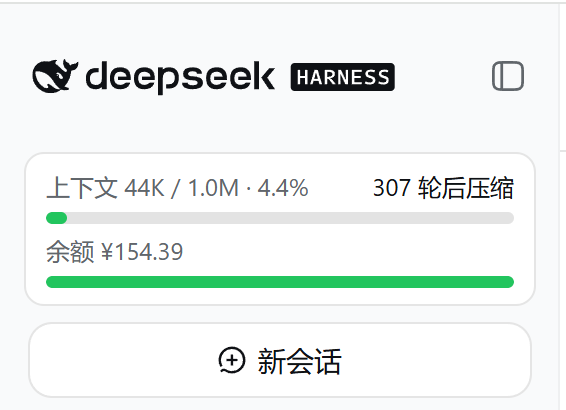
DSH(DeepSeek Harness)Web 侧边栏插件:实时显示上下文余量、账户余额和预计下次上下文压缩轮次。数据本地闭环,API Key 不离开本机。
功能
- 上下文占用 / 模型窗口进度条,接近压缩阈值变黄、达到变红
- 账户余额进度条,低于警示线整条变红
- 「N 轮后压缩」EMA 估算,数据不足显示"评估中"
- Web 设置面板可调整满条额度与警示线,热生效
- 侧边栏收起时为紧凑圆环 + 余额状态点
安装
前置:已安装 DSH 与 pnpm(缺 pnpm 先执行 npm install -g pnpm)。
方式一:Release 包(推荐)
dsh plugin --profile web add C:\path\to\dsh-usage-indicator-<version>.tgz
方式二:源码安装(clone 即用,内置 lib/ 无需构建)
git clone https://github.com/TiferKing/dsh-usage-indicator.git
dsh plugin --profile web add .\dsh-usage-indicator
安装后重启 dsh web 生效;更新用新包再执行一次 add;卸载:dsh plugin --profile web remove dsh-usage-indicator。
使用与配置
默认读取环境变量 DEEPSEEK_API_KEY 查余额,侧边栏顶部实时显示卡片;收起侧边栏自动切换为圆环视图。Web 设置面板「API 用量指示」可修改满条额度与警示线,写入 settings.yaml 热生效。
| 字段 | 默认值 | 说明 |
|---|---|---|
apiKeyEnv |
DEEPSEEK_API_KEY |
余额接口的凭证引用 |
baseURL |
$DEEPSEEK_BASE_URL → https://api.deepseek.com |
余额接口基址(自定义网关时配置) |
refreshIntervalMs |
60000 |
host 轮询周期(毫秒),下限 30 秒 |
thresholdRatio |
0.8 |
上下文压缩阈值,需与 dsh-compaction-basic 保持一致 |
fullBalance |
100 |
资金条满条金额 |
warnBalance |
20 |
余额低于该值时资金条变红 |
开发
npm install
npm run build      # 产出 lib/index.js + lib/client.js
npm run typecheck  # 类型检查
npm test           # 运行测试(需 Node ≥ 22.18)
结构:src/index.ts(host:轮询 + /api/usage-indicator 路由)、src/client.tsx(侧边栏卡片与设置页)、src/balance.ts(余额解析)、test/。欢迎提交 Issue 与 PR。
License
安装
装一次目录插件,之后本站所有插件都能让 DeepSeek Harness 自动找、自动装:
dsh plugin add dshbase-catalog然后对 agent 说「帮我装 dsh-usage-indicator」,它会在目录里找到并自动安装。文档:dshbase-catalog · 已验证场景包。
该插件是 GitHub 源码(未发 npm)——直接从仓库装:
Web profile:
dsh plugin --profile web add github:TiferKing/dsh-usage-indicatorHeadless(CLI)profile:
dsh plugin --profile headless add github:TiferKing/dsh-usage-indicator实测报告
验证通过:从 GitHub 源码完成 L1 安装 + L2 加载 + L3 运行(dsh 0.1.0-rc.6)。
分享徽章
把这枚徽章粘进 README——它会链回本页,实测状态变化时自动更新:

[](https://dshbase.com/zh/plugins/dsh-usage-indicator/)<a href="https://dshbase.com/zh/plugins/dsh-usage-indicator/"><img src="https://dshbase.com/badges/dsh-usage-indicator.svg" alt="dshbase 实测可装"></a>