
插件目录 / Knowledge / silverhand-dsh-pet
silverhand-dsh-pet
已验证 · 实测可装 Qiao-NEYC
功能简介
Silverhand desktop pet for DeepSeek Harness — drag to move, reacts to agent state.
可用 — 实测通过,早期项目
Silverhand desktop pet for DeepSeek Harness — drag to move, reacts to agent state. 实测能干净安装、正常启动。早期项目,但功能可用。
「已验证」表示我们的自动化 CI 在干净 profile 里实际执行了 dsh plugin add 并启动成功——仅此而已。功能描述与版本兼容性均为作者声明。这不是安全审计,也不代表对第三方代码的背书。
README
Silverhand — DSH Desktop Pet



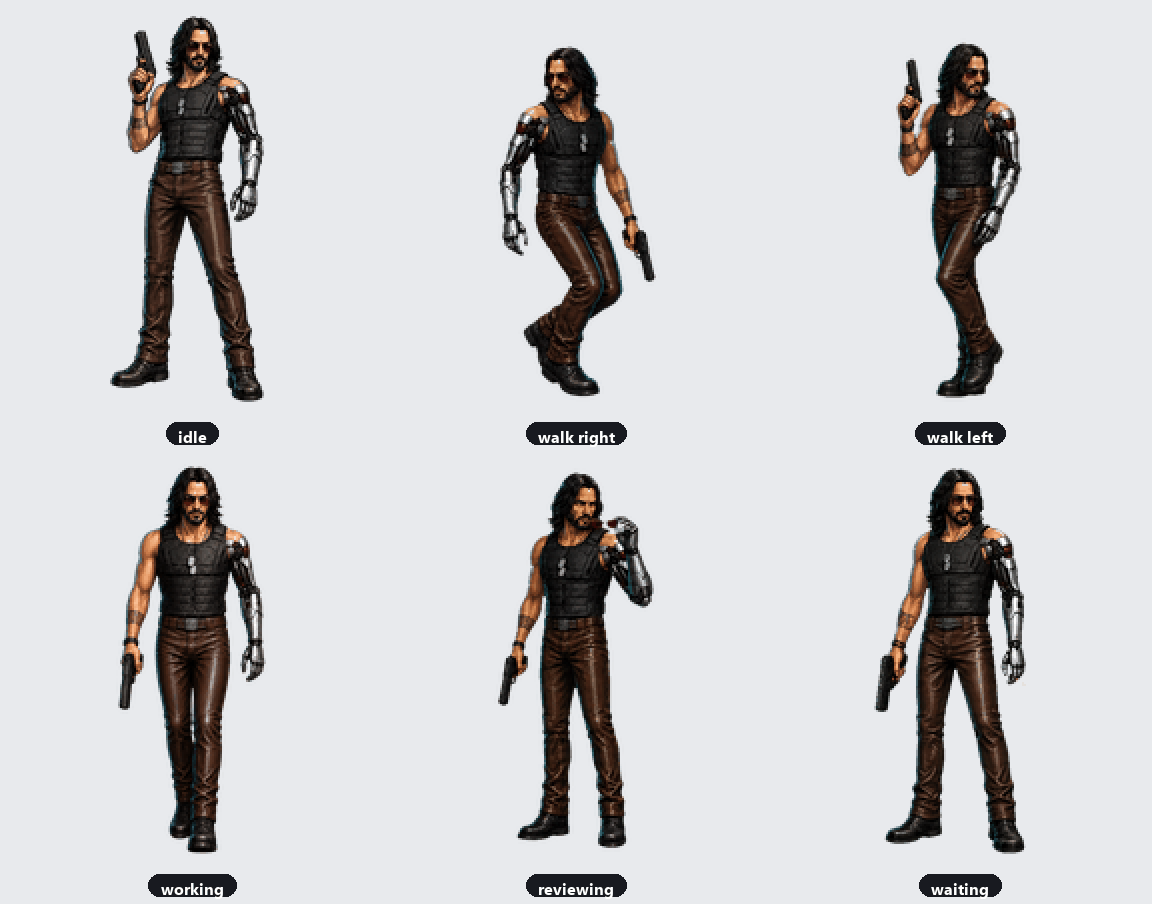
A desktop pet for the DeepSeek Harness Web GUI. Silverhand (a cyberpunk
mercenary with a silver cybernetic arm) lives in the bottom-right corner and
reacts to what the agent is doing — idle breathing, active work, reviewing
output, waving hello, celebrating a finished turn, sulking on an error, and
waiting for your approval.
The character artwork is migrated as-is from the Codex pet format — no
redesign, just the original spritesheet.webp + pet.json.
Features
- Renders in the frame-wide
shell.overlaylayer, fixed to the bottom-right. - Click-through by default (only the pet itself is interactive).
- Reacts to real agent state, driven by DSH host events:
idle/runningfromagent/statusreviewfromtools/resultfailedfromagent/errorwavingfromagent/created/agent/session-startjumpingwhen a turn finishes (running→idle)waitingwhile an approval request is open (approval/request)
- Drag the pet to move it — it walks left/right in the drag direction.
- Hover to see the current state; click (no movement) to make it jump.
Install
This is a standard DSH plugin package. Two ways to install:
From GitHub (recommended)
Add it to your profile's
dependenciesanddsh.profile.bundles
(in~/.dsh/profiles/<profile>/package.json):{ "dependencies": { "silverhand-dsh-pet": "github:Qiao-NEYC/silverhand-dsh-pet" }, "dsh": { "profile": { "bundles": [ "...your existing bundles...", "silverhand-dsh-pet" ] } } }Run
pnpm installin the profile directory (or let the DSH desktop app
install on launch).Restart DSH. The pet appears in the bottom-right.
From npm
Once published: npm i silverhand-dsh-pet, then add "silverhand-dsh-pet" todsh.profile.bundles.
Layout
Silverhand/
├── README.md
├── LICENSE
├── .gitignore
├── package.json           # DSH plugin manifest (dsh.client, exports)
├── lib/
│   ├── index.js           # host half: reads the sprite, serves HTTP routes + state
│   └── client.js          # client half: renders the pet, polls state
├── assets/
│   ├── pet.json           # migrated Codex manifest
│   └── spritesheet.webp   # migrated sprite atlas (8×9, 192×208 cells)
├── scripts/
│   ├── make_demo_gif.py   # render docs/demo.gif (animated demo)
│   ├── analyze_frames.py  # measure per-row frame counts / diffs
│   └── contact_sheet.py   # render a labeled contact sheet
└── docs/
    ├── demo.gif           # animated demo (all animations)
    └── sprite-atlas.md    # atlas layout + state mapping
Anatomy
A DSH plugin is a Cordis plugin split into two halves:
- Host (
lib/index.js) runs in the DSH Node process. It reads the sprite
from its ownassets/(viaimport.meta.url, so it works no matter where
the package is installed) and registers two HTTP routes:GET /silverhand-pet/spritesheet.webp— the sprite atlas.GET /silverhand-pet/state—{ "state": "..." }derived from agent events.
- Client (
lib/client.js) runs in the browser. It registers intoshell.overlay, polls/silverhand-pet/stateevery 300 ms, and animates the
matching atlas row from/silverhand-pet/spritesheet.webp.
The two halves communicate over plain same-origin HTTP routes.
Configuration
All tunables are constants at the top of each half:
lib/index.js—ROUTE_SPRITE/ROUTE_STATE, and the per-state transient
durations in the event listeners.lib/client.js—ANIMS(row / frame count / cadence per animation),STATE_ANIM(state → animation),PET_W/PET_H(display size), and theCSSblock (position, shadow, hover).
Troubleshooting blank or missing pet artwork
- Use package version
1.0.1or newer. The client bundle now declares the
layout dependency explicitly, soshell.overlayis available before the pet
registers. - The client probes
/silverhand-pet/spritesheet.webpand logs a route error in
the browser console if the Host half is not serving the atlas. A404or500means the host package is not active; reinstall the bundle and restart
DSH. - Animation frames are reset whenever the state changes. This prevents a stale
frame index from selecting an empty atlas cell when switching back to the
six-frameidleorwaitingrows. - If the pet container exists but is transparent, inspect the browser Network
panel for the sprite route and confirm its response isimage/webpwith a
payload around 1 MB.
Asset provenance
The artwork was migrated from the local Codex pet directory
(~/.codex/pets/silverhand/). It is your asset — before publishing this
repo to GitHub, confirm you hold (or have) the right to redistribute thesprite and the Silverhand likeness. The code in this repository is MIT
licensed; the sprite's licensing is yours to state.
Development helpers
# Regenerate docs/demo.gif
python scripts/make_demo_gif.py

# Report per-row opaque-cell counts and consecutive-frame deltas
python scripts/analyze_frames.py

# Render a labeled contact sheet (full + zoomed ambiguous rows)
python scripts/contact_sheet.py
analyze_frames.py / contact_sheet.py require Python 3 with Pillow andnumpy.
安装
装一次目录插件,之后本站所有插件都能让 DeepSeek Harness 自动找、自动装:
dsh plugin add dshbase-catalog然后对 agent 说「帮我装 silverhand-dsh-pet」,它会在目录里找到并自动安装。文档:dshbase-catalog · 已验证场景包。
该插件是 GitHub 源码(未发 npm)——直接从仓库装:
Web profile:
dsh plugin --profile web add github:Qiao-NEYC/silverhand-dsh-petHeadless(CLI)profile:
dsh plugin --profile headless add github:Qiao-NEYC/silverhand-dsh-pet实测报告
验证通过:从 GitHub 源码完成 L1 安装 + L2 加载 + L3 运行(dsh 0.1.0-rc.6)。
分享徽章
把这枚徽章粘进 README——它会链回本页,实测状态变化时自动更新:

[](https://dshbase.com/zh/plugins/silverhand-dsh-pet/)<a href="https://dshbase.com/zh/plugins/silverhand-dsh-pet/"><img src="https://dshbase.com/badges/silverhand-dsh-pet.svg" alt="dshbase 实测可装"></a>