
Plugin directory / Developer / dsh-software-tools
dsh-software-tools
Verified · install-tested on dsh AllenLogo
What it does
DSH 侧边栏【软件工具】管理器:勾选本机 WSL/Windows 软件工具并注入模型系统提示,随插件自带 add-software-tool 技能。Sidebar software-tools manager for DeepSeek Harness Web.
Works — verified, early-stage project
DSH 侧边栏【软件工具】管理器:勾选本机 WSL/Windows 软件工具并注入模型系统提示,随插件自带 add-software-tool 技能。Sidebar software-tools manager for DeepSeek Harness Web. It installs cleanly and boots without issues in our testing. It's early-stage but functional.
“Verified” means our automated CI actually ran dsh plugin add in a clean profile and it booted — nothing more. Feature descriptions and version compatibility are the author’s claims. This is not a security audit and not an endorsement of third-party code.
README
dsh-software-tools
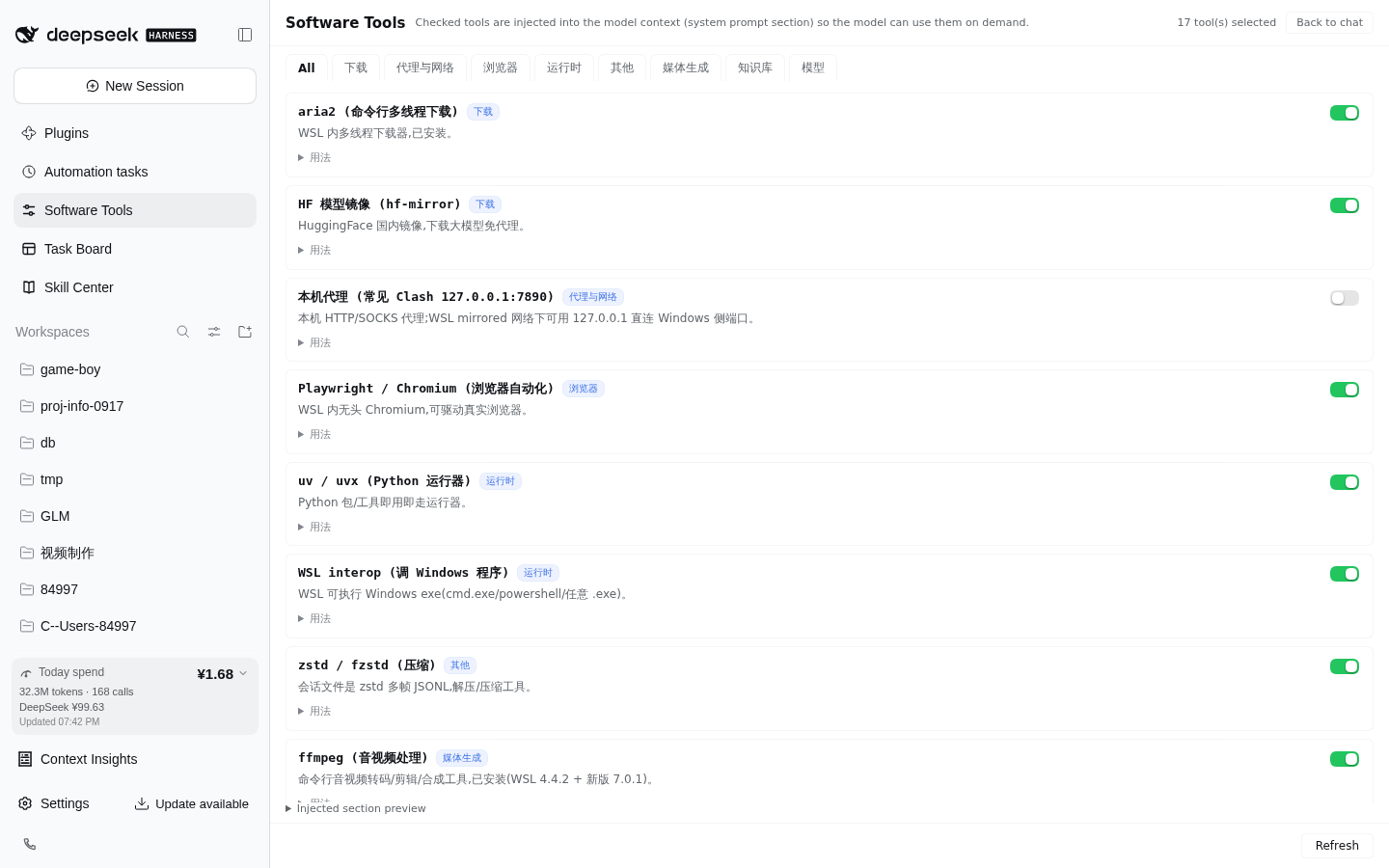
Sidebar 🔧 软件工具 manager for DeepSeek Harness Web. Maintain a curated inventory of local software — WSL CLI tools and Windows apps reachable via interop — and check the ones you want the model to know about. The checked set is injected into the model's system prompt as a compact section, so every session knows what software exists on this machine and how to call it. 中文说明见 README.zh.md。
Problem
A model (e.g. deepseek-v4-flash) has no idea that you have IDM, ComfyUI, Obsidian, aria2… installed, let alone how to invoke each one. This plugin turns "local software inventory + invocation recipes" into a checkable, persisted, auto-injected system-prompt section: the model reads the usage field and runs the ready-made command.
Features
| Capability | Detail | |
|---|---|---|
| 🔧 | Sidebar panel | Tools grouped by category; toggling takes effect on the model's very next request — no restart |
| 📥 | Built-in + user catalog merge | Portable built-in catalog (aria2 / proxy / playwright / uvx / interop / zstd …); user entries in catalog.json override built-ins by id |
| 🧠 | System-prompt injection | Checked tools become a compact section on every assembly (systemPrompt.section, same seam as persona / plan-mode) |
| 🛠 | Bundled skill | Ships add-software-tool: the model learns to write newly installed software into the user catalog — no rebuild, no restart |
| 🔒 | Loopback RPC | Panel ↔ host over a loopback-pinned RPC channel; reads local JSON only |
Install
dsh plugin --profile web add dsh-software-tools
If your pnpm supply-chain policy blocks dsh plugin add, install manually: copy the package into ~/.dsh/profiles/web/node_modules/ and append to ~/.dsh/profiles/web/cordis.patch.yml:
- insert:
    - id: dsh-software-tools
      name: dsh-software-tools
      config: {}
- insert:
    - id: software-tools-skill
      name: '@deepseek-ai/dsh-skill-filesystem'
      config:
        providerName: software-tools-skill
        includeDefaultRoots: false
        customSkillDirs:
          - !!js process.getBuiltinModule('node:path').join(process.getBuiltinModule('node:path').dirname(process.getBuiltinModule('node:module').createRequire(baseUrl).resolve('dsh-software-tools/package.json')), 'skills')
Restart dsh web and hard-refresh (Ctrl+Shift+R). A 🔧 软件工具 entry appears in the sidebar.
Configuration
All optional; zero-config by default:
| Field | Default | Meaning |
|---|---|---|
settingsDir |
$DSH_HOME/software-tools |
State directory holding selection.json + catalog.json |
State files
| File | Purpose |
|---|---|
<settingsDir>/selection.json |
{"ids": ["aria2", …]} — current selection |
<settingsDir>/catalog.json |
{"tools": [entry…]} — user catalog; same id overrides a built-in |
Entry fields: id ([a-z0-9-]{1,32}, unique), name, category (download/proxy/media/browser/knowledge/runtime/model/misc), desc (≤40 chars), usage (1–2 actionable, directly executable lines).
Adding a tool
Tell the model "add XXX to 软件工具" — the bundled add-software-tool skill researches the software and writes it into catalog.json (no rebuild, no restart; visible on panel refresh). You can also edit catalog.json by hand.
How it works
- Host half (
src/index.ts): registerssystemPrompt.section(software-tools, order 200) rendered from the current selection, plus the loopback RPC channel/ _dsh-software-tools(list/set). - Browser half (
src/client/): DOM-injected sidebar entry + panel (same selector pattern as the linxin666 plugin family), built bytsdowninto a lazy-CJS__ModuleLoader__bundle (React comes from the host shell). - Skill (
skills/add-software-tool/): mounted viadsh-skill-filesystem'scustomSkillDirs, scoped to the plugin's own directory so user skill roots stay untouched.
License
Install
Install the catalog once, then DeepSeek Harness can find and install any plugin from this site automatically:
dsh plugin add dshbase-catalogThen say "install dsh-software-tools for me" — your agent finds it in the directory and installs it. Docs: dshbase-catalog · verified packs.
This plugin is GitHub source (not published to npm) — install it straight from the repo:
Web profile:
dsh plugin --profile web add github:AllenLogo/dsh-software-toolsHeadless (CLI) profile:
dsh plugin --profile headless add github:AllenLogo/dsh-software-toolsTest report
Verified: L1 install + L2 load + L3 runtime from GitHub source on dsh 0.1.0-rc.6.
Share this badge
Drop this badge into your README — it links back here and updates automatically when our test status changes:

[](https://dshbase.com/plugins/dsh-software-tools/)<a href="https://dshbase.com/plugins/dsh-software-tools/"><img src="https://dshbase.com/badges/dsh-software-tools.svg" alt="dshbase install-tested"></a>