
插件目录 / Developer / dsh-software-tools
dsh-software-tools
已验证 · 实测可装 AllenLogo
功能简介
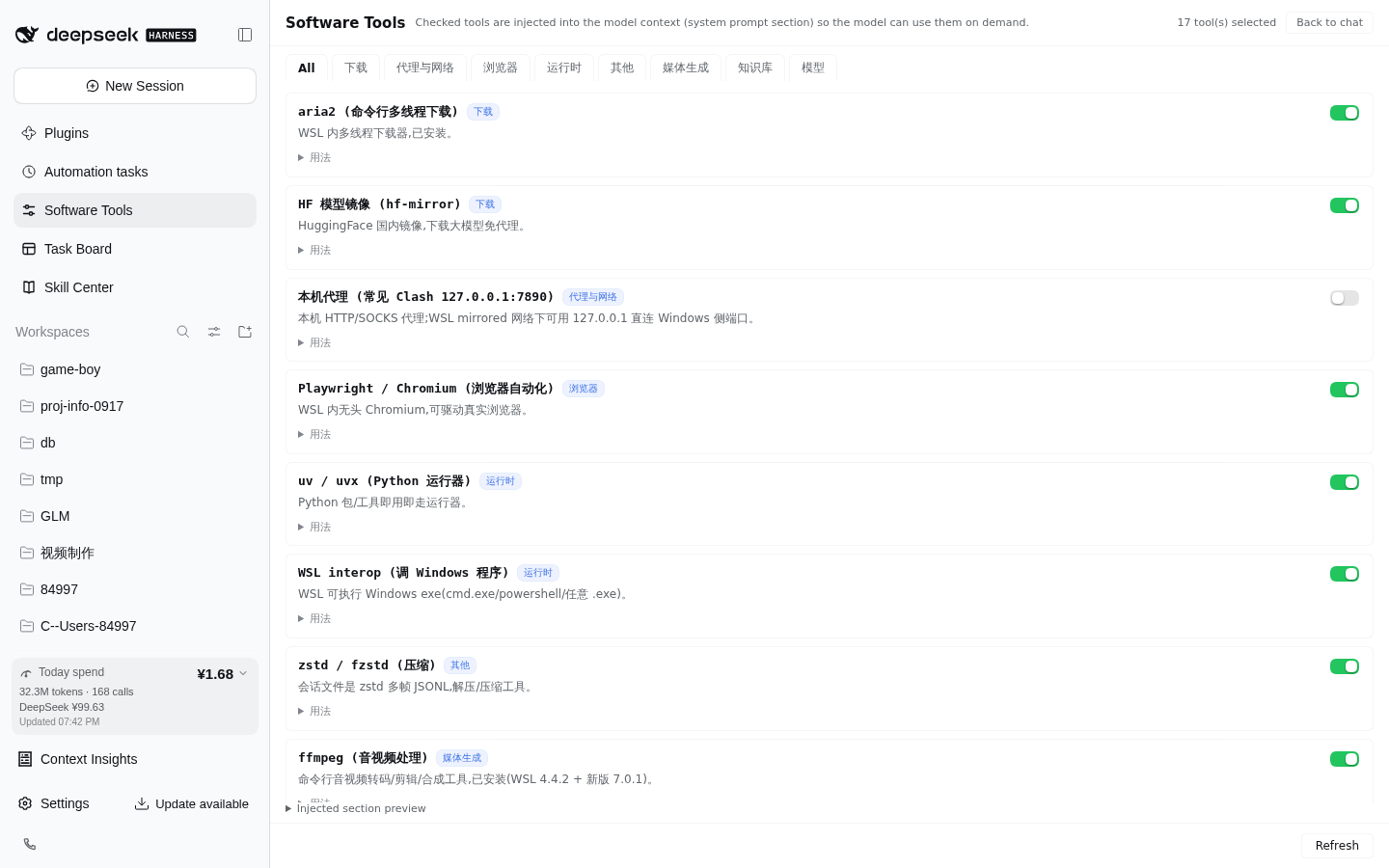
DSH 侧边栏【软件工具】管理器:勾选本机 WSL/Windows 软件工具并注入模型系统提示,随插件自带 add-software-tool 技能。Sidebar software-tools manager for DeepSeek Harness Web.
可用 — 实测通过,早期项目
DSH 侧边栏【软件工具】管理器:勾选本机 WSL/Windows 软件工具并注入模型系统提示,随插件自带 add-software-tool 技能。Sidebar software-tools manager for DeepSeek Harness Web. 实测能干净安装、正常启动。早期项目,但功能可用。
「已验证」表示我们的自动化 CI 在干净 profile 里实际执行了 dsh plugin add 并启动成功——仅此而已。功能描述与版本兼容性均为作者声明。这不是安全审计,也不代表对第三方代码的背书。
README
dsh-software-tools
Sidebar 🔧 软件工具 manager for DeepSeek Harness Web. Maintain a curated inventory of local software — WSL CLI tools and Windows apps reachable via interop — and check the ones you want the model to know about. The checked set is injected into the model's system prompt as a compact section, so every session knows what software exists on this machine and how to call it. 中文说明见 README.zh.md。
Problem
A model (e.g. deepseek-v4-flash) has no idea that you have IDM, ComfyUI, Obsidian, aria2… installed, let alone how to invoke each one. This plugin turns "local software inventory + invocation recipes" into a checkable, persisted, auto-injected system-prompt section: the model reads the usage field and runs the ready-made command.
Features
| Capability | Detail | |
|---|---|---|
| 🔧 | Sidebar panel | Tools grouped by category; toggling takes effect on the model's very next request — no restart |
| 📥 | Built-in + user catalog merge | Portable built-in catalog (aria2 / proxy / playwright / uvx / interop / zstd …); user entries in catalog.json override built-ins by id |
| 🧠 | System-prompt injection | Checked tools become a compact section on every assembly (systemPrompt.section, same seam as persona / plan-mode) |
| 🛠 | Bundled skill | Ships add-software-tool: the model learns to write newly installed software into the user catalog — no rebuild, no restart |
| 🔒 | Loopback RPC | Panel ↔ host over a loopback-pinned RPC channel; reads local JSON only |
Install
dsh plugin --profile web add dsh-software-tools
If your pnpm supply-chain policy blocks dsh plugin add, install manually: copy the package into ~/.dsh/profiles/web/node_modules/ and append to ~/.dsh/profiles/web/cordis.patch.yml:
- insert:
    - id: dsh-software-tools
      name: dsh-software-tools
      config: {}
- insert:
    - id: software-tools-skill
      name: '@deepseek-ai/dsh-skill-filesystem'
      config:
        providerName: software-tools-skill
        includeDefaultRoots: false
        customSkillDirs:
          - !!js process.getBuiltinModule('node:path').join(process.getBuiltinModule('node:path').dirname(process.getBuiltinModule('node:module').createRequire(baseUrl).resolve('dsh-software-tools/package.json')), 'skills')
Restart dsh web and hard-refresh (Ctrl+Shift+R). A 🔧 软件工具 entry appears in the sidebar.
Configuration
All optional; zero-config by default:
| Field | Default | Meaning |
|---|---|---|
settingsDir |
$DSH_HOME/software-tools |
State directory holding selection.json + catalog.json |
State files
| File | Purpose |
|---|---|
<settingsDir>/selection.json |
{"ids": ["aria2", …]} — current selection |
<settingsDir>/catalog.json |
{"tools": [entry…]} — user catalog; same id overrides a built-in |
Entry fields: id ([a-z0-9-]{1,32}, unique), name, category (download/proxy/media/browser/knowledge/runtime/model/misc), desc (≤40 chars), usage (1–2 actionable, directly executable lines).
Adding a tool
Tell the model "add XXX to 软件工具" — the bundled add-software-tool skill researches the software and writes it into catalog.json (no rebuild, no restart; visible on panel refresh). You can also edit catalog.json by hand.
How it works
- Host half (
src/index.ts): registerssystemPrompt.section(software-tools, order 200) rendered from the current selection, plus the loopback RPC channel/ _dsh-software-tools(list/set). - Browser half (
src/client/): DOM-injected sidebar entry + panel (same selector pattern as the linxin666 plugin family), built bytsdowninto a lazy-CJS__ModuleLoader__bundle (React comes from the host shell). - Skill (
skills/add-software-tool/): mounted viadsh-skill-filesystem'scustomSkillDirs, scoped to the plugin's own directory so user skill roots stay untouched.
License
安装
装一次目录插件,之后本站所有插件都能让 DeepSeek Harness 自动找、自动装:
dsh plugin add dshbase-catalog然后对 agent 说「帮我装 dsh-software-tools」,它会在目录里找到并自动安装。文档:dshbase-catalog · 已验证场景包。
该插件是 GitHub 源码(未发 npm)——直接从仓库装:
Web profile:
dsh plugin --profile web add github:AllenLogo/dsh-software-toolsHeadless(CLI)profile:
dsh plugin --profile headless add github:AllenLogo/dsh-software-tools实测报告
验证通过:从 GitHub 源码完成 L1 安装 + L2 加载 + L3 运行(dsh 0.1.0-rc.6)。
分享徽章
把这枚徽章粘进 README——它会链回本页,实测状态变化时自动更新:

[](https://dshbase.com/zh/plugins/dsh-software-tools/)<a href="https://dshbase.com/zh/plugins/dsh-software-tools/"><img src="https://dshbase.com/badges/dsh-software-tools.svg" alt="dshbase 实测可装"></a>