
Plugin directory / Knowledge / dsh_upload_file
dsh_upload_file
Verified · install-tested on dsh JarszmLovesAI
What it does
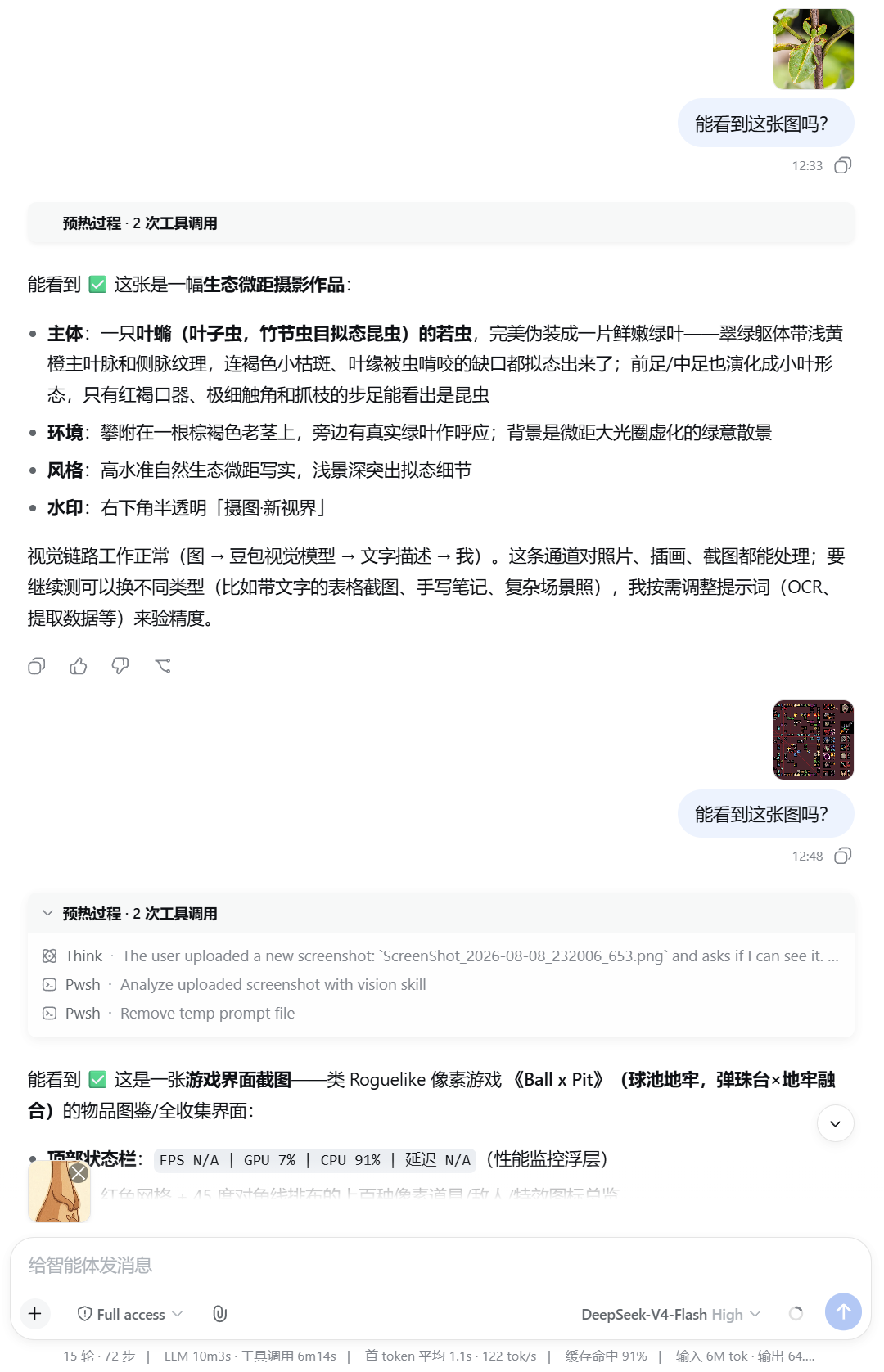
DeepSeek Harness(DSH) web plugin: paste files into the composer, inbox storage, thumbnails. Text via read_inbox; image understanding needs your vision skill (bundled image-reader + ARK_API_KEY).
Works — verified, early-stage project
DeepSeek Harness(DSH) web plugin: paste files into the composer, inbox storage, thumbnails. Text via read_inbox; image understanding needs your vision skill (bundled image-reader + ARK_API_KEY). It installs cleanly and boots without issues in our testing. It's early-stage but functional.
“Verified” means our automated CI actually ran dsh plugin add in a clean profile and it booted — nothing more. Feature descriptions and version compatibility are the author’s claims. This is not a security audit and not an endorsement of third-party code.
README
dsh-inbox-paste
DSH web bundle: paste or pick files in the composer, store under {session.cwd}/inbox/, show thumbnails before/after send. Agents use list_inbox / read_inbox for text; image understanding requires your own vision skill or model (see below).
Requirements
- DeepSeek Harness with the web profile
- Node.js ≥ 22,
dshCLI
Install
dsh plugin --profile web add github:JarszmLovesAI/dsh_upload_file
dsh web
Remove: dsh plugin --profile web remove dsh-inbox-paste
Usage
- Paste (Ctrl+V / Cmd+V) or use the paperclip in the composer.
- Pending thumbnails appear above the input; remove with × before send (no disk write yet).
- On send, files land in
inbox/; the bubble can show thumbnails (see config). - Agent:
list_inbox→read_inboxfor text; for images, use the bundled image-reader skill or your own vision tooling.
Upload ≠ multimodal understanding
This plugin does not use Harness native image attachments. The main model only gets path markers unless you add vision:
- Install the optional image-reader skill and set
ARK_API_KEYin~/.dsh/.env, or - Bring your own vision MCP / skill / multimodal model.
Configuration
~/.dsh/profiles/web/cordis.patch.yml (adjust profile name):
- id: inbox-paste
  config:
    uploadMaxBytes: 26214400
    inboxDirName: inbox
    allowedExtensions: []
    customizeUserBubble: true   # false = built-in user bubble (may show raw paths)
Restart dsh web after changes.
vs dsh-file-upload
| dsh-inbox-paste | dsh-file-upload | |
|---|---|---|
| Paste | ✅ | ❌ |
| Storage | {cwd}/inbox/ |
{cwd}/.dsh-uploads/ |
| Built-in PDF | ❌ | ✅ |
Tests
npm test
License
MIT
Install
Install the catalog once, then DeepSeek Harness can find and install any plugin from this site automatically:
dsh plugin add dshbase-catalogThen say "install dsh_upload_file for me" — your agent finds it in the directory and installs it. Docs: dshbase-catalog · verified packs.
This plugin is GitHub source (not published to npm) — install it straight from the repo:
Web profile:
dsh plugin --profile web add github:JarszmLovesAI/dsh_upload_fileHeadless (CLI) profile:
dsh plugin --profile headless add github:JarszmLovesAI/dsh_upload_fileTest report
Verified: L1 install + L2 load + L3 runtime from GitHub source on dsh 0.1.0-rc.6.
Share this badge
Drop this badge into your README — it links back here and updates automatically when our test status changes:

[](https://dshbase.com/plugins/dsh-upload-file/)<a href="https://dshbase.com/plugins/dsh-upload-file/"><img src="https://dshbase.com/badges/dsh-upload-file.svg" alt="dshbase install-tested"></a>